Security Camera Field of View Explained in Plain English
Field of view is the area a camera can capture, measured in degrees. Pick a wider angle for open spaces and a narrower angle when you need clear facial detail at a distance.
If you want the security camera field of view explained without the jargon, start here. Field of view (FOV) is the area a camera can see. It is measured in degrees. A wide FOV shows more space. A narrow FOV shows less space but more detail. This guide covers the numbers, the placement rules, and the limits that matter most for US homeowners and renters.
What Is a Security Camera Field of View, and Why Does It Matter?
Field of view is the visible area your camera captures in a single frame. Spec sheets list it in degrees. You will see numbers like 90°, 110°, or 130°. Bigger numbers mean more coverage. Smaller numbers mean you see less.
FOV matters because it decides what your camera actually records. A camera pointed at your driveway may miss the package thief at your front door. A camera with too-wide a view may record your whole yard but show faces as small, blurry shapes.
The goal is matching the lens to the spot you want to watch. That takes one simple planning step. Decide what you need to identify: a face, a license plate, or just a person moving.
How Field of View Works: Horizontal Angle, Vertical Angle, and Focal Length
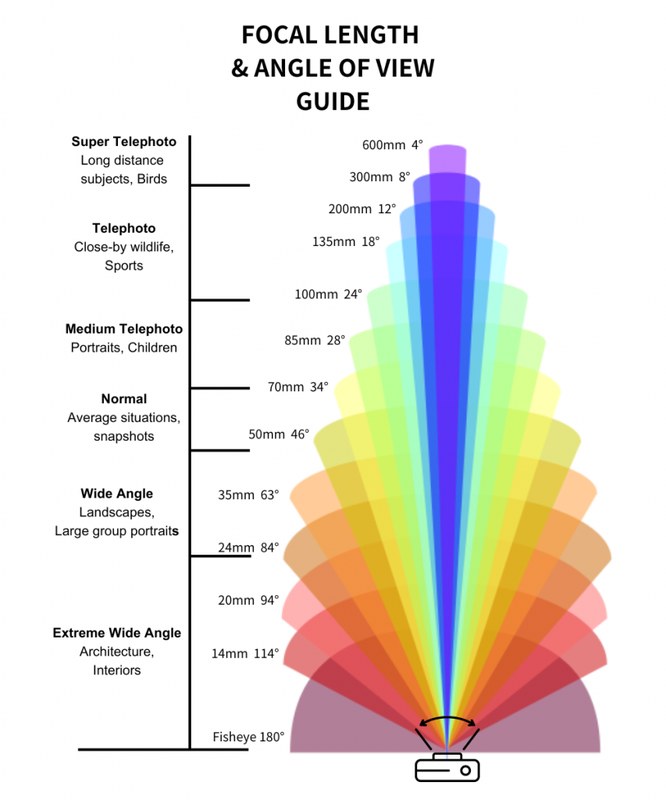
Every camera lens has three FOV numbers: horizontal, vertical, and diagonal. The horizontal angle runs left to right. The vertical angle runs top to bottom. The diagonal angle crosses the frame from one corner to the other.
Horizontal vs. Vertical Field of View: What the Spec Sheet Really Means
Horizontal FOV is the number that matters most outdoors. It decides how much of your porch or driveway fits across the frame. Vertical FOV decides how much sky and ground you see.
A typical outdoor camera may offer a horizontal FOV around 90° to 130°. A 90° lens covers a narrow slice of a yard. A 130° lens covers nearly half of a circle. Neither is automatically better. The right choice depends on the exact area.
For a hallway or narrow gate, a smaller angle often works fine. For a corner of a house, a wider angle is usually safer.
Focal Length, Lens Distortion, and Why a Wide FOV Is Not Always Better
Focal length controls how wide a lens sees. It is measured in millimeters. A short focal length, like 2 mm or 3 mm, gives a wide view. A longer focal length, like 6 mm or 8 mm, gives a narrow, zoomed view.
Shorter lenses bring a tradeoff. They squeeze more area into the frame, so objects appear smaller. A face may become just a few pixels tall. It may be too small to identify after the event.
Ultra-wide lenses also bend straight lines near the edges. This is called barrel distortion. It rarely stops a camera from working. The tradeoff is that you see more area with slightly bent edges.
Wide FOV is not always better. A camera that sees everything often identifies nothing. Think about the distance to the object you care about. For identification, a narrow lens aimed at one zone beats a wide lens that spreads its resolution.
Choosing the Right Field of View for Your Home Layout
Your home layout decides the best FOV. Measure the area you want covered. Then match the lens angle to that measurement, not to the biggest number on the box.
Entry Points: Front Doors, Side Gates, and Porches
Front doors get the widest view. A wide FOV captures the door, the package area, and the approach path in one frame. Many video doorbells offer a wide angle so you can see visitors and the packages at your feet.
Side gates and narrow walkways need less width. A moderate FOV around 90° can cover the whole gate. The tighter angle also keeps neighbors’ yards out of the frame.
Driveways and Backyards: Coverage Distance vs. Coverage Width
Driveways and backyards create a distance problem. A wide FOV covers width, but it cannot see far with detail. A car parked 50 feet away may look small.
For long driveways, angle the camera down the length of the drive. That uses your horizontal FOV to cover the path a car takes. For short yards, a wide FOV mounted above a door is usually enough.
Indoor vs. Outdoor Cameras: How FOV Needs Differ by Room
Indoor rooms are small. A wide FOV in a living room often covers the whole space from one corner. That is useful for watching kids, pets, or indoor entry points.
Hallways are the opposite. They are long and narrow, so a wide lens wastes space on walls. A narrower FOV points straight down the corridor and gives better detail on faces.
Camera Placement: How Mounting Height and Angle Change Your Coverage
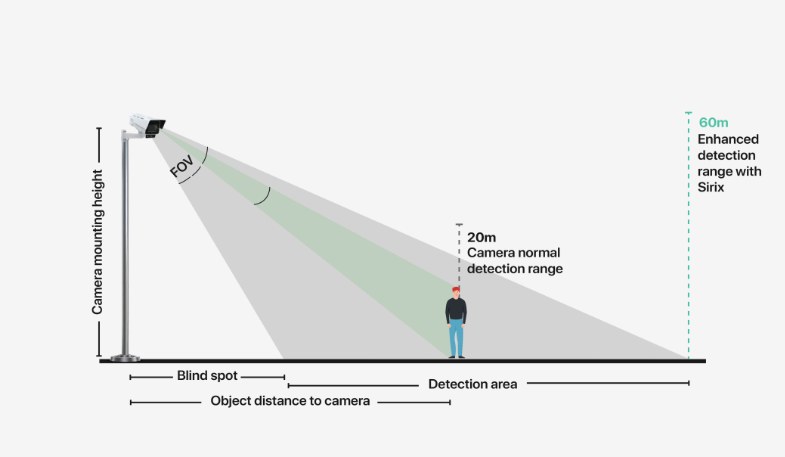
Mounting height changes what the lens sees more than most buyers expect. The FOV only describes the lens. The final coverage is a mix of lens angle, height, and tilt.
Optimal Heights and Tilts for Reducing Blind Spots
Most outdoor cameras work best mounted 8 to 10 feet above the ground. At that height, the lens tilts down slightly to capture faces instead of the tops of heads. A downward tilt of about 30 degrees works well for most porches and driveways.
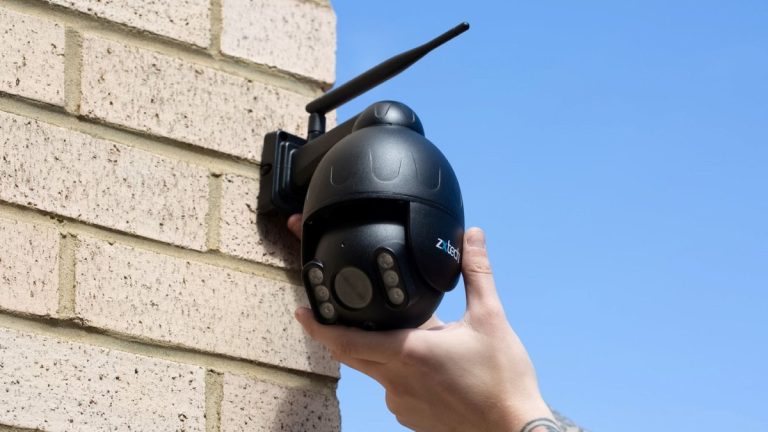
Corner mounts help. A camera in a corner sees two sides of the house instead of one. A flat wall mount can create a blind spot where the wall meets the lens.
Every camera has a dead zone directly below it. You cannot remove the dead zone entirely. You can shrink it by tilting the lens down farther, which trades distance for coverage.
Renter-Friendly Positioning and Temporary Mounting Options
Renters can still aim a camera well without drilling. Use no-drill adhesive mounts, shelf tops, tension rods, or door hooks. Place the camera on a stable surface at eye level or above.
Keep the same rule: high enough to see faces, angled down to avoid glare. A camera sitting low on a table sees more ceiling and less floor. Check your lease before mounting anything to walls or doors.
Indoor cameras near windows have limits. Glass reflects infrared at night. A camera pointed through glass may be blinded by its own reflection.
How Night Performance, Audio, and Weather Interact with Field of View
FOV does not work alone at night. Infrared range, microphone reach, and weather all shrink what the wide angle can actually deliver.
Night Vision Range and How It Limits What You Can See
Night vision lets the lens see in the dark, but only within a limited distance. Most home camera infrared range falls somewhere around 30 to 100 feet, depending on the model. Beyond that range, the image goes dark even though the FOV is still wide.
That is the key limit: a 130° lens at night only shows what the IR light can reach. Check both the FOV and the night-vision range before you rely on a far corner of the yard.
Two-Way Audio Reach vs. Video Coverage: Setting Expectations
Two-way audio does not match the video range. A camera can see 60 feet but only deliver clear two-way audio within 10 to 20 feet indoors, less in wind. Position the camera closer to the person you want to talk to, even if that narrows the view.
Weather Resistance and Placement Exposures
Outdoor cameras need weather protection. Check the exact IP rating for the US model. A higher rating, such as IP65 or IP66, resists rain and dust better than a lower one.
Placement matters. A camera under an eave faces less rain and sun glare. A camera mounted in open weather needs a stronger rating and more cleaning.
Power, Wi-Fi, Storage, and Subscription Costs You Should Plan For
Field of view only works when the camera has power, a network, and a place to store video. Plan all three before you decide on placement.
Wired, Battery, and Solar Power Options
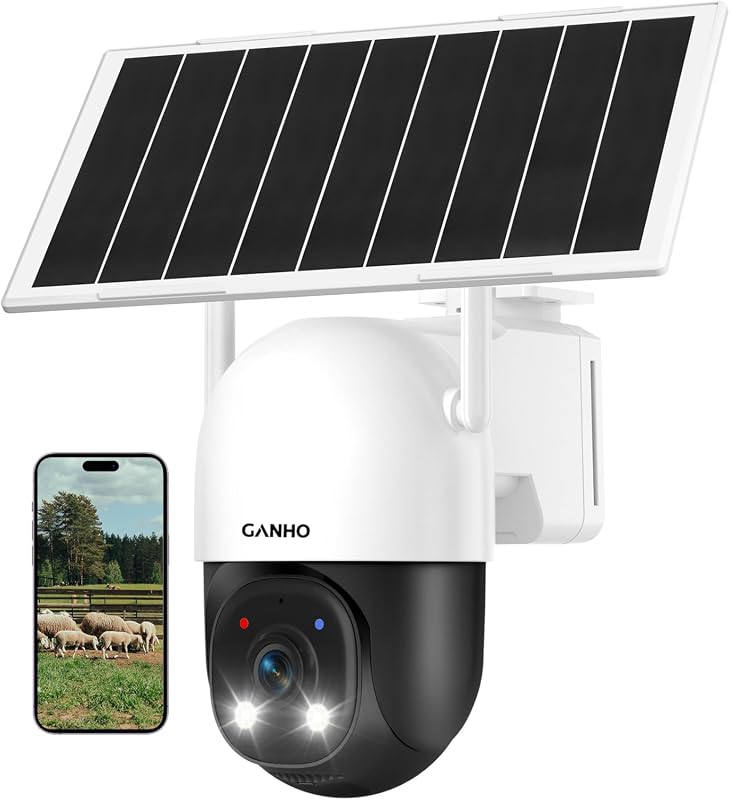
Wired cameras get steady power, so they can record continuously. Battery cameras offer flexible placement but need recharging. Solar panels help battery life but depend on sunlight.
Battery cameras often wake up on motion, which can cause a short delay. That delay may make the camera miss the first second of an event. If that matters, choose a wired camera or position a battery camera before the key action area.
Wi-Fi Bands, Signal Strength, and Hub Requirements
Most Wi-Fi cameras use the 2.4 GHz band for longer range. Some newer models also support 5 GHz for faster video. A weak signal causes lag, freezes, and missed clips.
Check the distance from your router to the camera. A camera 50 feet away with walls in between may need a mesh node or an extender. Our guide to 2.4 GHz vs 5 GHz security cameras explains the tradeoffs in more detail.
Some camera systems require a hub or a base station. The FOV is the same, but the camera range depends on hub placement, not your router.
Local Storage vs. Cloud Retention and Monthly Subscription Costs
Cameras store video locally or in the cloud. Local storage uses a microSD card or an NVR. Cloud storage records to the manufacturer’s servers, usually behind a monthly plan.
Cloud plans change the long-term cost. Retention windows vary by brand and plan, often from a few days to a couple of months. A camera that looks like a bargain can cost you a subscription fee every month.
Local storage avoids the monthly bill but has risks. A thief can steal the camera and the card with it. Cloud backup protects against that loss. Here is how the two storage paths compare.
- No monthly fee for the storage itself.
- Video stays on hardware you own.
- Device theft can take the recordings with it.
- Easy to view from anywhere.
- Survives camera theft or damage.
- Requires a subscription for longer retention.
Read more in our guide to local storage security cameras to compare the two options.
Privacy Zones, Neighbor Privacy, and Securing Your Camera System
A wide FOV often captures more than your property. Privacy tools let you keep the useful part of the view and hide the rest.
Using Privacy Zones and Masking to Protect Neighbors’ Spaces
Privacy zones block out specific parts of the frame. Use them to mask a neighbor’s bedroom window, a shared sidewalk, or a street that your wide lens can see.
Most camera apps let you draw rectangles over the areas to ignore. The camera still records the rest of the frame. This keeps your coverage while respecting neighbors.
Our guide to security camera privacy settings walks through these controls step by step.
Cybersecurity Basics: MFA, Firmware Updates, and Account Recovery
A camera with a wide view still needs a secure account. Start with a unique password. Never reuse a password from another site.
Enable multi-factor authentication (MFA) when the app offers it. MFA stops most unauthorized logins even if a password leaks. Update the camera firmware and the app regularly.
Shared access brings its own risks. If you give a neighbor or a dog walker access, review the permissions in the app. Our guide to security camera guest access covers the safe way to share.
Troubleshooting Common Field of View Limitations and Maintenance Must-Dos
Even a well-planned FOV can fail. Small fixes often solve the problem before you buy another camera.
Filling Blind Spots and Dead Zones Without Buying More Cameras
Start by checking the live view. Walk the whole area while a second person watches the app. Mark the spots where the person disappears from view.
Tilt the lens to cover those spots. Raise the camera to see over an obstacle. Move it closer to the doorway or gate you care about. Sometimes a slight turn of the mount removes a blind spot.
When one camera cannot cover two directions, consider a dual-lens camera instead of two separate mounts. Some models combine a wide view and a zoomed view in one device.
Routine Maintenance: Cleaning Lenses, Checking Mounts, and Updating Firmware
Dirty lenses shrink effective FOV. A smudge hides the area behind it. Wipe the lens with a microfiber cloth when it looks hazy. Spider webs near the lens trigger false motion alerts, so clear them weekly.
Check the mount for loose screws after storms. A camera that shifts a few inches changes the whole coverage. Reboot the camera when feeds lag. Confirm that firmware updates are current.
Slow down and test the camera after any adjustment. Have someone walk the pathway at night. The FOV may look perfect in daylight and fail after dark.
Your Next Steps: Planning a Camera Setup That Covers What Matters
Your next move is simple. Map the areas you must see. Decide if you need wide coverage, facial detail, or both. Check the lens specs, the night range, the Wi-Fi signal, and the storage plan before you buy.
Then mount at 8 to 10 feet, tilt down, test with a live walkthrough, and secure the account. Start with one camera for the front door. Add more only when a real blind spot remains.
Field of view is the starting point, not the whole answer. Match the lens angle to the spot you watch, aim it high and tilted down, and check night, audio, and weather limits before you rely on it. The right coverage comes from planning, not from the biggest degree number on the box.
Frequently Asked Questions
Field of view is the visible area a camera captures in one frame, measured in degrees. A wider degree number means more space appears in each frame. A narrower number means you see less space, but each object looks larger.
No. A wide lens shows more area, but it spreads the same resolution across a bigger image. Faces and license plates appear smaller, so identification gets harder. Choose a wide angle for open spaces and a narrow angle for specific entry points.
Mount outdoor cameras about 8 to 10 feet above the ground and tilt them down. This height captures faces instead of the tops of heads and keeps the lens out of easy reach. Check the exact manual for your model.
Adjust the tilt and height first, then test by walking the area while watching the live view. Move the camera closer to the zone you care about. Some dual-lens cameras combine a wide view and a zoomed view in one device.
No, the lens angle stays the same at night, but the infrared range limits what you can actually see. A wide camera may still go dark beyond its IR reach. Check both the field of view and the night-vision range before relying on a far part of the yard.
No, subscriptions affect where recordings are stored, not how wide the camera sees. They do change your long-term cost and retention period. Local storage avoids the monthly fee, while cloud storage protects recordings if the camera is stolen.