NVR vs Cloud Storage for Security Cameras Which is Better
NVR stores footage on a hard drive in your home with no monthly fee, but you buy and maintain the hardware. Cloud storage keeps clips on the provider’s servers with easy app access, but you pay a subscription and depend on internet.
If you are weighing nvr vs cloud storage for security cameras, this guide explains how each option really works. You will see where the money goes, what happens during an outage, and which setup fits a rental or a home you own.
The Short Answer: Which Storage Option Fits Your Home?
NVR stores video on a hard drive in your home. Cloud storage sends footage to the provider’s servers. Your choice depends on budget, internet reliability, privacy, and whether you can mount permanent hardware.
Choose NVR if You Want Local Control and No Monthly Fees
An NVR gives you a full local archive. You buy the hard drive once, and most systems record continuously without a subscription. That makes sense if you own your home, can run cables, and want to keep footage on your property.
If you want to compare common systems, our best security camera system with NVR for home guide is a good starting point.
Choose Cloud Storage if You Want Remote Access and Zero Hardware
Cloud plans are simpler for many households. You install cameras, connect them to Wi-Fi, and view clips from an app anywhere. You do not manage hard drives or network recorders.
The trade-off is a monthly fee and a stronger dependence on your internet connection.
How NVR and Cloud Storage Actually Work
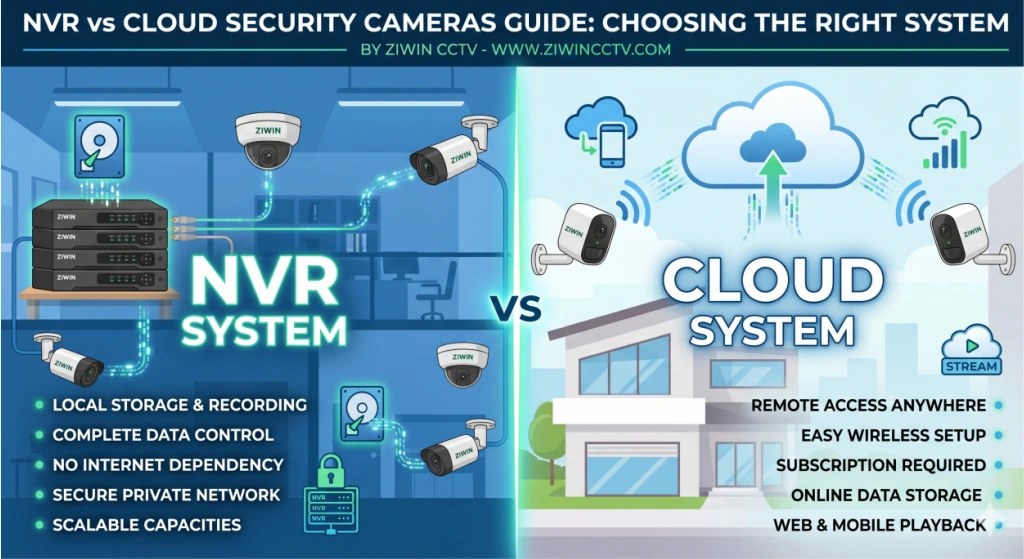
Both options record video, but the path that footage takes is different. Knowing that path helps you predict cost, privacy, and reliability.
Local NVR Systems: What’s in the Box and How Footage Flows
An NVR is a network video recorder. The system usually includes a recorder box, a hard drive, and cameras. Cameras send video over Ethernet cable or Wi-Fi to the recorder. The recorder writes that video to the drive.
To watch from your phone, the NVR connects to your router and streams through the provider’s app. The app gives remote access, but the original footage stays on the local drive.
Wired systems often use Power over Ethernet (PoE), which sends power and data over one cable. That can be more stable than Wi-Fi.
Cloud Storage: How Video Leaves Your Home and Where It Lives
Cloud cameras compress and upload short clips to the provider’s data center. The video is stored on servers you do not own. You reach it with an app or web browser.
Most cloud recordings are event-based. A motion or sound trigger tells the camera to save a clip. Continuous cloud recording exists, but it uses more bandwidth and usually costs more.
Key Differences in Video Quality, Compression, and Playback
Both NVR and cloud cameras can record sharp video. The big difference is where playback comes from.
An NVR keeps the original high-bitrate stream on the local drive. That usually gives cleaner playback, especially for identifying details. Cloud services may compress video to save bandwidth and storage.
Cloud playback depends on your upload speed and the provider’s servers. NVR playback depends on the health of your hard drive and network.
Upfront and Long-Term Cost Breakdown
Compare more than the shelf price. Storage costs show up over years, not just at checkout.
NVR Hardware, Hard Drives, and Replacement Costs
An NVR kit costs more upfront than a single cloud camera. You also pay for cameras, cables, and a recorder.
Hard drives wear out. Surveillance-grade drives are built for constant recording, and they cost more than basic computer drives. Plan to replace a drive after several years of use.
Some NVRs accept standard SATA drives, so you can swap in a new one when needed. Keep the model number and manual handy.
Cloud Subscription Tiers, Retention Periods, and Price Creep
Many cloud cameras work without a plan but limit features. A paid plan usually adds longer clip history, more cameras, and richer alerts.
Watch how plan prices change over time. A service that looks cheap for one camera can become expensive as you add cameras or want longer retention.
Verify the current plan terms before you buy. Retention windows and camera limits vary by brand and plan.
Hidden Costs: Power Draw, Networking, and Maintenance
An NVR runs continuously, so it uses more electricity than a small camera. Wired installation may require Ethernet cabling, a switch, or an electrician.
Cloud cameras use upload bandwidth for every clip. If your internet provider has a data cap, continuous cloud recording could push you over the limit.
Storage Capacity and Video Retention Compared
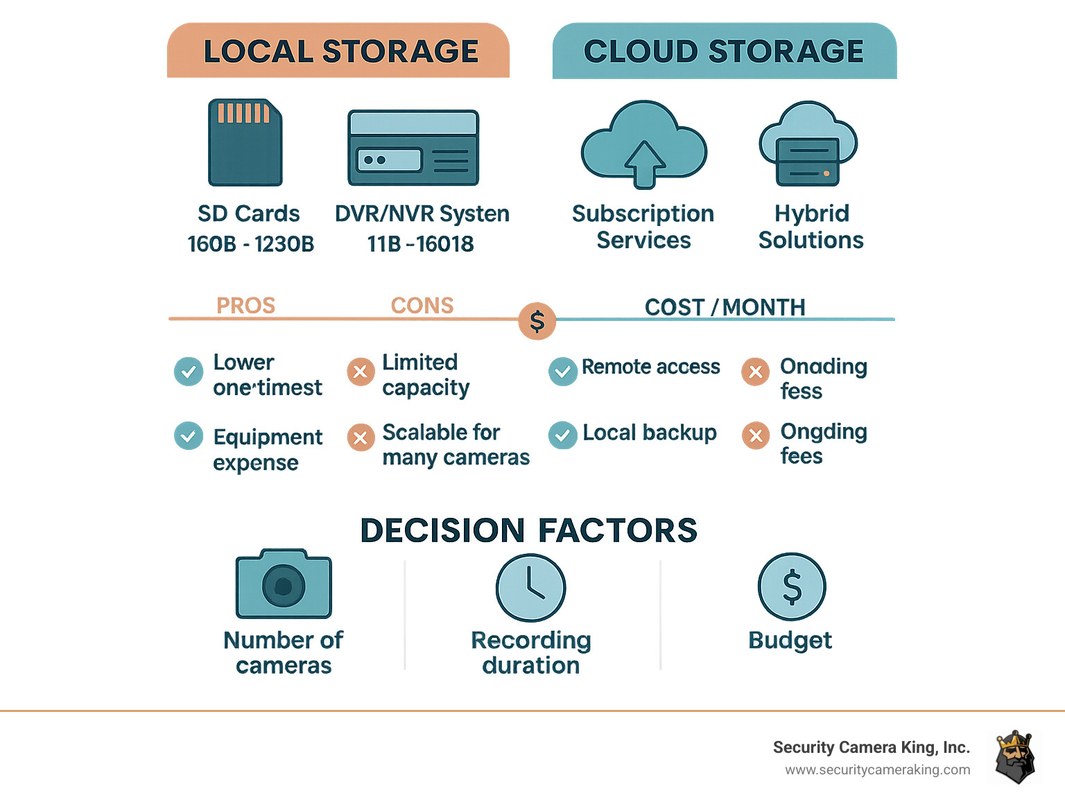
Think about how many days of footage you need before it is overwritten. That answer drives storage choices.
How Much Footage an NVR Can Hold Before Overwriting
Capacity depends on the hard drive size, number of cameras, resolution, frame rate, and compression codec. A larger drive stores more days of continuous video.
When the drive is full, most NVRs overwrite the oldest footage. That means you do not run out of space, but you do lose old recordings.
Check the manufacturer’s storage calculator or manual for your exact model.
Cloud Retention Windows and Bandwidth Limits
Cloud plans usually keep clips for a set number of days. After that, the provider deletes them automatically.
Continuous cloud recording can create a huge amount of upload traffic. If your connection is slow or capped, you may see shorter clips or buffering.
Choose a plan that matches how long you really need to review footage.
Which Option Handles Continuous Recording vs. Event Clips
NVR systems handle 24/7 continuous recording as their normal job. Cloud cameras often default to event clips to save bandwidth and cost.
If you need a reliable timeline that captures everything, local recording is easier. If you only want motion alerts and short clips, cloud storage is enough.
- Keeps footage on a hard drive in your home.
- Can record without an internet connection.
- Has no monthly fee for the recorder.
- Can be damaged, stolen, or lost with the hardware.
- Stores clips on the provider’s servers.
- Offers easy app access from anywhere.
- Requires internet and usually a subscription.
- Retention and quality depend on the plan.
Installation, Placement, and Home Layout Constraints
Your home type and network affect which storage option is practical. Measure walls, distances, and power before choosing.
Renter vs. Homeowner: Drilling, Cabling, and Permanent Mounts
Renters usually want less drilling and easy removal. Battery-powered Wi-Fi cameras with cloud or SD card storage are simpler to take down.
Homeowners can run Ethernet cables, mount cameras permanently, and install a dedicated NVR closet or shelf. Check lease rules, HOA restrictions, and local ordinances before drilling.
Power and Wi-Fi Range: Where Each Camera Can Realistically Go
Cloud cameras need Wi-Fi strong enough to upload clips. Thick walls, long distances, and metal siding can weaken the signal.
NVR cameras that use PoE can reach farther with Ethernet cable. Wi-Fi NVR cameras still need a reliable wireless link.
Planning Field of View, Night Performance, and Audio Coverage
Place cameras to cover entryways, walkways, and driveways without pointing into a neighbor’s home. Check night vision specs and audio features.
Audio recording has state-specific rules. If you do not need sound, it is safer to disable recording.
Privacy and Cybersecurity: Local vs. Remote Footage
Storage location changes who can access your footage. Both NVR and cloud systems need strong account security.
Who Can Access Your Footage and When
With an NVR, the video stays on your hard drive. Household members with access to the recorder or app can view it.
With cloud storage, the provider stores your clips. Support staff, account integrations, or a legal request can bring outside access. Read the privacy policy and delete old footage you no longer need.
Securing Your NVR, Router, and Cloud Account
Use unique passwords and enable multi-factor authentication (MFA) on every security account. Keep the camera, recorder, router, and phone apps updated.
Do not open unknown ports on your router without understanding the risk. A hidden camera is safer when it is not exposed directly to the internet.
For deeper guidance, read our article on how to secure home security cameras from hackers.
Neighbor Privacy, Privacy Zones, and Legal Considerations
Privacy zones let you block out parts of the image, like a neighbor’s porch. Use them to narrow your camera’s view.
If you share access with family or guests, review the user list regularly. Remove people who should no longer see live video.
Reliability, Monitoring, and Maintenance
A camera is only useful when it works during the moments you care about. Plan for outages and failures.
What Happens When Your Internet or Power Goes Down
An NVR can keep recording locally when the internet drops, as long as the recorder and cameras have power. Remote viewing stops because the app needs internet.
Cloud cameras stop uploading when the internet goes down. Battery-powered models may still capture clips locally if they have an SD card, but the cloud plan will not receive them.
For more details, see how security camera works during internet outage behavior differs by setup.
Hard Drive Failures, Cloud Outages, and Data Recovery
Hard drives fail eventually. A single NVR has one copy of the footage unless you add backup.
Cloud providers usually store copies across multiple servers. That helps during a local hardware failure, but a service outage can still delay access to clips.
Alerts, Self-Monitoring, and Firmware Update Responsibilities
Cloud cameras send alerts through the provider’s app. NVR systems also need app access for reliable push notifications.
Firmware updates fix bugs and close security holes. With an NVR, you usually control updates. With cloud cameras, the provider pushes updates, but you still need to install them and restart devices when asked.
Hybrid Approach: Local Recording with Cloud Backup
You do not have to choose one or the other. Many homes use local recording and cloud backup together.
How Hybrid Storage Works and When It’s Worth the Cost
Hybrid storage saves continuously to a local hard drive or SD card, then uploads important clips to the cloud. That gives you a long local archive plus offsite backup for critical events.
It costs more because you buy hardware and pay for a cloud plan. It is worth it when you want both local control and a backup if the recorder is stolen or damaged.
Which Cameras and NVRs Support Both Storage Methods
Some NVRs upload selected clips to the provider’s cloud. Many Wi-Fi cameras record to an SD card and a paid cloud plan at the same time.
Check the exact model manual before buying. Not every “local” camera supports cloud backup, and cloud plans often limit the number of cameras or retention period.
Final Verdict: What to Choose
Your decision should match your home, budget, and privacy comfort level. There is no single best answer for every household.
Decision Guide Based on Home Type, Budget, and Privacy Priorities
Choose an NVR if you own your home, can run cables, want 24/7 recording, and prefer no monthly fee. Choose cloud storage if you rent, want quick app access, and accept a subscription for convenience.
Choose a hybrid setup when you want a local archive and an offsite safety copy for critical events.
Next Steps: Measuring Your Needs Before Buying
Count the cameras and write down each camera’s location. Check power outlets, Wi-Fi strength, and whether you can drill into walls. Estimate your internet upload speed and data cap.
Then compare exact model specs, plan terms, and replacement costs. A little planning prevents a storage choice you regret later.
For most US homeowners who can run wiring, an NVR gives local control with no monthly fee. For most renters and budget-conscious users who want app access without hardware, cloud storage is simpler. Review your layout, internet reliability, privacy needs, and five-year cost before you decide.
Frequently Asked Questions
Yes, most NVR systems can keep recording to the local hard drive during an internet outage. Remote viewing and cloud backup will stop because they need internet, but the local footage continues.
Many cloud cameras work without a subscription, but free plans usually limit features. You may only get live viewing, short clips, or a short retention period. Check the exact plan before buying.
No camera is completely unhackable. You reduce risk by using a unique password, enabling MFA, keeping firmware updated, and reviewing shared users and app permissions.
Cloud storage is usually easier for renters because battery-powered cameras avoid drilling and wiring. SD card local storage also works if you want a no-subscription option without permanent mounts.
Retention depends on the brand and plan. Many plans keep clips for 30 or 60 days, but you should verify the current terms for the exact camera and plan you are considering.
Cloud backup is useful when you want an offsite copy of important clips. It costs more, but it can help if the NVR is stolen, damaged, or fails.