Do Water Leak Sensors Need Wi-Fi The Complete Guide
No, water leak sensors do not need Wi-Fi to detect water, but Wi-Fi turns a local siren into a phone alert. Pick your connectivity based on whether you are home often or need alerts while away.
Do water leak sensors need wifi? The short answer is no. A sensor can detect water and sound a local alarm with zero internet.
Wi-Fi turns that beep into a phone alert. You get the alert at work, asleep, or away from home.
This guide explains how water leak sensors work. It covers which connectivity fits your lifestyle. It also lists what to check before you buy.
The Short Answer: No, But Wi-Fi Is What Makes a Leak Sensor Truly Useful
A leak sensor needs power and a way to detect water. The internet is not required.
A basic model uses a battery and metal probes. It sounds a loud siren the moment it touches water.
Wi-Fi adds the follow-up. With a connection, the sensor sends a push notification to your phone. It logs the event and can trigger other smart devices.
Three Ways to Get Alerted: Local Siren, Hub, or Wi-Fi Cloud
Every leak sensor fits one of three alerting styles. Local-only sensors keep everything in the room. Hub-based sensors talk to a central bridge.
Wi-Fi sensors connect directly to your router and the cloud.
Matching Connectivity to Your Lifestyle Before You Buy
Think about who needs the alert. If you are home most of the time, a loud siren covers much of the risk. If you travel or own a second home, phone alerts matter more.
Renters usually prefer peel-and-stick sensors. Homeowners can add a hub, shut-off valve, or alarm system.
| Option | Best suited to | Power and network | Main limitation |
|---|---|---|---|
| Local-only sensor | Renters and homes where someone is usually present | Battery, no network | No alert when the room is empty |
| Wi-Fi sensor | Travelers who want phone alerts | Battery, 2.4 GHz Wi-Fi | Alerts depend on your internet |
| Hub-based sensor | Homes with an existing smart ecosystem | Battery, hub bridge, network | Requires a compatible hub |
How Water Leak Sensors Work and Where Wi-Fi Fits Into the Equation
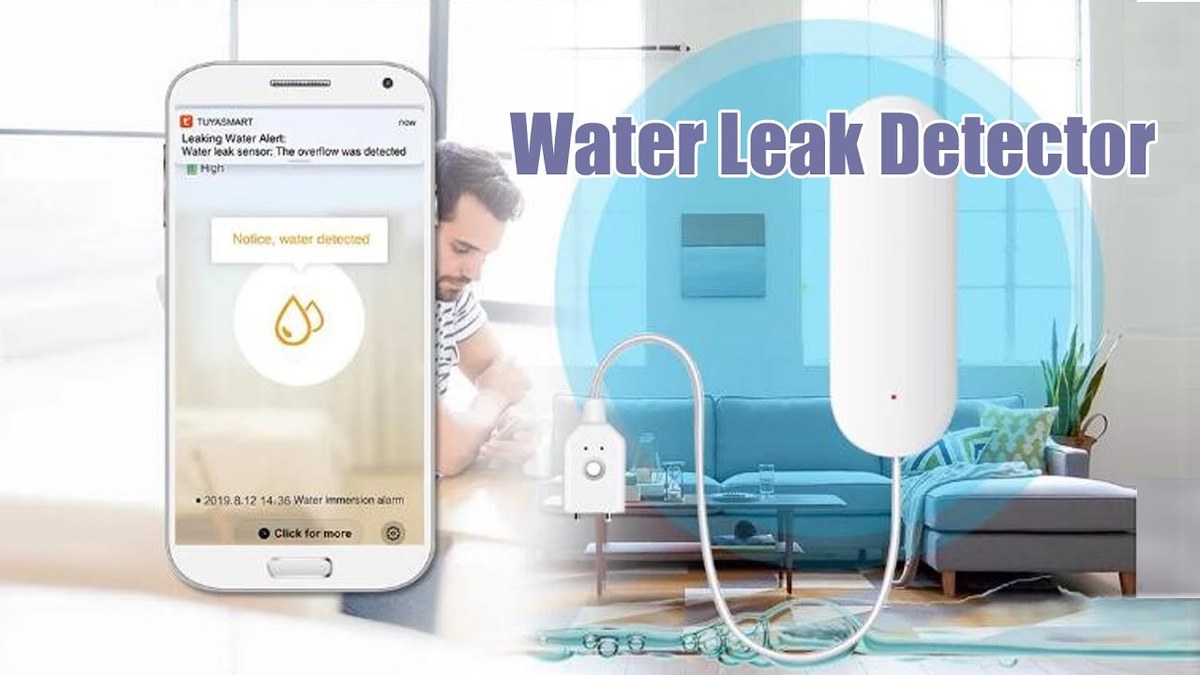
Most leak sensors share the same core design. Two metal contacts sit at the base. When water bridges those contacts, the device closes a circuit and triggers an alarm.
The difference between models is what happens after that trigger.
Local-Only Sensors: Battery, Probe Contacts, and a Loud Siren
Local-only sensors run on batteries and beep loudly. They need no app, account, or network. The trade-off is distance.
A siren in the basement may not reach you upstairs.
Wi-Fi Sensors: Cloud Relay, Push Notifications, and Event History
Wi-Fi sensors connect directly to your router. When they detect water, they send the event to the company’s cloud. The cloud pushes a notification to your phone.
This adds event history, app controls, and smart home triggers.
Hub-Based Sensors: Z-Wave, Zigbee, and Matter Over Thread
Hub-based sensors talk to a bridge. They use Z-Wave, Zigbee, or Thread. These are wireless protocols.
The hub sends the alert to your phone or alarm panel. These setups use less battery and handle many sensors on one network.
Matter over Thread needs a Thread border router. That is a bridge device, like a compatible smart speaker or hub. For more background, see our guide on whether alarm sensors need a Wi-Fi connection.
Placement and Coverage: High-Risk Zones Matter More Than the Signal
Wi-Fi range is rarely why a leak goes unnoticed. Placement is the real reason. A sensor under the wrong sink will miss the leak it was bought to catch.
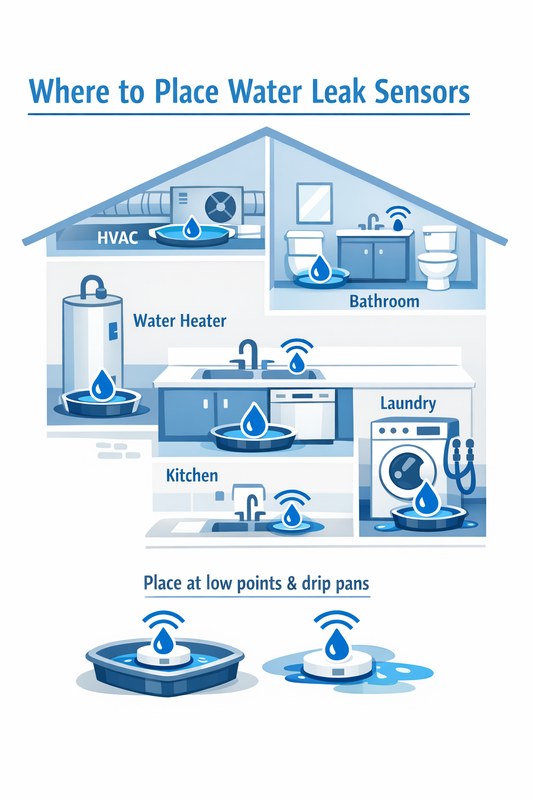
The Five Zones Every Homeowner Should Check First
- Kitchen sink, dishwasher, and refrigerator water line.
- Bathroom sinks, toilets, and tub or shower valves.
- Water heater, on the drip pan or the floor nearby.
- Laundry room around the washing machine supply hoses.
- Basement near the sump pump, utility sink, or main shut-off valve.
Place the sensor on the floor at the lowest point where water would collect. Keep the probes flat against the surface.
Our guide on where to place water leak sensors covers each room in detail.
Renter-Friendly Placement Without Drilling or Permanent Wiring
Most leak sensors use peel-and-stick tape or double-sided strips. You can place them under sinks, behind toilets, and beside appliances without drilling.
Check the included mounting method before buying.
How Many Sensors Does a Typical Home Actually Need
A small apartment may need just two or three sensors. A typical home usually starts with five to seven covering the zones above.
Most systems let you add sensors later as your needs grow.
Power, Battery Life, and the Monthly Maintenance Routine That Keeps Sensors Honest

Leak sensors only work when their batteries are healthy. Battery life varies by model and connectivity type. It also varies by how often the sensor checks for water.
Check these details before you buy. This prevents surprises.
Battery Life Expectations by Sensor Type and Connectivity
Local-only sensors typically run one to three years on common batteries. Wi-Fi sensors use more power, so their batteries drain faster. Z-Wave and Zigbee sensors often last longer.
Check the manual for the exact battery type.
The Two-Minute Testing Routine That Prevents Silent Failures
Test every sensor once a month. Use a damp paper towel on the probes.
The sensor should alarm within seconds. Your phone should show the notification.
If it does not respond, replace the batteries and test again.
Alerts, Monitoring, and Subscriptions: What Wi-Fi Unlocks and What Costs Extra
Wi-Fi opens the door to phone alerts. It does not mean you owe a monthly fee. Most standalone Wi-Fi leak sensors come with free app alerts.
Costs appear when you add professional monitoring, longer cloud history, or a full alarm plan.
Self-Monitoring With Smartphone Alerts: Free but Wi-Fi Dependent
Self-monitoring is the default for most Wi-Fi sensors. You connect the sensor to the app. You get a push notification when water is detected.
No subscription is usually required for basic alerts. The catch is dependence. If your internet drops, the sensor may not reach the cloud.
Professional Monitoring Through Alarm Systems: Contracts, Dispatch Limits, and Sirens
Some alarm providers include water sensors in a professionally monitored plan. A monitoring center can see the sensor’s status. The center can contact you about a possible leak.
Dispatch depends on the plan and event. Some areas require alarm permits or charge false-alarm fees.
- The household receives alerts and decides what action to take.
- Usually has no ongoing cost for basic notifications.
- Does not guarantee emergency dispatch.
- A monitoring center may review eligible alarms.
- Dispatch availability depends on the plan and event.
- Fees, contracts, permits, and false-alarm rules may apply.
Shared Access for Family Members and Multi-User Alert Routing
A leak alert works best when the right people receive it. Most apps let you add household members. A partner or neighbor can also get notified.
Set this up at install, not after a leak. Check sharing limits. Decide who can silence an alarm.
Privacy and Cybersecurity: What Your Leak Sensor Actually Sends to the Cloud
Leak sensors collect far less data than cameras. But they still send status to a company’s servers. Know what data is stored.
This helps you choose a model you can trust.
Data Collected, Cloud Retention Policies, and Vendor Access
Typical data includes device status, battery level, Wi-Fi signal, and alert time. Some companies also store your account email, home address, and event history.
Retention periods vary. If a company does not explain data deletion, treat that as a caution flag.
Securing Your Account: MFA, Account Recovery, and App Permissions
Your leak sensor account can reveal when you are away from home. Enable multi-factor authentication if offered. That adds a second login step. Use a unique password.
Review which phone numbers can reset the account. Revoke access for old devices or former roommates.
Firmware Updates and the Vendor Support Lifecycle
Leak sensors receive firmware updates. Firmware is the software built into the device. Updates fix bugs and improve reliability.
Check that the model has a clear update path through the app. Weigh how long the company supports older models. A sensor that stops receiving updates is not one you can fully trust.
Installation and Compatibility: Wi-Fi Bands, Hubs, and Network Dead Zones
Most Wi-Fi leak sensors connect to your router within minutes. The biggest setup mistake is forgetting that many smart devices only work on the 2.4 GHz band.
A quick network check prevents that headache.
Why Most Sensors Depend on 2.4 GHz and Refuse to Join 5 GHz Networks
2.4 GHz signals travel farther than 5 GHz. They also pass through walls better. Many leak sensors will not join a 5 GHz network.
If the sensor cannot find your network, split the bands temporarily. Connect to 2.4 GHz. Then recombine them.
Mesh Networks, Wi-Fi Extenders, and Signal-Reach Planning
If the water heater sits in a garage, a single router may not reach it. The same is true for a far corner of the basement. A mesh system or Wi-Fi extender can fill that gap.
Plan the network before placing sensors. Weak signals still detect water but may delay alerts.
Hub-Based Options for Homes Already Running Smart Ecosystems
You might own a hub from Apple, Google, Amazon, Samsung SmartThings, or another ecosystem. Check whether your hub supports water sensors over Z-Wave, Zigbee, or Matter.
The hub handles the network. The sensors use very little power.
Limitations and Realistic Expectations: What a Leak Sensor Will Not Do
A leak sensor is a detection tool, not a cleanup crew. It will not stop the water, fix the pipe, or protect areas it cannot reach.
Contact Detection vs. Flood Detection: Knowing the Difference
Most sensors use two metal probes. The probes must touch water to trigger. If water pools just beside the probes, the sensor stays silent.
Some models add a rope sensor. A rope sensor detects water along its full length. Choose a point sensor for a sink leak. Choose a rope sensor for a long basement wall.
False Alerts From Humidity, Steam, and Splash
Backsplash, shower steam, and cleaning spray can trigger a false alarm. Keep sensors low, dry, and out of the splash zone.
If false alerts keep happening, move the sensor. Or adjust its sensitivity in the app, if supported.
Sensors Notice Leaks, but Shut-Off Valves Are the Ones That Stop Them
The most common gap is action. A sensor tells you water is flowing. But someone has to turn off the water.
An automatic shut-off valve can do that. It receives the alert through the same app or hub. Our comparison of leak sensors versus shut-off valves explains the difference.
The Bottom Line and Next Steps for Your Home
No, leak sensors do not require Wi-Fi to function. Wi-Fi converts a local siren into a smartphone alert. It also adds event history and triggers for other smart devices.
The right choice depends on your home layout. It also depends on how often you are away and whether you own a hub.
A Simple Decision Framework Based on Lifestyle, Tenure, and Ecosystem
- Renter with a tight budget: start with two or three local-only or Wi-Fi sensors under the most active sinks.
- Homeowner who travels: choose Wi-Fi sensors with push alerts and a monthly test habit.
- Smart hub owner: add Z-Wave, Zigbee, or Matter sensors to the hub you already manage.
- Alarm system subscriber: check if your provider sells compatible water sensors.
For model-specific ideas, browse our roundup of the best water leak sensors for smart homes before comparing prices.
Before You Buy: A 60-Second Checklist of Requirements
- Confirm the sensor uses the network type you have: Wi-Fi, hub, or local only.
- Verify the battery type, expected life, and whether USB power is available.
- Check that the app supports shared users and multi-factor authentication.
- Measure the distance from the sensor to the router or hub.
- Pick a model with a clear firmware update path and documented support.
Water leak sensors do not need Wi-Fi to detect water. But Wi-Fi makes them more useful by alerting your phone when you are away.
Local-only models suit simple offline needs. Wi-Fi and hub models add remote alerts and integrations.
Place sensors low. Test them monthly. Pair them with a shut-off valve to actually stop the water.
Frequently Asked Questions
No. A basic sensor uses metal probes and a battery to detect water and sound a local siren without any internet connection. Wi-Fi is only needed for push notifications, event history, and smart home integrations.
Many models still sound a local siren when water is detected, but the phone notification may not arrive until the connection returns. Check the product manual to confirm whether the siren works during an outage.
Yes. Standalone Wi-Fi sensors connect directly to your router and need no hub. Hub-based sensors using Z-Wave, Zigbee, or Matter need a compatible hub or Thread border router instead.
Most standalone models provide basic push alerts for free. Subscriptions appear when you add professional monitoring, longer cloud history, or a full alarm system plan. Verify the plan details for the exact model before buying.
Place sensors at the lowest point where water would collect: under sinks, near the water heater, behind the washing machine, beside toilets, and around a sump pump. Keep the metal probes flat against the floor surface.
Test every sensor once a month with a damp paper towel pressed against the probes. The sensor should alarm within a few seconds and your phone should receive the notification. Replace the batteries and test again if it does not respond.