Smart Lock Door Compatibility Guide for Homeowners
Smart lock door compatibility means the lock fits your door, connects to your network, and follows your property rules. Measure your door, check the lease, and confirm power and Wi-Fi before you buy.
Smart lock door compatibility starts with your door, not the lock itself. A popular model can fail if the bolt does not line up or the Wi-Fi signal is weak. This guide covers physical fit, connectivity, rental rules, power, and maintenance so you can choose with confidence.
Smart Lock Door Compatibility: What It Actually Means
Compatibility means the lock fits your door, connects to your home network, and works with your daily routine. Many buyers check the app first and skip the physical fit. That order causes most return headaches.
Physical Fit vs. Connectivity Fit
Physical fit covers the holes in your door, the deadbolt size, and the door thickness. Connectivity fit covers Wi-Fi, Bluetooth, hubs, and voice assistants. A lock can fit perfectly but fail to connect. It can also connect easily but not line up with your deadbolt. You need both types of fit to work together.
What Happens When Compatibility Is Overlooked
Ignoring compatibility leads to stuck bolts, loose keypads, and poor battery life. Some locks will not latch at all. Others connect to Wi-Fi but drop alerts every night. In rental homes, a wrong install can also violate a lease. Checking fit before purchase saves time, money, and frustration.
Measure Your Door and Deadbolt Before You Buy
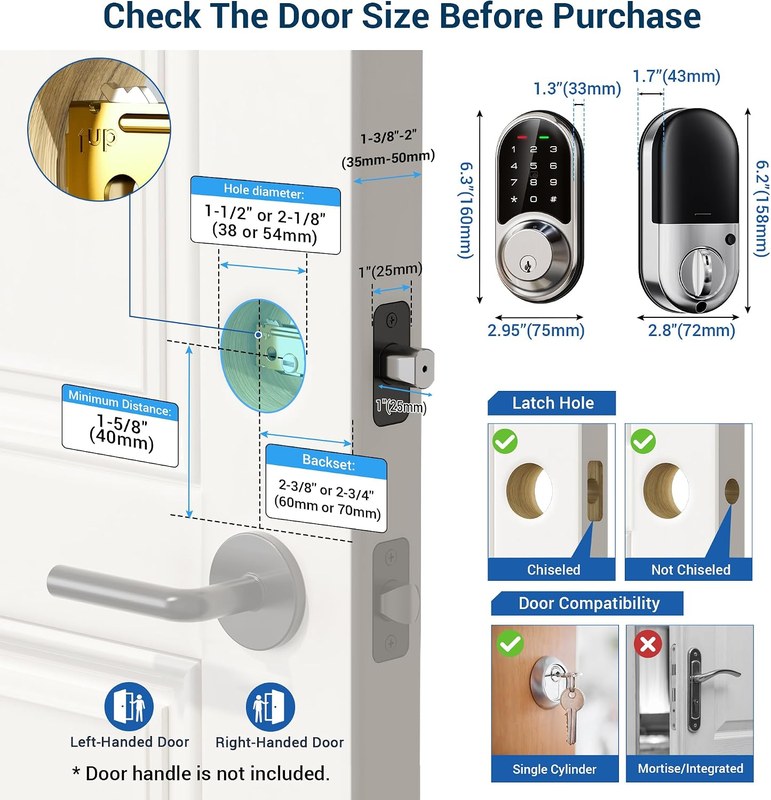
Take three measurements before you shop: backset, crossbore, and door thickness. Most US homes use standard sizes, but older doors often differ. A tape measure gives you the answer in minutes.
Backset, Crossbore, and Deadbolt Thickness
Backset is the distance from the door edge to the center of the deadbolt hole. It is usually 2-3/8 or 2-3/4 inches. Crossbore is the large hole where the lock body sits, usually 2-1/8 inches. Deadbolt thickness matters too. Most smart locks fit standard deadbolts, but some need an adapter for unusual sizes. Write down these numbers and compare them to the lock’s spec sheet.
Door Handing, Thickness, and Material Constraints
Door handing tells you which side the hinges are on. Most smart locks work on both left and right doors, but a few need a setting change. Door thickness usually ranges from 1-3/8 to 1-3/4 inches. Check the spec sheet for the minimum and maximum. Material matters less often. Metal, fiberglass, and wood doors usually work. Some smart locks include extra screws for metal doors and fire-rated frames.
Renter vs. Homeowner Constraints: What You Can Install
Homeowners can usually replace a full deadbolt. Renters often need a lock that keeps the original hardware. Your lease, landlord, and HOA may limit what you can install.
Lease Terms, Landlord Approval, and HOA Rules
Read your lease before buying. Many leases require written permission for lock changes. Some HOAs restrict visible hardware or keypad colors. Ask for approval in writing and keep a copy. If you change the lock, keep the original parts for move-out. A quick email to your landlord can prevent a costly dispute later.
Reversible and Non-Destructive Installation Options
Some smart locks replace only the inside thumb turn. They leave the exterior key cylinder and existing deadbolt in place. These options are often reversible and renter-friendly. Others require drilling new holes and are not reversible. If you rent, look for locks described as non-destructive or renter-approved. Also check our guide to the best smart locks for apartment doors with keys for renter-specific choices.
Power, Connectivity, and Subscription Requirements

Smart locks need power, a way to connect, and sometimes a paid plan. Each of these affects daily use and long-term cost. Check all three before checkout.
Batteries and Low-Battery Behavior
Most smart locks run on AA or AAA batteries. Battery life depends on Wi-Fi use, auto-lock frequency, and temperature. When power gets low, the lock usually warns you in the app. Some locks keep working with a dead battery if you use a physical key. Others offer a backup power port on the outside. Learn what happens if a smart lock battery dies so you are never locked out.
Wi-Fi, Bluetooth, Thread, Z-Wave, and Matter
Bluetooth locks connect directly to your phone but may lack remote access. Wi-Fi locks connect to your router and work from anywhere. Z-Wave and Thread locks need a hub or border router. Matter is a newer standard that works across Apple, Google, and Amazon. Choose a lock that matches the devices you already own.
Check the lock’s Wi-Fi band before buying. Some locks support 2.4 GHz only, while newer models support 5 GHz. Place the lock within a reasonable distance of your router. A weak signal causes delayed alerts and failed remote commands. If you use a mesh system, confirm the lock works with your brand.
Hubs, Firmware, Subscriptions, and Cloud Retention
Some locks need a separate hub to connect to your network. Others include a built-in Wi-Fi bridge. Firmware updates fix bugs and security issues, so check for them regularly. Subscriptions are optional for many locks, but some features require a plan. Event history, video clips, and cloud storage may cost extra. Review the plan page before you buy and note the cancellation terms.
Backup Entry: Keys, Dead Batteries, and Emergency Access
Every smart lock needs a backup entry method. Batteries die, apps fail, and phones get lost. A physical key is the most reliable backup. Some locks have no keyhole at all and rely on codes or jump ports.
Keyed vs. Keyless Smart Locks
Keyed smart locks keep a traditional cylinder on the outside. You can open them with a key, a code, or an app. Keyless smart locks remove the keyhole for a cleaner look but leave you with fewer options during a power or battery failure. Compare smart locks vs traditional key locks to see which backup fits your routine. For keyed options, review the best smart locks with physical key backup.
Emergency Entry and First-Responder Access
First responders may need to force entry if they cannot reach a key. Some keyless locks make this harder. If you have a keyed lock, keep a spare key with someone you trust. A lockbox is another option, but its safety depends on placement and quality. Never hide a key under a mat or in a fake rock. Check your local rules about lockboxes if you use one for emergency access.
Shared Access, App Permissions, and Cybersecurity
Smart locks let you share access with family, guests, and service providers. Each shared user should have a separate code or account. Review permissions often and remove users who no longer need access.
Access Codes for Family, Guests, and Service Providers
Create unique codes for each person. Use temporary codes for guests and contractors. Set expiration dates when the app supports them. If you share a single code with everyone, you cannot tell who entered and who did not. Review your code list monthly and delete codes you no longer use.
- Use a unique password and enable MFA.
- Update device, hub, router, and app software.
- Review shared users, sessions, permissions, and integrations.
- Use modern Wi-Fi security and isolate unsupported devices when practical.
- Confirm how recordings and account data can be exported or deleted.
MFA, Account Recovery, and Vendor Support Lifecycle
Enable multi-factor authentication on your lock account. That adds a second step beyond your password. Set up account recovery with a separate email or phone number. Check how long the vendor supports the model. Older locks may stop receiving updates, which raises security risk over time. Plan for a replacement when support ends.
Auto-Lock, Monitoring, and Privacy
Auto-lock and activity alerts make a smart lock useful, but they also collect data. Understand what the app records and who can see it.
Auto-Lock Schedules, Geofencing, and Activity Alerts
Auto-lock closes the bolt after a set delay. Geofencing uses your phone’s location to lock or unlock as you arrive and leave. Activity alerts tell you when a door opens. These features depend on phone permissions and network reliability. Test them after setup and adjust the delay to avoid accidental lockouts. If you have pets or frequent visitors, a short delay may cause false alerts.
Smart lock apps record event history, user codes, and sometimes location data. Review the app’s privacy settings and limit what you share. Cloud storage may keep logs for a set period. Learn how to export or delete your data. Some states have specific privacy rules, so check local guidance.
Installation, Maintenance, and Troubleshooting
Most smart locks install in under an hour with basic tools. But mistakes happen. Follow the manual exactly and test the lock before relying on it.
Common Installation Mistakes and Misalignment Fixes
The most common mistake is skipping the alignment check. If the bolt scrapes the strike plate, the lock will struggle to latch. Loosen the screws, adjust the plate, and retighten. Another mistake is overtightening the mounting screws, which warps the lock body. Tighten until snug, not forced. Test the key, the code, and the app before you close the door.
Troubleshooting Sticky Locks, Cold Weather, and Low Batteries
A sticky bolt often means misalignment, not a broken motor. Check the strike plate and the door frame. Cold weather can slow batteries and thicken lubricant. Keep spare batteries inside the home. If the lock beeps but will not turn, replace the batteries first. If it still fails, check the manual for a reset procedure before calling support.
Routine Maintenance: Lubrication, Battery Checks, and Firmware Updates
Clean the keypad with a dry cloth. Lubricate the deadbolt only with products the manual allows. Check batteries every three months and replace them before the low-battery warning gets urgent. Update firmware when the app prompts you. These small tasks extend the lock’s life and keep it secure.
Smart Lock Door Compatibility Checklist: Confirm These Before You Buy
- Measure the backset, crossbore, and door thickness.
- Confirm the lock fits your door material and handing.
- Check lease, landlord, or HOA rules in writing.
- Verify the lock’s power source and backup options.
- Confirm Wi-Fi band, hub, or bridge requirements.
- Review subscription, cloud, and retention terms.
- Choose a backup entry method you can use reliably.
- Plan for MFA, account recovery, and firmware updates.
- Test auto-lock, alerts, and guest codes after install.
- Keep the original hardware for rental move-out.
Smart lock compatibility starts with your door’s measurements and ends with your network, budget, and daily routine. Measure first, read the lease, and confirm power and connectivity before buying. A lock that fits and connects reliably beats a popular model that does not.
Frequently Asked Questions
Measure the backset, crossbore, and door thickness. Most US doors use a 2-3/8 or 2-3/4 inch backset and a 2-1/8 inch crossbore. Compare those numbers to the lock’s spec sheet before buying.
Yes, but read your lease first. Many leases require written landlord approval for lock changes. Look for reversible locks that keep the original hardware and replace only the inside thumb turn.
A keyed smart lock still opens with a physical key. Keyless locks may need a backup power port or a jump start from a 9V battery. Keep spare batteries inside your home.
Not always. Bluetooth locks work without Wi-Fi but lack remote access. Wi-Fi locks need a router connection for app control from anywhere. Z-Wave and Thread locks require a compatible hub.
Many smart locks work without a subscription for basic codes and alerts. Advanced features like video, cloud history, or multi-user access may require a paid plan. Review the plan page before buying.
Yes, if you choose a keyed smart lock. These models keep a traditional cylinder on the outside. Keyless models remove the keyhole entirely and rely on codes, apps, or backup power.



2 Comments