What Happens If Smart Lock Battery Dies: Access Solutions and Prevention Tips
A dead smart lock battery can stop the keypad, fingerprint reader, app control, and automatic unlocking from working. Your door may stay locked, but most smart locks include a backup entry method, such as a physical key, emergency power contacts, or an external battery connection.
We can help you identify the safest way to regain entry, replace the batteries, and prevent another lockout. You will also learn when the lock needs support from the manufacturer or a locksmith.
Key Takeaways
- A dead battery can disable electronic entry features.
- Backup keys or emergency power may restore access.
- Regular battery checks can help prevent lockouts.
Immediate Lock Behavior
A dead battery stops electronic functions, but it does not usually change the lock’s last physical position. Our ability to enter then depends on the lock’s design, its backup features, and whether we have a physical key or another approved access method.
Fail-Secure Versus Fail-Safe Designs
Most residential smart locks use a fail-secure design. If the batteries die while the door is locked, the lock normally stays locked. This protects the property, but it prevents app commands, keypads, fingerprint readers, and motorized unlocking from working.
Some commercial or specialty locks use a fail-safe design. These locks unlock when power fails, which supports emergency exit rules in certain buildings. However, fail-safe behavior can reduce security, so we should check the product specifications rather than assume how a lock will respond.
A dead battery does not usually lock or unlock the door by itself. The lock generally remains in its previous locked or unlocked state. A manual key cylinder, if included, may still work because it operates separately from the battery-powered motor.
What Continues To Work Without Power
The electronic features usually stop working when the battery is fully depleted. We should not expect the mobile app, wireless connection, keypad, fingerprint scanner, or automatic locking motor to respond.
Several backup options may remain available:
- Physical key: Use the key cylinder if the lock has one.
- External battery terminals: Some models accept temporary power from a 9-volt battery.
- USB emergency power: Certain locks provide a USB port for temporary power.
- Interior operation: The inside thumb turn or handle often works mechanically.
We should follow the manufacturer’s instructions for emergency terminals or USB power. After opening the door, we should replace all batteries with the correct type and inspect the contacts for dirt or corrosion.
How To Regain Entry
We can usually restore access with the lock’s built-in backup options. A physical key, temporary external power, or another authorized user may work, depending on the lock model and its setup.
Using A Physical Backup Key
Many smart locks include a hidden key cylinder behind a cover or trim plate. We should check the product manual for its location before forcing the cover, since designs differ. Some models require us to slide, lift, or rotate the outer cover.
If the lock accepts a key, we can insert the manufacturer’s key and turn it like a standard deadbolt. Keep a spare key with a trusted person or in a secure location outside the home. Do not hide it near the door, where someone could easily find it.
If the key does not turn, we should avoid using excessive force. The deadbolt may be under pressure from the door frame, or the lock may need power before the cylinder operates. A locksmith can open the door without damaging the lock when the backup key fails.
Using Emergency External Power
Some smart locks have two metal contacts on the outside for temporary power. We can press a fresh 9-volt battery against these contacts while entering the code, using the app, or turning the knob. The exact contact location varies by model.
Other locks provide a USB emergency power port. We can connect a charged power bank with the correct cable, then unlock the door through the keypad, fingerprint reader, app, or manual control. External power usually does not recharge the internal batteries; it only supplies power long enough to unlock the lock.
We should confirm the required method in the manual before applying power. Never connect wires to unknown terminals or use a charger with the wrong voltage.
Alternative Authorized Access Methods
A person already inside may unlock the door from the interior. If our lock supports remote access, an authorized user can unlock it through the manufacturer’s app, provided the lock still has power or a connected hub can operate it. Some systems also allow a temporary code created in advance.
We can contact a trusted household member, property manager, or building staff if they hold a registered key or access code. We should verify their identity before sharing entry details and remove temporary codes after use.
If none of these methods works, we should call the lock manufacturer or a licensed locksmith. We should have proof of residence ready, such as identification or a lease, because a professional may need to confirm that we are authorized to enter.
Battery Replacement Steps
We should identify the lock’s battery access point, use the exact battery type listed by the manufacturer, and test the lock before closing the door. Keeping the door open during replacement helps us avoid accidental lockouts.
Finding The Battery Compartment
We usually find the battery compartment on the inside section of the lock. Look for a sliding cover, a small screw, or a removable interior panel. Some models place the batteries behind the thumb-turn assembly, while others use a separate cartridge.
Before opening the compartment, unlock and open the door. Take a photo of the battery layout so we can match the positive and negative ends correctly. Remove all old batteries rather than mixing them with new ones.
Check the contacts for dirt, corrosion, or moisture. We can wipe light dirt away with a dry cloth. If we see heavy corrosion or damaged contacts, we should stop and contact the manufacturer or a qualified locksmith.
Choosing Compatible Replacement Batteries
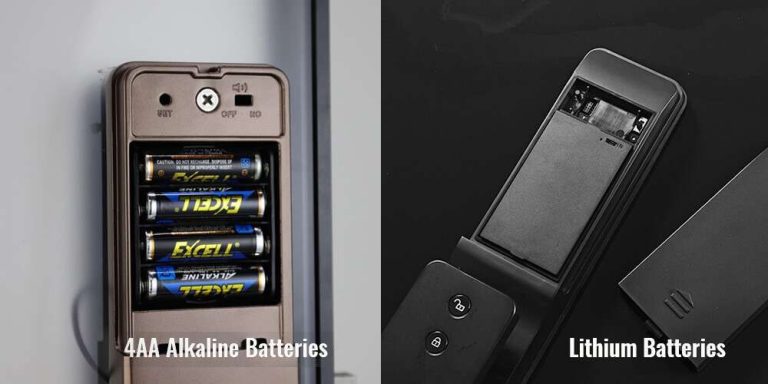
We should use the battery size and type printed inside the compartment or listed in the lock’s manual. Many smart locks use AA or AAA alkaline batteries, but some models require lithium batteries or a rechargeable battery pack. We should not guess based on appearance alone.
Install a complete set from the same brand and package. Mixing old and new batteries, or mixing alkaline and lithium batteries, can reduce performance or cause leakage. We should avoid rechargeable cells unless the manufacturer specifically supports them, because their voltage may differ.
Do not use damaged, swollen, or leaking batteries. Insert each battery with its positive (+) and negative (–) ends aligned with the markings. Replace the cover firmly so the batteries stay connected and protected from moisture.
Restoring Settings After Replacement
After installing the batteries, we should wait for the lock to power on. A light, tone, or motor sound may confirm that it has restarted. We should test the keypad, fingerprint reader, app connection, and physical key while the door remains open.
Some locks keep user codes and connected devices after a battery change. Others may lose temporary settings or require a new connection to the mobile app. We should follow the model-specific instructions before pressing a reset button, since a factory reset can erase access codes.
Lock and unlock the door several times from both sides. We should also check the app for a current battery reading and confirm that low-battery alerts work. Dispose of old batteries through a local battery recycling program.
Warnings And Prevention
We can avoid most smart lock battery failures by responding to alerts early, keeping another way inside, and replacing batteries on a schedule. Each lock uses different warning methods and emergency power features, so we should check the manual for our exact model.
Low-Battery Alerts
Smart locks may warn us through flashing lights, beeps, keypad messages, or smartphone notifications. Some models also show battery levels in their apps. These alerts can appear weeks or days before the batteries stop working, depending on the lock and how often we use it.
We should treat the first warning as a reminder to prepare, not as a failure. Check the app after replacing batteries to confirm the new level. If alerts continue, make sure the batteries sit correctly and use the type listed by the manufacturer.
Cold weather, heavy use, and weak batteries can shorten battery life. We should not mix old and new batteries or combine different brands unless the manual allows it.
Maintaining Backup Access
We should keep a working backup method outside the locked area. If our lock has a mechanical key, store a spare with a trusted person or in a secure location that we can reach without entering the home. Do not hide it in an obvious place near the door.
Some locks include two metal contacts for a temporary 9-volt battery, while others provide a USB emergency power port. These features usually power the lock long enough for us to enter a code or use an approved access method. We should learn where the contacts or port are and test the procedure before an emergency.
A backup key may not work if the lock has a separate mechanical problem. We should also keep another entry option, such as a garage door, available only if it remains secure.
Replacing Batteries Before Failure
We should replace batteries when the lock gives its first low-power warning, rather than waiting for the keypad or motor to stop. Use the battery size and chemistry stated in the manual. Many locks use alkaline batteries, while some models support lithium batteries for better cold-weather performance.
Before removing the old batteries, keep the door open if possible. After installation, test the lock several times from both sides, including the keypad, app, and physical key if available. Confirm that the deadbolt moves smoothly and that the battery cover closes tightly.
Record the replacement date and inspect the batteries during routine home checks. Remove leaking or damaged batteries promptly, and contact the manufacturer if corrosion has reached the contacts.
When To Contact Support
We should contact the manufacturer when the physical key cannot open the lock or when emergency power does not restore access. Support can also help with repeated battery drain, failed connections, or a lock that remains unresponsive after basic checks.
Mechanical Key Override Problems
We should contact support if the key will not enter, turn, or fully unlock the cylinder. We should avoid forcing it because a broken key can make the problem harder and more expensive to fix. First, we can confirm that we are using the correct key and that the keyway cover has fully opened.
If the lock uses a removable cover, we should check the product instructions before taking it off. We can apply only a small amount of lock-safe lubricant if the manufacturer permits it. We should not use excessive force, sharp tools, or household oils.
Support may ask for the model number, proof of ownership, and a description of the problem. If the door has shifted in its frame, the deadbolt may bind even when the key works. A locksmith may need to help with the door hardware, while the manufacturer can address a failed lock mechanism.
Persistent Power Or Connectivity Issues
We should contact support when new batteries drain quickly, the lock shows no response after battery replacement, or emergency terminals fail to power it. We should install the battery type listed by the manufacturer and check that each battery sits in the correct direction.
If the lock powers on but the app or keypad still fails, we should check Bluetooth or Wi-Fi range, the hub’s power, and the lock’s connection status. We should also install available firmware updates only through the manufacturer’s official app.
Support can review error codes, confirm compatibility, and explain reset steps for the specific model. We should avoid resetting the lock if we cannot verify the programming code or account access, since a reset may erase user codes and connected-device settings.
Frequently asked questions
Will the door stay locked when the battery dies?
In most models, the lock stays in its last position. If it was locked, it usually remains locked; if it was unlocked, it usually remains unlocked. Check the manual because designs differ.
Can we unlock it without power?
Many smart locks include an emergency power option. We may be able to connect a 9-volt battery to external contacts or use a USB power bank, depending on the model. The keypad or app may then work long enough to unlock the door.
Do smart locks have a physical key?
Many models include a backup key cylinder, but not all do. We should keep the key in a safe place outside the home, such as with a trusted person.
Will the lock still send alerts or work through the app?
No. A dead battery usually stops the keypad, motor, wireless connection, and remote access. The lock cannot receive commands or send status updates without power.
How can we prevent a lockout?
- Replace batteries when the low-power warning appears.
- Use the battery type listed by the manufacturer.
- Keep emergency power contacts accessible.
- Test the backup key or power method before an emergency.
- Store a spare key with someone we trust.
Conclusion
A dead smart lock battery usually stops electronic entry, remote access, alerts, and automatic functions. The door may stay locked, but the lock itself often remains intact and secure.
We can regain access through the lock’s approved emergency options, such as a physical key, an external 9-volt battery contact, or a USB power port. These features vary by model, so we should check the manufacturer’s instructions before an emergency occurs.
To reduce the risk of a lockout, we should:
- Replace batteries when low-power warnings appear.
- Keep the correct spare batteries available.
- Store a backup key in a safe, reachable place.
- Test emergency power contacts when we install the lock.
- Keep the lock’s manual and model details accessible.
After restoring power, we should confirm that the lock works, reconnect it to the app if needed, and inspect the battery compartment for corrosion or damage.




9 Comments