Best Smart Locks With Physical Key Backup for Secure Home Access
A smart lock with a physical key backup gives us keyless entry without removing a familiar emergency option. It can unlock through a keypad, app, fingerprint reader, or other method while keeping a mechanical way inside when batteries or electronics fail.
The best keyed smart locks combine dependable security, simple access, reliable battery life, and a backup key that works when we need it. We’ll compare leading options, explain how keyed systems work, and show which features matter for different homes.
Key Takeaways
- Physical keys provide backup access during battery or system failures.
- Security, compatibility, and daily convenience should guide our choice.
- Regular testing and spare access plans help prevent lockouts.
How Keyed Smart Locks Work
Keyed smart locks combine an electronic access system with a traditional key cylinder. We can unlock them with a key, PIN, app, fingerprint, or another supported method. Batteries power the electronic features, while the mechanical key path works independently during many electronic failures.
Mechanical Override Design
A keyed smart lock keeps a physical key cylinder in the exterior housing. Turning the correct key moves a tailpiece or cam, which retracts the deadbolt without using the motor, batteries, app, or wireless connection. This gives us a direct backup when batteries fail or the keypad stops responding.
Key designs differ by model. Some locks use a standard cylinder that a locksmith can rekey, while others use a manufacturer-specific keyway. Check whether the lock supports key retention, which requires the key to stay inserted while the door remains unlocked, or key removal, which lets us remove it after turning the cylinder.
We should also check the battery location and emergency power method. Many models place batteries inside the home and provide exterior contacts for a temporary 9-volt battery. A physical key remains the main fallback, so we should keep a working copy in a secure location.
Common Lock Types And Connectivity
Most keyed smart locks replace the interior thumb turn while keeping the existing exterior deadbolt cylinder. This retrofit design usually fits a standard single-cylinder deadbolt and avoids replacing the entire lock. Full-replacement models change both the interior and exterior parts and may offer a larger keypad or stronger motor.
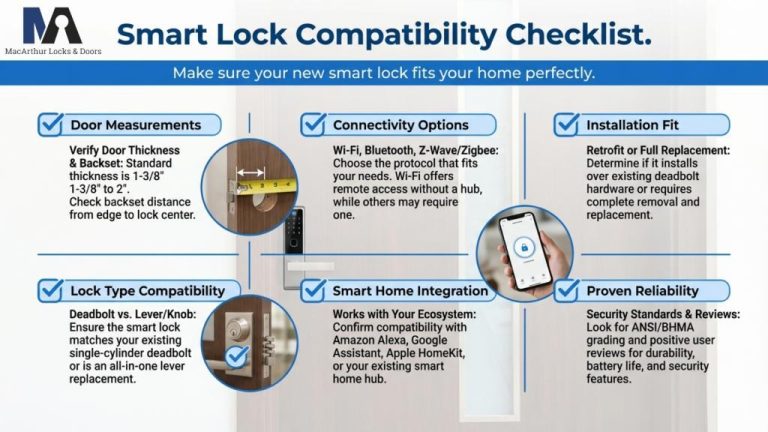
Connectivity affects remote control and setup. Bluetooth works nearby and often uses a phone as a local key. Wi-Fi enables remote locking, alerts, and temporary codes but can use batteries faster. Z-Wave and Zigbee connect through a compatible home hub, while Matter support can improve compatibility across smart-home platforms.
We should verify the lock’s door thickness, backset, deadbolt type, and required hub before buying. ANSI Grade 1 or Grade 2 certification provides a useful durability and security benchmark.
Essential Security And Reliability Criteria
We should judge a smart lock by its certified physical strength, protected digital access, and dependable operation during power or battery problems. A physical key backup helps, but it does not replace careful checks of the lock’s rating, software security, battery warnings, and emergency power options.
ANSI And BHMA Ratings
We should look for an ANSI/BHMA rating, which shows how a lock performed in tests for strength, durability, and operation. Grade 1 generally represents the highest residential hardware rating, while Grade 2 suits many homes. We should confirm the exact rating in the manufacturer’s specifications rather than relying on marketing terms such as “heavy duty.”
A certified rating does not measure every smart feature. It mainly covers the lock’s physical hardware and endurance. We should also check whether the model fits our door, works with the existing deadbolt, and includes a strong thumb turn and secure strike plate.
For a keyed model, we should inspect the key cylinder and choose a lock from a reputable manufacturer. We should install the strike plate with long screws that reach the door frame, following the manufacturer’s instructions.
Encryption And Account Protection
We should choose a lock that encrypts communication between the lock, phone, hub, and cloud service. Bluetooth, Wi-Fi, and Matter connections can use different security methods, so we should review the manufacturer’s current security documentation before buying.
Our account should use a unique password and multifactor authentication when available. We should limit administrative access, remove former users promptly, and avoid sharing one account with everyone in the household. Individual access codes make it easier to identify and disable a specific user.
We should also check whether the app records lock activity and sends alerts for new users, code changes, or manual unlocking. Software updates matter because they can fix security problems. A smart lock remains safer when we keep its app, firmware, phone, and home network updated.
Battery Alerts And Emergency Power
We should select a lock that provides early low-battery warnings through the keypad, app, or both. We should replace batteries when the first warning appears instead of waiting for the lock to stop responding. Standard replaceable batteries make maintenance easier than proprietary packs.
Emergency power methods differ by model. Some locks provide external contacts for a 9-volt battery, while others use USB-C power or another temporary connection. We should confirm the method before installation and keep the required battery or cable accessible.
A physical key backup remains valuable when the battery fails or electronics malfunction. We should test the key before an emergency, store a spare in a secure location outside the home, and make sure the cylinder stays clear of dirt and corrosion.
Top Models By Use Case
We should match the lock to the door, property type, smart-home platform, and budget. A physical key cylinder remains useful when batteries, wireless connections, or electronic controls fail.
Best For Front Doors
We recommend the Schlage Encode Plus for many front doors. It combines a keyed cylinder, a built-in keypad, and Wi-Fi, so we can create codes and manage access without buying a separate hub. It also supports Apple Home Key on compatible iPhones and Apple Watches.
Its reinforced construction and ANSI/BHMA Grade 1 rating suit high-use exterior doors. We should confirm that the existing deadbolt and door frame fit its installation requirements before buying. The lock uses four AA batteries, and we should keep the physical key and the low-battery warning in mind.
The Yale Assure Lock 2 with a keyed module offers another strong choice. We can select the connectivity module that fits our smart-home system, but compatibility varies by version, so we should check the exact model.
Best For Rental Properties
We favor the Kwikset Halo for rental homes and other properties where owners need remote access. Its keypad supports individual codes, while the physical key backup gives occupants a familiar emergency option. Built-in Wi-Fi removes the need for a separate bridge.
We can create temporary codes for guests, cleaners, or contractors and remove them later. The app can also show lock activity, which helps us manage access between stays. We should use unique codes rather than sharing one permanent code.
For apartments, we need to check lease rules and door compatibility first. A full replacement may not suit every renter, while a retrofit model such as the August Wi-Fi Smart Lock can preserve the outside key cylinder. However, August’s physical-key backup depends on the existing exterior hardware.
Best For Apple Home Integration
The Schlage Encode Plus is a practical pick for Apple households because it supports Apple Home Key, HomeKit control, keypad entry, and a physical key. With Home Key enabled, we can tap a compatible iPhone or Apple Watch to unlock the door.
Apple Home support differs across models and versions, so we should verify the product’s exact compatibility before purchase. Remote control may also require a suitable Apple home hub, such as a HomePod or Apple TV.
The Level Lock+ offers a less noticeable design and supports Apple Home Key on compatible versions. Its slim appearance can suit homes where we want the lock to look like standard hardware, but we should confirm that the selected version includes a physical key cylinder.
Best Budget Option
We recommend the Kwikset SmartCode 917 when we want keypad access and a physical key without paying for advanced app features. It uses a standard deadbolt replacement, supports multiple user codes, and includes Kwikset’s re-keying system.
This model does not provide built-in Wi-Fi or remote access, so we cannot manage it from outside the home without additional equipment. That simpler design can reduce setup problems and battery use.
We should choose it for a main door, rental unit, or guest space where local keypad entry matters more than phone control. The physical key remains available if the batteries fail, but we should store a spare key somewhere secure.
Installation And Compatibility Considerations
We should confirm the door’s measurements, deadbolt layout, and keyway before choosing a lock. We also need to check whether the lock supports our existing cylinder or requires a new key, since these details affect installation time and daily use.
Door And Deadbolt Measurements
We should measure the door thickness, backset, and the space around the deadbolt. Most residential doors use a 2⅜-inch or 2¾-inch backset, but the lock must support the correct distance. We should also check whether the door has a single-cylinder deadbolt, with a key outside and a thumb turn inside.
The interior side needs enough flat space for the smart-lock housing. Trim, windows, handles, and nearby walls can block installation or prevent the motor from turning the deadbolt fully. We should measure the distance between the deadbolt and the handle, then compare those measurements with the manufacturer’s template.
Before installing, we should test the existing deadbolt by locking and unlocking it with the door open. The bolt should move smoothly without force. A misaligned strike plate can overload the smart lock’s motor and reduce battery life.
Keyway And Rekeying Options
Smart locks with physical key backup use different key systems. Some replace the entire deadbolt, while others attach to the inside and keep the existing exterior cylinder. The second type usually preserves our current key and requires less exterior work.
If a lock replaces the cylinder, we should check whether it includes a standard keyway, such as Kwikset or Schlage, and whether a locksmith can rekey it. Rekeying lets us match the smart lock to other doors instead of carrying another key.
We should confirm how the backup key enters the lock. Some models use a visible keyhole, while others hide it behind a cover or keypad. We should keep the emergency key in a secure location outside the home, but not directly beside the door.
Daily Use, Maintenance, And Backup Planning
We should protect physical keys, test every entry method, and plan for dead batteries or network problems. Regular battery checks, firmware updates, and a trusted backup contact help keep access reliable.
Managing Physical Keys Securely
Keep at least one physical key outside the home, but do not hide it near the door. A locked key safe, trusted neighbor, or nearby family member provides better protection than a planter or doormat.
Store another key in a secure location inside the home. We should label spare keys carefully and avoid tags that show our address. If we move, lose a key, or give one to a contractor, we should rekey or replace the cylinder when appropriate.
Check how the key backup works before buying a lock. Some models use a standard keyway, while others require a special key or operate only with the included cylinder. We should keep the key clean, test it twice a year, and avoid forcing it if the lock feels stiff.
Testing Access Methods
Test every approved entry method after installation. We should try the physical key, PIN, fingerprint reader if included, phone app, and emergency power contacts from outside the locked door.
Create a simple access plan:
- Give each regular user a separate PIN.
- Delete codes for former guests or workers.
- Test temporary codes before relying on them.
- Keep the physical key available.
- Confirm that the lock still works when the home internet is down.
We should test the lock during normal conditions and after changing batteries or settings. Check the deadbolt alignment as well. If the bolt drags against the strike plate, the motor may use more power and fail to lock correctly.
Replacing Batteries And Updating Firmware
Replace batteries when the lock gives a low-power warning, rather than waiting for total failure. Use the battery type listed by the manufacturer, replace all cells at once, and avoid mixing old and new batteries. Keep a fresh spare set in a dry place.
Some locks provide emergency contacts for a 9-volt battery, while others use a USB-C power port. We should confirm the correct method in the manual and test it before an emergency. A physical key remains useful if the lock supports one.
Install firmware updates through the manufacturer’s app when the lock has stable power and a reliable connection. Updates can fix security or reliability issues, but we should check whether they reset codes, settings, or integrations before starting. Afterward, test locking, unlocking, notifications, and each active access code.
Frequently asked questions
Are smart locks with physical keys secure?
Yes, when we choose a model with a strong deadbolt, a quality lock cylinder, and a recognized security rating. The keyway can face many of the same risks as a standard deadbolt, so we should also use a reinforced door and strike plate.
Will the key work if the battery dies?
Yes. A physical key operates the mechanical cylinder without power. We should keep a spare key in a safe, accessible place outside the home, such as with a trusted person.
Can we install a smart lock ourselves?
Many models support DIY installation and fit standard residential doors. Before buying, we should check the door thickness, backset, deadbolt type, and compatibility with the existing hardware.
Do smart locks need Wi-Fi?
No. Bluetooth models can often lock and unlock locally without Wi-Fi. Wi-Fi enables remote control and alerts, but some locks need a separate hub or bridge for those features.
What happens if the app or internet stops working?
We can usually unlock the door with the physical key, keypad code, or Bluetooth connection, depending on the model. We should test these backup methods before relying on the lock.
How should we protect the backup key?
We should avoid hiding it near the door, where someone could easily find it. A trusted contact or a secure, weatherproof key box offers safer storage.
Conclusion
We should choose a smart lock that combines dependable electronic access with a strong mechanical backup. A physical key can help when batteries fail, the app stops working, or a network connection becomes unavailable.
Before buying, we should check the lock’s battery life, warning system, keyway design, and installation requirements. Models that use standard batteries and provide clear low-power alerts can reduce maintenance. We should also confirm that the lock fits our door and works with its existing deadbolt or hardware.
Useful features may include:
- Keypad entry for family and guests
- Temporary codes for service providers
- Remote control through a secure app
- Automatic locking with adjustable timing
- A physical key for emergencies
We should store a spare key in a secure, accessible place rather than inside the home. We should also keep the lock’s firmware updated, use strong account protection, and test both electronic and key access after installation.
The best choice depends on our door, budget, preferred access methods, and tolerance for battery maintenance. A smart lock with a reliable physical key backup gives us added flexibility without making us depend on one electronic system.





3 Comments