Smart Lock Installation Requirements You Need to Know
Check door fit, power, network, and property rules before buying a smart lock. Measure backset, bore hole, and door thickness, then read the exact model manual.
Before you buy, you need to check the smart lock installation requirements that apply to your door. Fit, power, connectivity, tools, and property rules all matter. This guide explains each one, what to measure, and when to call a professional.
Smart Lock Installation Requirements: The Short Answer
A smart lock needs a compatible door, reliable power, a network connection, and a few standard tools. Most US doors use a 2-1/8-inch bore hole and a backset of 2-3/8 or 2-3/4 inches. Batteries power the lock, and Wi-Fi, Bluetooth, or a hub handles remote access.
The Six Requirements You Must Verify Before Buying
- Door fit: backset, bore hole, and door thickness.
- Deadbolt compatibility with the existing latch and strike plate.
- Power needs: battery type, backups, and low-battery alerts.
- Connectivity: Wi-Fi, Bluetooth, hub, Matter, or Thread support.
- Tools and skill level for a clean install.
- Property rules: lease, HOA, or permit limits on lock changes.
Door and Deadbolt Fit: The Non-Negotiable Basics
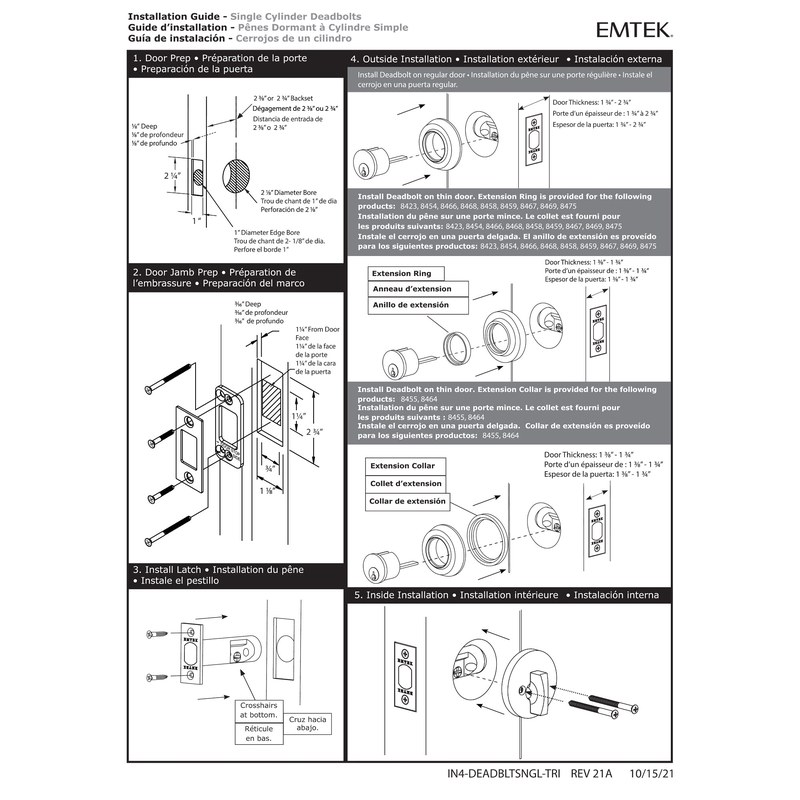
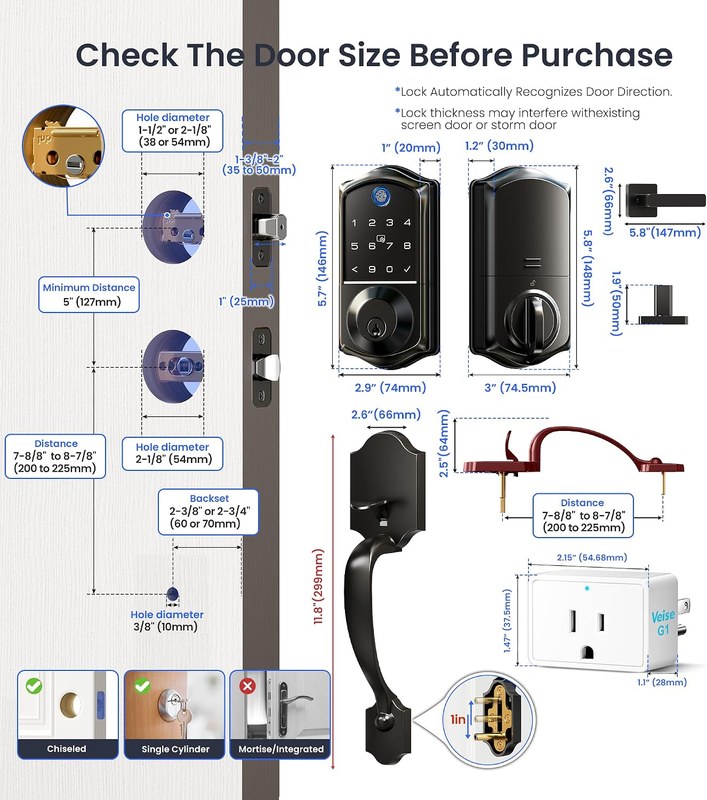
Start with measurements, not the app. A lock that fits poorly feels loose, jams, or misses the strike plate. Check backset, bore hole, door thickness, and handing.
Backset, Bore Hole, and Door Thickness
Backset is the distance from the door edge to the center of the deadbolt hole. US homes usually use 2-3/8 inches or 2-3/4 inches. The bore hole is the large hole cut through the door; 2-1/8 inches is standard. Door thickness usually falls between 1-3/8 and 1-3/4 inches. Measure with a tape measure and write the numbers down.
Handing and Latch Configuration
Handing describes which side the hinges are on and which way the door swings. Most smart locks work with every handing, but some latches need a specific direction. Check the manual for latch face size and bolt throw. A latch that does not reach the strike plate will not secure the door.
Compatible Deadbolts and Existing Hardware
Some smart locks replace the whole deadbolt. Others retrofit over an existing deadbolt and keep the original keyed cylinder. The exact model manual lists the brands and latches that work. If your deadbolt is old or damaged, replace it first. A worn latch causes jams and failed auto-lock tests.
Power Requirements: Batteries, Backup, and Physical Keys
Smart locks run on batteries and need a backup plan. Know how to get inside before a battery dies. A lock you cannot enter with is not useful.
Battery Types and Expected Lifespan
Common types include AA, AAA, CR123 lithium cells, and rechargeable packs. Lifespan varies by model, usage, temperature, and Wi-Fi activity. Check the manual for the exact type and keep spares. For a deeper look, see what happens if a smart lock battery dies and plan a safe fallback.
Low-Battery Alerts and Emergency Backup Power
Most locks warn you in the app when batteries are low. Many also show a keypad light or tone. Some exterior keypads have a 9-volt contact or a USB-C port for emergency power. Check the manual to find the jump location. Test the backup once after installation, not during an emergency.
Keeping a Physical Key as a Fallback
A physical key is the most reliable backup, but not every smart lock has one. Confirm the model has a keyed cylinder and keep the key somewhere safe. Retrofit models may let you keep your old key. Review whether smart locks have physical keys before you choose.
Connectivity Requirements: Wi-Fi, Bluetooth, and Hubs
Your network decides how well remote access works. A lock must reach your router, a hub, or a nearby phone. Test the signal at the door before installing, because walls and metal frames weaken it.
Wi-Fi Bands and Signal Strength at the Door
Many locks use 2.4 GHz Wi-Fi; fewer support 5 GHz. A door far from the router may have weak signal even when the rest of the house is fine. Check the manual for band support. A mesh node, extender, or hub can fix poor coverage.
Bluetooth Direct vs. Hub-Based Connections
Bluetooth works only when your phone is near the door. Wi-Fi or a hub adds remote access from anywhere, but usually increases battery drain. Z-Wave locks and some others require a separate hub. Decide if you need remote control, because that changes your power and network needs.
Matter, Thread, and Protocol Choices
Newer locks may support Matter, Thread, or both. Matter is a common standard for cross-brand control. Thread is a low-power mesh network that often uses a border router, such as a smart speaker. Compatibility depends on firmware, the app, and your smart home ecosystem. Verify Apple Home, Google Home, Alexa, or SmartThings support before buying.
Tools and the Step-by-Step Installation Process
Most standard installs need a screwdriver and 15 to 30 minutes. Metal doors, mortise locks, or non-standard holes add work. Read the manual and follow the manufacturer’s order.
Tools You Need Before You Start
- Phillips screwdriver, usually a #2.
- Tape measure for backset and thickness.
- Pencil for marking positions.
- Drill, hole saw, or chisel only for new holes.
- Fresh batteries and the hardware from the box.
Removing the Existing Lock and Preparing the Door
Remove the interior plate and latch, then pull the old assembly out. Keep all screws and plates in a labeled bag. Check that the new latch slides smoothly and lines up with the strike plate. A misaligned plate causes binding, alarms, and battery drain.
Aligning, Calibrating, and Testing the Smart Lock
Mount both halves, tighten screws in the manual’s order, and insert fresh batteries. Run any calibration step so the bolt moves fully. Test the key, keypad, app lock, and unlock from both sides. Then close the door and test auto-lock five times.
Renter vs. Homeowner Constraints
Renters face extra rules. Changing a lock can affect your deposit, lease, and the landlord’s access. Get written permission and choose a reversible install.
Reversibility and Keeping the Original Hardware
A reversible install returns the door to stock when you move out. Store every screw, spindle, and plate from the old lock. Label the bag by room, since hardware looks alike. Many apartment-friendly models work with existing deadbolts. If your landlord has limits, check smart locks for apartment doors with keys that keep shared access easy.
Landlord Approval and Rekeying Rules
Get rules in writing before installation. Some landlords need a physical key or a way in for emergencies. Others ban any lock change. Rekeying rules vary by state and lease. A written email is better than a verbal agreement.
What to Check in Your Lease Agreement
- Lock changes: allowed, prohibited, or silent.
- Rekeying rules at move-in and move-out.
- Landlord and maintenance access.
- Fines or deposit deductions for door damage.
Shared Access, Auto-Lock, and Integrations
Plan who gets codes, how auto-lock behaves, and which integrations you need. These choices shape the model you pick and the ongoing cost.
Access Codes, Activity Logs, and Shared Users
Most locks support permanent, temporary, and one-time codes. Logs show when the door opened and which code was used. Decide how many codes you need and whether schedules for guests matter. Remove old users from the app when access ends.
Auto-Lock Behavior and Safety Habits
Auto-lock prevents “did I lock it?” worries, but it can also lock you out. Set the delay around your routine and test the alignment. Wait for the confirmation sound before walking away. If auto-lock fails, disable it and lock manually.
Integrations with Alarm Systems and Voice Assistants
Many locks connect to alarm panels, video doorbells, and voice assistants. Some hubs keep local automations working offline; others depend on the cloud. List your current platforms and check the manual. Do not assume every feature works by voice.
Subscription Requirements for Cloud Features
Basic app control is often free. Activity history, remote sharing, integrations, and extended logs may require a paid plan. Prices and billing terms change. Read the current plan page before you buy.
Privacy, Cybersecurity, and Maintenance
A smart lock is a networked device. Secure the account, update the firmware, and clean the hardware. Simple habits reduce the biggest risks.
App Permissions, MFA, and Account Recovery
Use a unique password and turn on multifactor authentication. Review the permissions the app requests, like location and camera access. Keep recovery contacts current so you can regain access. Share by adding users, not by giving out your password.
Firmware Updates and Vendor Support Lifecycle
Firmware updates fix bugs and close security gaps. Check how updates arrive and how long support lasts. Avoid old models that no longer receive patches. An unsupported lock is a weak spot on your network.
Mechanical Maintenance and Cleaning
Clean the keypad with a soft, dry cloth. Keep moisture away from the electronics. Follow the manual for latch lubrication and use only approved products. Replace batteries at the first low-battery alert.
Limitations and Your Next Steps
Smart locks are convenient, but they have limits. They depend on power, network, and updates. They do not guarantee security or replace emergency services.
Common Smart Lock Limitations to Expect
- Wi-Fi use and cold weather drain batteries faster.
- Internet outages block remote access, though the keypad usually works.
- No lock is “unhackable”; your account security matters.
- Physical threats, like force or lockpicking, still exist.
- Retrofit models may lack features of full replacements.
For an honest comparison, weigh a smart lock against a traditional key lock before investing.
When to Call a Professional Installer
Call a pro for steel doors, unusual holes, mortise locks, or multi-point locks. Also call if drilling is needed or the frame is damaged. A small fee beats a damaged door.
Confirming Your Requirements Before You Buy
- Measure backset, bore hole, and door thickness.
- Confirm deadbolt compatibility in the manual.
- Verify battery type and backup entry.
- Test Wi-Fi or hub coverage at the door.
- Read lease, HOA, or permit rules first.
- Check current plans for cloud and subscription costs.
Check door fit, deadbolt compatibility, power, and network coverage before purchase. Measure first, read the exact model manual, and confirm your lease or HOA rules. When drilling feels uncertain, use a qualified installer. A smart lock adds convenience but is not a guarantee of security.
Frequently Asked Questions
A typical US door needs a 2-1/8-inch bore hole, a backset of 2-3/8 or 2-3/4 inches, and a door thickness of 1-3/8 to 1-3/4 inches. The lock model must also match your deadbolt style, latch size, and door handing. Measure these before buying.
Yes. Most US smart locks need a 2-3/8 or 2-3/4-inch backset and a 1-3/8 to 1-3/4-inch thick door. Non-standard dimensions usually require an adapter or a different model. Check the exact manual rather than guessing.
Many locks show a low-battery warning in the app and on the keypad before they fail. Some have a 9-volt jump contact or USB-C emergency port on the exterior. A physical key override is the most reliable escape route.
Bluetooth works only when a paired phone is nearby. Wi-Fi, a hub, or a Thread border router enables remote access from anywhere. Choose based on whether remote control matters to you.
Yes, if the lease allows it or the landlord gives written permission. Pick a reversible model, keep the original hardware, and leave one approved key or code method for the landlord. Removing the lock at move-out avoids deposit deductions.
Basic app control, codes, and local alerts are often free. Some brands charge for activity history, remote sharing, cloud storage, and integrations. Check the current plan page because prices and features change.


6 Comments