Check the app settings, then look at placement, power, and Wi-Fi. Most Ring motion issues come from a narrow zone, a poor angle, or a weak connection.
When a ring video doorbell not sensing motion issue shows up, the cause is usually simple. It is often placement, app settings, power, or Wi-Fi.
Start with the easiest checks first. Then move to mounting and network fixes if alerts still do not arrive.
Why Your Ring Video Doorbell Is Not Sensing Motion
Motion detection depends on what the camera can see. It also depends on the app settings and stable power and network.
If one of those is off, the doorbell may still work for live view and doorbell presses. But it may miss walk-by activity.
How motion detection works on Ring doorbells
Most Ring doorbells use motion detection zones and software-based detection. In plain terms, the camera looks for movement inside the area you choose in the app.
If the zone is too narrow, too high, or aimed at the wrong spot, the doorbell may not trigger. It may miss someone walking by.
Some models also use smarter detection settings that reduce alerts for certain movement. That can help with false alerts. But it can also make the system less sensitive in busy entryways.
A restart can clear temporary glitches. Confirm the doorbell shows as online in the app after it comes back up.
If it keeps dropping offline, the issue is more likely Wi-Fi, power, or signal strength than motion settings.
Test with a person walking through the detection area
Have one person walk the normal path to your door while another watches the app. Use a slow, natural walk first.
Then try a faster pass. This helps you learn whether the problem is the zone shape, the angle, or the device missing movement altogether.
Placement Problems That Block Motion Detection
Placement matters more than many owners expect. A doorbell can be fully powered and online, yet still miss motion.
This often happens if it is aimed too high or too far from the path.
Height, angle, and distance from the walkway
If the camera points down too sharply, it may only see feet near the door. If it sits too far from the walkway, motion may happen outside the active zone.
The best setup usually captures people before they reach the door. It should not wait until they are already standing there.
Porch layout, stairs, landscaping, and obstructions
Railings, columns, plants, screen doors, and stair angles can block part of the view. Even seasonal changes matter.
A bush that was small in spring may cover the motion path by summer. Night lighting can also affect how clearly the camera sees movement.
Apartment, condo, and rental entryway constraints
In apartments and rentals, you may have limited mounting choices. That can make the camera angle less than ideal.
If you cannot move the device, try adjusting the motion zone or using an approved wedge mount. Check building rules before drilling or changing shared entry hardware.
Power, Battery, and Installation Issues<
Doorbell installation and power setup can affect motion sensing performance.
Power problems can reduce detection quality. They can also make the unit miss events during low-battery periods.
Installation angle and mounting parts can also change what the camera sees.
Hardwired vs. battery-powered motion performance
Hardwired models often stay ready longer because they do not rely on battery charge alone. Battery models can still work well.
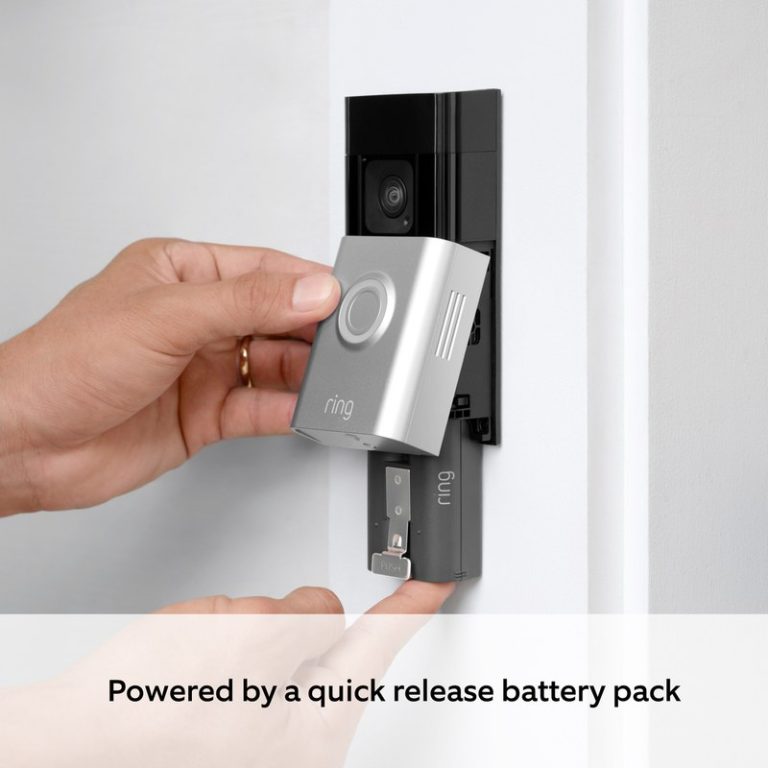
But low power may affect responsiveness. If your device is battery powered, make sure the battery is charged and seated correctly.
Transformer, voltage, and charging checks for wired models
Wired video doorbells depend on the right transformer and chime setup. If voltage is outside the model’s required range, features can behave unpredictably.
The same can happen if the chime kit is not installed correctly. For exact wiring requirements, use the manual for your model and do not guess.
Mounting angle, wedge kits, and door frame limitations
Some door frames point the camera too far left, right, up, or down. A wedge kit can help aim the sensor toward the walkway.
That small change often improves motion detection more than changing sensitivity alone.
Wi-Fi, App, and Firmware Troubleshooting
Ring doorbells rely on a stable connection for alerts, event uploads, and app control. Weak Wi-Fi can make motion alerts late, incomplete, or inconsistent.
2.4 GHz signal strength and router distance
Many doorbells work best on 2.4 GHz Wi-Fi because it reaches farther than 5 GHz. If the router is far away, the doorbell may struggle.
The same is true if the signal passes through brick, stucco, or metal. A mesh node or router relocation can help if the signal is weak at the front door.
Firmware updates, app permissions, and notification settings
Outdated firmware can cause bugs, so check for updates in the app. Also review phone permissions for notifications, background activity, and location if the app uses them.
A phone setting can block alerts even when the doorbell records events correctly.
Account access, shared users, and MFA recovery basics
If multiple people use the same doorbell, make sure each person has the right access. Shared users may not receive the same alerts if permissions are limited.
If you cannot log in, use account recovery steps and keep multi-factor authentication enabled for the main account.
Settings That Can Reduce or Miss Motion Alerts
Some settings are designed to cut false alerts. That can be helpful, but it can also make the doorbell less responsive in real life.
Motion zones, smart alerts, and people-only detection
Motion zones limit where the camera looks for movement. Smart alerts and people-only detection can reduce useless alerts from cars, trees, or passing pets.
The downside is that a narrow zone or filtered alert mode may miss side-angle motion. It may also miss movement near the edge of the frame.
Privacy zones and their impact on what the camera can see
Privacy zones hide selected parts of the image. That protects neighboring areas, but it also removes those areas from motion detection.
If a privacy zone covers the walkway, the doorbell may not detect people until they reach the unmasked area.
Battery-saving features and motion frequency limits
Battery-saving settings can reduce how often the device wakes up. Some systems also limit repeated alerts in a short time.
That helps stretch battery life, but it can make motion seem inconsistent during busy periods.
Subscription, Storage, and Monitoring Considerations
Motion detection and event history are related, but not the same. A doorbell can detect motion and still give you limited review options.
This can happen if storage or plan features are restricted.
What Ring Protect changes for event history and review
Ring Protect typically affects how long you can review saved events and what features are available in the app. If you do not have the right plan, you may still get some live features.
But event review can be limited. Check the current plan page for your exact model and region before assuming a feature is included.
Cloud retention, local limitations, and ownership-cost tradeoffs
Cloud storage depends on the vendor account and internet access. Local storage, when available on other systems, gives more direct control but may require extra hardware.
If you want a broader ownership picture, DecatHome’s Ring battery doorbell subscription guide is a useful place to compare plan-based features and long-term cost.
Local Storage
Stores clips on your own hardware.
Can reduce ongoing plan costs.
May need backup planning if equipment fails or is stolen.
Cloud Storage
Stores clips through the vendor account.
Depends on internet and account access.
Usually includes retention limits and plan rules.
Self-monitoring expectations versus professional security systems
Most video doorbells are self-monitored. That means you, not a monitoring center, decide what to do when motion appears.
If you want a broader system, compare the doorbell with a full alarm setup instead of expecting the doorbell to act like one.
Self-Monitoring
The household receives alerts and decides what action to take.
Usually has lower ongoing cost.
Does not guarantee emergency dispatch.
Professional Monitoring
A monitoring center may review eligible alarms.
Dispatch availability depends on the plan and event.
Fees, contracts, permits, and false-alarm rules may apply.
Privacy, Cybersecurity, and Neighbor Courtesy
Doorbells sit at the edge of your property, so privacy and courtesy matter. Good setup protects your account and reduces conflict with neighbors or visitors.
Protecting the account with strong passwords and MFA
Use a unique password and turn on multi-factor authentication. That lowers the chance that someone else can view your doorbell feed or change motion settings.
Keep recovery email and phone details current so you can regain access if needed.
Reviewing shared access, device permissions, and privacy zones
Shared users should only have the access they need. Review who can view live video, change settings, or delete clips.
If you use privacy zones, confirm they do not block the actual motion path you want to watch.
Reducing false triggers and avoiding neighbor-facing recording issues
False alerts can make people ignore real ones. Aim the camera at your entry path, not the sidewalk or a neighbor’s door.
If your setup records shared spaces, check local rules and building policies before mounting or adjusting the camera.
When to Replace, Relocate, or Get Support
If the same checks keep failing, the issue may be hardware, placement, or a model mismatch. At that point, changing the mount or contacting support is more useful than repeating the same app steps.
Signs the doorbell hardware may be failing
Watch for random reboots, repeated offline status, charging problems, or motion behavior that changes without settings changes.
If the device gets hot, will not hold a charge, or shows physical damage, stop using it and contact support.
When a different mount, extender, or model fit is needed
Some homes need a wedge, corner mount, or no-drill bracket to point the camera correctly. In other cases, the model itself may not fit the entry layout well.
If the walkway is too far away or the door frame blocks the view, a different mounting approach can solve more than app tuning.
If you are comparing fit before replacing anything, this no-drill mount guide can help renters and cautious homeowners think through mounting limits.
When to contact Ring support or a licensed installer
Contact support if the app shows errors you cannot clear, or if the doorbell will not stay online after basic troubleshooting.
Use a licensed installer when wiring, transformer checks, or exterior mounting feels uncertain. That is especially important for hardwired units and older homes.
Common causes include a narrow motion zone, poor camera angle, weak Wi-Fi, low battery, or motion alerts turned off in the app. Start with app settings, then check placement and power.
Many doorbells perform best on 2.4 GHz because it usually reaches farther than 5 GHz. A weak signal can delay alerts or make motion clips unreliable.
Yes. Privacy zones hide parts of the image, and the camera will not use those hidden areas for motion detection. Make sure the walkway is not covered.
It can. A low battery may reduce responsiveness or make the device less reliable during busy periods. Recharge or inspect the power source if alerts become inconsistent.
Motion detection can work without a plan, but storage and review features may be limited. Check the current plan details for your exact model before assuming clips will be saved.
Contact support if the doorbell keeps going offline, will not charge, or misses motion after you have checked settings, placement, and Wi-Fi. Replace or relocate it if the entry layout does not suit the camera view.
Hi, I'm Marcus Sterling, a smart home security expert with over 5 years
of hands-on experience testing and reviewing hundreds of security cameras, smart locks, and alarm systems. My mission is to make smart home security accessible, affordable, and easy to understand—and every review I publish is 100% independent, unbiased, and honest. I don't accept payments for positive reviews, just practical advice to help you secure your home with confidence.
Compare the best smart locks for apartments with fingerprint, keypad, and app access. See renter-friendly picks, privacy notes, and current price checks.
Video doorbells can help us see who is outside, answer visitors, and monitor activity near the front door. Most models connect to a phone and offer features such as motion alerts, two-way audio, night vision, and cloud or local video storage. The eufy Video Doorbell E340 is a battery-powered video doorbell with two cameras. One…
Choosing between eufy, Ring, Arlo, and Nest depends on your budget, privacy needs, and smart home setup. Each brand offers useful cameras and doorbells, but they differ in video quality, storage, subscriptions, and security features. We recommend eufy for lower long-term costs, Ring for broad home security options, Arlo for strong video quality, and Nest…
View on Amazon Quick Security Answer Random alarm triggers almost always come from sensor misalignment, low batteries, pets, or network glitches, not from an intruder. Check the app’s event log first, inspect the zone, and test each sensor before calling for service. Smart Home Security Guide If you are wondering what causes a home alarm…
Installing the eufy Video Doorbell E340 takes only a few basic steps, whether we use its rechargeable battery or existing doorbell wiring. We can mount it near the entryway, connect it to the eufy Security app, and adjust its settings for reliable alerts. We can install the E340 with battery power or 16–24 VAC wiring,…
Quick Security Answer A Ring battery doorbell can still work without a plan, but paid storage is what makes it useful for reviewing past events. If you want saved clips, compare monthly and annual pricing, then check setup, Wi-Fi, and privacy needs before you buy. The ring battery doorbell subscription is the paid plan that…