Smart Lock Access Log Privacy What You Need to Know
Your smart lock access log records who enters, when, and how often. Control who sees it by managing user roles, reviewing vendor privacy policies, and auditing your log regularly.
Smart lock access log privacy is a growing concern for US homeowners and renters. Your lock records who enters, when, and how often. That data can be shared, stored, or requested by others. This guide explains what your log reveals, who can see it, and how to protect it.
What Your Smart Lock Access Log Reveals (and Who Can See It)
Your access log is a digital record of every entry event. It shows entry codes used, timestamps, and failed attempts. System alerts also appear, such as low-battery warnings or manual lock overrides. Understanding what your log contains is the first step toward protecting it.
Entry Events, Failed Attempts, and System Alerts
Most smart locks log four main event types. Successful entries show which code or key unlocked the door. Failed attempts record wrong codes or unauthorized tries. System alerts cover low batteries, tamper signals, or connectivity drops. Manual operations show when someone used a physical key or the lock’s touchscreen.
Each event includes a timestamp. Some locks also show the user’s name if the code belongs to a shared profile. This makes the log useful for tracking family schedules, guest visits, or service workers. It also means your daily patterns are visible in one place.
Default Visibility for Owners, Shared Users, and Vendor Apps
The owner account usually has full access to the log. Shared users may see partial data, depending on the app. Some apps let you hide entry history from shared users. Others show it by default. Check your app’s settings to see what shared users can view.
Vendor apps and cloud platforms often collect log data too. That means the manufacturer may see patterns of your comings and goings. Check the privacy policy for your exact model to understand what data the vendor collects and how it uses that data.
Where Your Access Log Data Actually Lives
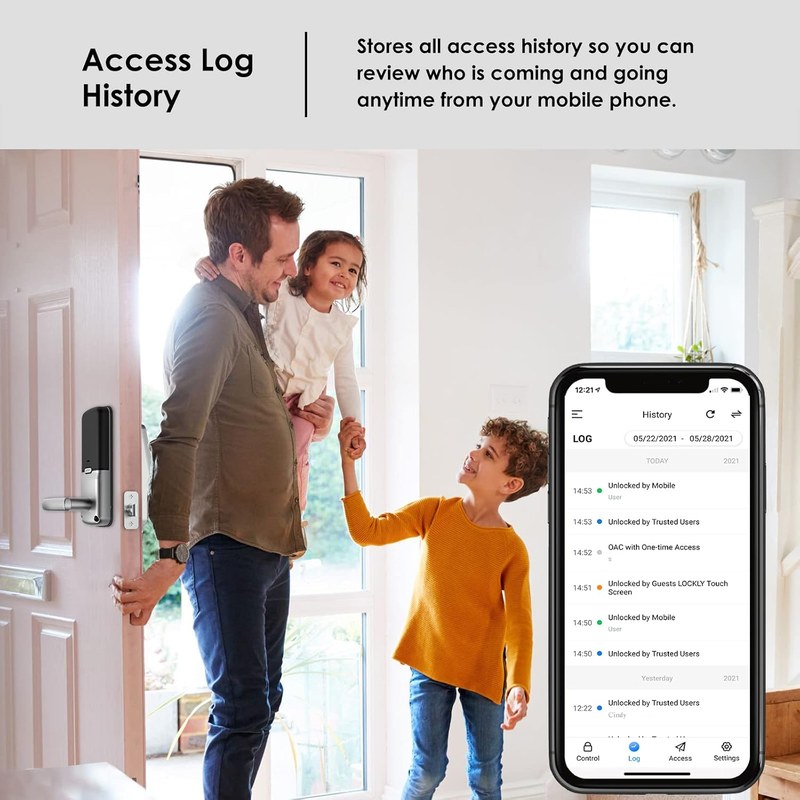
Your access log can live in two places: on the lock itself or in the vendor’s cloud. Some locks store logs locally on the device. Others upload everything to a cloud server. Many use a mix of both. Knowing where your data lives helps you control it.
On-Device Storage vs. Cloud Retention Periods
On-device storage keeps your log on the lock’s internal memory. You can usually view it through the app when connected. But the lock has limited storage space. Old events may be overwritten by new ones. This means your history may not be permanent.
Cloud storage sends your log to the vendor’s servers. This allows remote viewing from anywhere. But it also means the vendor holds your data. Retention periods vary by brand and plan. Some keep logs for 30 days, while others keep them for years. Always check the retention policy before you buy.
- Log stays on the device and is not uploaded.
- You control access to the data.
- Limited capacity; old events may be overwritten.
- Data is lost if the lock is reset or removed.
- Log is uploaded to vendor servers for remote viewing.
- Vendor controls data retention and security.
- Requires internet access to view history remotely.
- Data may be shared with third parties per the privacy policy.
What Happens to Log History When a Subscription Ends
Some smart locks require a subscription for full log history. Without a paid plan, you may only see recent events. Older history could become locked or deleted. Before buying, check what happens to your log if you cancel a plan. Some vendors keep the data, while others delete it after a grace period. This affects how long your history remains available to you.
Smart Lock Privacy Risks to Know Before You Install
Smart locks collect sensitive data about your daily routines. That data has value to advertisers, data brokers, and law enforcement. Understanding these risks helps you make informed choices before you install a lock.
Third-Party Data Sharing and Analytics
Many smart lock vendors share anonymized data with analytics partners. This data helps improve products but may also be used for marketing. Some vendors share data with parent companies or affiliates. Read the privacy policy carefully. Look for sections on data sharing, cookies, and analytics. If the policy is vague, contact the vendor for clarity.
Law Enforcement Requests and Legal Disclosure
In the US, law enforcement can request access log data with a warrant or subpoena. Some vendors comply with these requests. Others publish transparency reports showing how often they receive them. Your access log could reveal when you are home or away. This is a real privacy risk to consider before installing a smart lock. If this concerns you, look for a lock that stores logs locally and minimizes cloud data.
How to Control Who Sees Your Access Log
You have more control than you think. Most smart lock apps let you manage user roles, permissions, and shared access. Use these tools to limit who sees your entry history.
User Roles, App Permissions, and Shared Access
Most apps offer two or three user roles. An owner has full control. A shared user can lock and unlock but may not see logs. Some apps let you customize permissions per user. You can also revoke access at any time. Review your app’s user management settings to understand your options. Set the strictest permissions that still meet your household needs.
Temporary Codes and Revoking Access for Guests or Service Providers
Temporary codes are a smart way to grant limited access. You can set a code that works for a single day or a specific time window. After that, the code expires automatically. This is ideal for house cleaners, dog walkers, or repair technicians. Always revoke codes after a service visit ends. This prevents unwanted future access and keeps your log accurate.
Cybersecurity Essentials for Protecting Your Logs
Your access log is only as secure as your account. Weak passwords and outdated firmware create easy targets. Follow these steps to protect your data.
Strong Passwords, MFA, and Account Recovery Pitfalls
Use a unique password for your smart lock account. Do not reuse passwords from other sites. Enable multi-factor authentication (MFA) if the app supports it. MFA adds a second step to verify your identity. Also, review your account recovery options. An outdated recovery email or phone number could let someone else take over your account.
Firmware Updates and Vendor Support Lifecycle
Firmware updates fix security flaws. Check for updates monthly in your lock’s app. Also, consider the vendor’s support lifecycle. If a company stops supporting a lock model, security patches stop too. This leaves your lock vulnerable over time. Choose a brand with a track record of long-term support.
Wi-Fi Band, Hub, and Network Segmentation Considerations
Smart locks connect to your home network. Use a Wi-Fi network with WPA2 or WPA3 encryption. Some locks only support 2.4 GHz Wi-Fi. Others work on 5 GHz or use a hub. Consider placing your lock on a separate network or VLAN. This isolates it from your main devices if it gets compromised.
Renters vs. Homeowners: Who Owns the Access Log?
Ownership of the access log depends on who controls the lock account. The account owner usually owns the log data. This matters for renters who install a smart lock with the landlord’s permission.
Landlord Access, Lease Agreements, and Shared-Entry Situations
If you rent, your lease may address smart locks. Some landlords install their own locks and control the account. Others allow renters to install locks but require landlord access. Read your lease carefully. If the landlord controls the account, they can see your entry history. This may be acceptable to some renters but not others.
For apartment dwellers, a smart lock with a physical key backup is often a safer choice. The lock works even if the landlord’s system changes. It also gives you a way to enter if the app fails. Consider a smart lock for apartment doors with keys that balances convenience and security.
Backup Entry, Physical Keys, and Changing Locks After Move-Out
Physical key backup is essential for most smart locks. If the battery dies or the app fails, a key still works. Some locks include a traditional key cylinder. Others use a keypad override or a mechanical backup. Learn more about whether smart locks have physical keys before you buy.
When you move out, reset the lock to factory settings. Delete all user codes and shared access. If the lock is yours, take it with you. If it stays, make sure the next tenant sets up a new account. This prevents old codes from working and protects your log history.
How to Audit and Clear Your Access Log History
Regular log reviews help you spot problems early. You can also clear history when needed. Here is how to build a simple audit habit.
Building a Regular Log-Review Habit
Check your access log once a week. Look for entries you do not recognize. Note the time of day and which code was used. If you see a failed attempt, investigate. A weekly review takes less than five minutes and keeps you aware of your lock’s activity.
Factory Resets and Data Deletion When Selling or Moving
Before selling your home or moving out, perform a factory reset. This deletes all codes, users, and log history from the lock. It also disconnects the lock from your account. Follow the manufacturer’s reset instructions for your exact model. Some locks require a specific button sequence or app command. Do not skip this step.
Smart Lock Limitations That Affect Log Privacy
Smart locks are not perfect. Certain limitations can create false entries or missing data. Understanding these limits helps you interpret your log accurately.
Auto-Lock Behavior, Battery Failures, and Connectivity Gaps
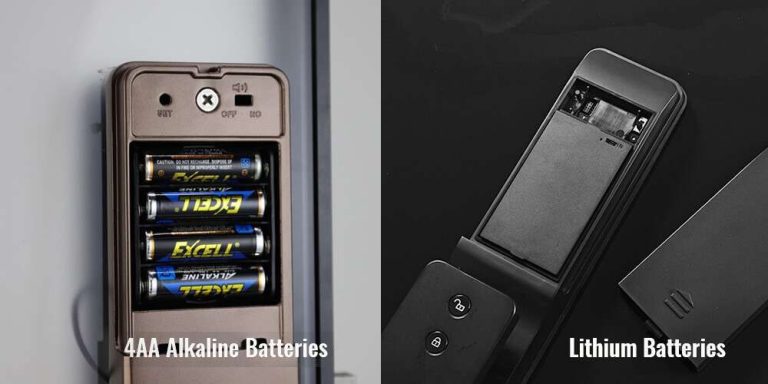
Auto-lock can cause false entries. If the lock re-locks itself, it may log an event even though no one entered. Battery failures can stop logging entirely. A dead battery means no entries, no alerts, and no remote access. Know what happens when a smart lock battery dies so you can prepare.
Connectivity gaps also affect logs. If your Wi-Fi drops, the lock may store events locally. When the connection returns, it syncs the data. In some cases, events are lost. This is more likely with older locks or weak signals. Place your router or hub close enough to maintain a stable connection.
Door Fit, Handing, and Installation Issues That Create False Entries
A poorly installed lock can log false entries. If the latch does not align, the lock may think the door is open or closed incorrectly. This can trigger alerts or log phantom events. Proper door fit and handing are essential. Follow the installation guide carefully or hire a professional.
If you are weighing a smart lock against a traditional one, consider the differences between smart locks and traditional key locks. A traditional lock has no logs to protect. A smart lock offers convenience but adds privacy considerations.
Next Steps for a Privacy-Smart Smart Lock Setup
Start with privacy-friendly settings. Then build a maintenance routine. Finally, decide whether local storage or a hub fits your home.
Choosing Privacy-Friendly Default Settings and Maintenance Routines
Turn off features you do not need. Disable geofencing if it tracks your location. Limit shared users to people who truly need access. Set a retention period for logs if the app allows it. Schedule a monthly check of your lock’s settings, firmware, and battery level. These small steps keep your data under your control.
When Local Storage or a Hub Makes Sense for Your Home Layout
Local storage keeps your log on the device. This is ideal for privacy-focused users. A hub can improve connectivity and reduce cloud dependence. If your home has thick walls or a large layout, a hub may help your lock stay connected. Choose a setup that matches your home’s network and your privacy comfort level.
Smart lock access log privacy depends on your lock model, app settings, and vendor policies. Review your privacy policy, control user permissions, and audit your log regularly. For renters, understand who owns the account. For everyone, enable MFA, update firmware, and know how to reset the lock before you move or sell.
Frequently Asked Questions
The account owner usually has full access to the log. Shared users may see partial data depending on app settings. The lock vendor may also collect log data through cloud storage, so check the privacy policy for your exact model.
Retention periods vary by brand and plan. Some vendors keep logs for 30 days, while others keep them for years. Check the vendor’s privacy policy or plan details to confirm your specific retention period.
If the landlord controls the smart lock account, they can see your entry history. Read your lease agreement carefully. If you want privacy, install a lock you control or use one with local storage that does not sync to a landlord-managed account.
Some vendors lock or delete older log history when a subscription ends. Others keep the data for a grace period. Check the plan terms before you cancel to understand what happens to your stored history.
Most smart lock apps offer a way to delete log history from the settings menu. For a full wipe, perform a factory reset on the lock. This removes all codes, users, and log data. Follow the manufacturer’s reset instructions for your exact model.
Your log is as secure as your account and network. Use a unique password, enable multi-factor authentication, and update firmware regularly. Place the lock on a secure Wi-Fi network with WPA2 or WPA3 encryption to reduce the risk of unauthorized access.



2 Comments