Yes, many Ring battery doorbells can be hardwired to existing low-voltage doorbell wiring. In most homes, that wiring helps charge the battery rather than replace it.
can ring battery doorbell be hardwired is a common question. Many Ring battery models can connect to existing low-voltage doorbell wiring. But that wiring usually helps with charging, not full-time power. So the answer depends on the exact model, your home’s transformer, and circuit compatibility.
Can a Ring Battery Doorbell Be Hardwired? The Short Answer
Yes, many Ring battery-powered doorbells can be hardwired to existing doorbell wiring. In most cases, the wiring helps keep the battery charged. It may also reduce how often you need to remove it for charging. It does not always make the device a true wired-only doorbell.
The exact behavior varies by model. Some battery models accept hardwiring and use it as a charging source. Others may need the battery installed even when wired. Always check the manual for your exact doorbell before buying parts or opening the wall plate.
How Hardwiring Works on Battery-Powered Ring Doorbells
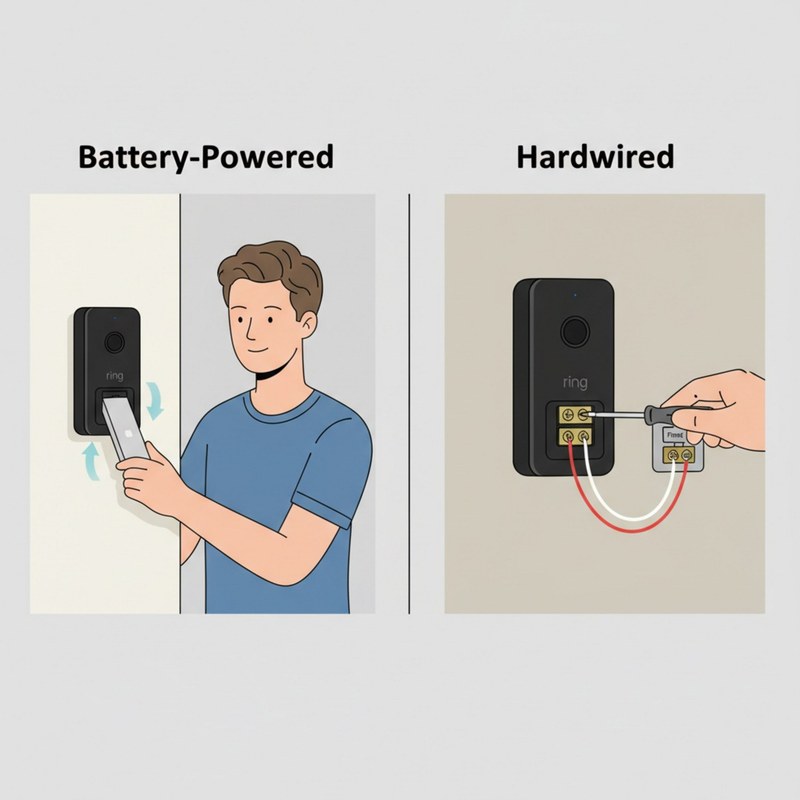
Illustration of how hardwiring supplies power to a battery-powered Ring doorbell.
Battery Ring doorbells usually connect to low-voltage doorbell wiring, not household mains power. Low-voltage means a much smaller electrical load than standard home wiring. The wiring sends a small amount of power from a transformer to the doorbell.
That power can help recharge the internal battery or keep it topped off during normal use. This setup is different from a standard plug-in camera or a full wired doorbell. The doorbell still relies on its internal battery for some functions.
What hardwiring can and cannot do
Hardwiring can reduce battery charging chores. It may also support the existing indoor chime on some homes. It can help the doorbell stay online longer between charges. In some setups, it may improve convenience more than performance.
Hardwiring cannot fix an incompatible transformer, weak wiring, or a missing doorbell circuit. It also does not guarantee that every feature will run only from wall power. If the manual says the battery must stay installed, that is a real design requirement.
Why a battery model may still need its internal battery
The battery often acts as the main power buffer. A power buffer is a reserve source that handles short power spikes. When motion events, live view, night vision, or cold weather increase power demand, the battery helps cover those spikes.
Think of the battery as the reserve tank. The wiring may refill it, but the device may still draw from it when needed.
Compatibility Check: Which Homes Can Support Hardwiring
Not every home can support a battery Ring doorbell with hardwiring. The key questions are whether you already have doorbell wiring, whether the transformer output matches the model, and whether your chime setup is compatible. Older homes and rentals often need extra checking.
If your home lacks a doorbell circuit, hardwiring may not be practical without new wiring. In that case, a battery-only setup is often the simpler path.
Existing doorbell wiring, transformer voltage, and chime setup
Most compatible homes already have low-voltage doorbell wires near the front door. You also need a transformer that matches the doorbell’s required voltage and VA rating. VA means volt-amperes, which measures power capacity for the doorbell circuit.
Chime compatibility matters too. Some homes use a mechanical chime, while others use a digital chime. Depending on the model, you may need a connector, power kit, bypass, or adapter. The how-to-wire guide for a wired video doorbell can also help you understand the wiring checks that matter before installation.
Renters, older homes, and homes without a doorbell circuit
Renters should check lease rules before drilling or changing wiring. Even if the wiring exists, you may need landlord approval. A battery-only doorbell is often the easiest choice when you cannot make permanent changes.
Older homes may have outdated transformers, hidden splices, or damaged wire insulation. Homes without a doorbell circuit may need a wireless chime or a battery-first setup. If the wiring looks fragile or unmarked, stop and get help.
Installation Basics and Safety Considerations<
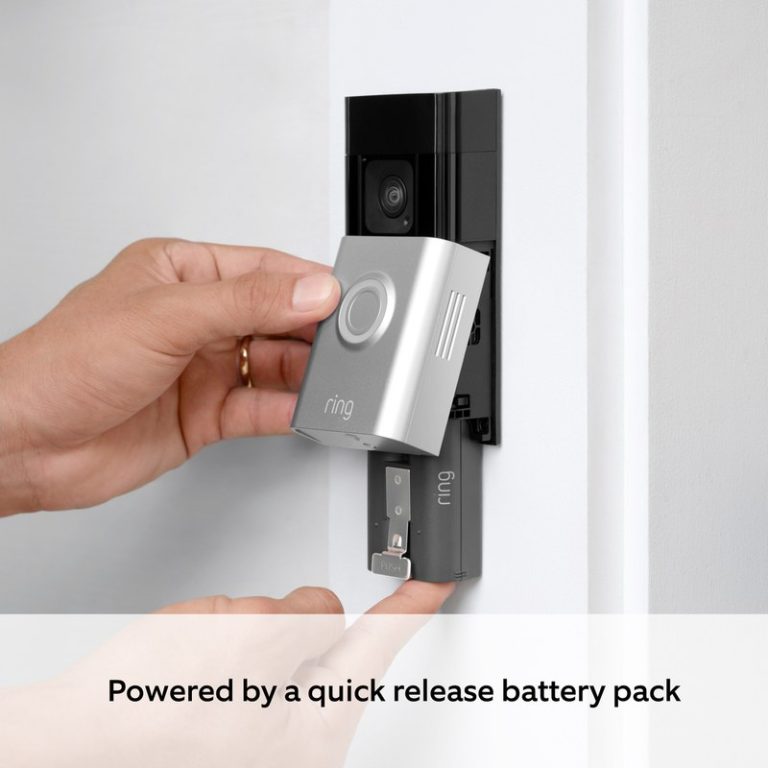
Basic installation steps and safety checks for hardwiring a battery doorbell.
/h2>
Installation is usually straightforward when the home already has compatible wiring and a stable mounting surface. The main risks are incorrect voltage, loose wire connections, poor placement, and skipping the setup steps in the app. Safe installation starts with checking the manual first.
If you are unsure about the transformer, chime box, or wire condition, a pro can save time and reduce mistakes. That is especially true when the doorbell is mounted high, exposed to rain, or connected to older electrical parts.
Pre-install checklist for power, mounting, and weather exposure
Before installing, confirm the exact model, the required voltage, and whether the battery must stay installed. Check the wall surface, door frame, and mounting angle. Make sure the camera will not point too far into a neighbor’s entry or a public sidewalk.
Also check weather exposure. Some entryways are fully covered, while others face direct rain, snow, or strong sun. Mounting height matters too. A well-placed doorbell is easier to use and usually gives a better view of visitors.
When to use a pro versus a DIY install
DIY works best when the home already has a known-good doorbell circuit and the manual is clear. A professional is a better fit when the transformer voltage is unknown, the chime is unusual, or the wire routing is old or damaged. A pro is also wise if you need drilling into brick, stucco, or hard siding.
If you are renting, ask before drilling. If the wiring is exposed, brittle, or warm, stop and get qualified help. That is the safest path.
Power, Charging, and Battery Maintenance After Hardwiring
Hardwiring usually changes how often you need to charge the battery, not whether the battery matters. In normal use, the wired connection may help maintain the battery. But heavy motion activity, frequent live view sessions, or cold weather can still drain it faster than expected.
That means hardwiring is best viewed as a convenience upgrade. It can reduce maintenance, but it does not always eliminate it.
How charging behavior changes with frequent use, motion alerts, and cold weather
More alerts mean more wake-ups. More live view use means more power draw. Cold weather can also reduce battery performance, which is common with many rechargeable batteries.
If the doorbell sits in a busy area, the battery may still need occasional charging even when wired. A sheltered location may help, but placement alone cannot solve every power issue.
What to expect if the wiring only supplements battery life
Expect longer time between manual charges, not endless operation. The battery may stay healthier when the wiring provides regular top-offs. Still, you should plan for occasional checks in the app and a backup charging routine.
A simple habit helps. Review battery status after a few weeks of use, then again during cold months. This is often enough to spot problems early.
Wi-Fi, App Setup, and Smart Home Connectivity
Power is only part of the setup. A Ring battery doorbell also depends on a stable Wi-Fi signal, a working app account, and the right permissions for household users. Weak internet can make even a hardwired doorbell feel unreliable.
Most setup problems come from network distance, app permissions, or account issues, not the bracket on the wall.
2.4 GHz network requirements, signal strength, and placement near the door
Many doorbells use 2.4 GHz Wi-Fi because it reaches farther than 5 GHz. That band is often better for front doors, garages, and detached entryways. But a weak signal can still cause slow alerts, dropped live view, or delayed video uploads.
Place the router or mesh node with the front door in mind. Thick walls, metal doors, and exterior brick can weaken the signal. If needed, a mesh system may help more than moving the doorbell itself.
Shared users, permissions, and account recovery basics
Households often need more than one person to answer the door. Shared users, device permissions, and alert settings help make that possible. Review who can view video, change settings, or delete recordings.
Also set up account recovery before you need it. Use a strong password. Turn on multi-factor authentication if available. Keep recovery email and phone details current. For a broader security comparison, see our Ring doorbell comparison with the Eufy E340 and our guide to whether the Eufy Video Doorbell E340 needs Wi-Fi for another view of connectivity tradeoffs.
Privacy, Security, and Video Storage on Ring Doorbells
Video doorbells capture more than the front steps, so privacy planning matters. You should think about motion zones, audio capture, neighbor sightlines, and who can access the account. Storage choices also affect how long clips remain available.
These settings are not just technical details. They shape what the camera records and who can see it later.
Motion zones, neighbor privacy, and audio/video capture concerns
Motion zones can limit alerts to specific areas. That helps reduce false alerts from sidewalks, trees, and passing cars. It can also lower the chance of recording more of a neighbor’s property than needed.
Audio and video laws can differ by state and local rules. If your doorbell faces a shared walkway or apartment hall, keep the view as narrow as practical. The goal is to record the doorway, not the whole block.
Cloud storage, subscriptions, retention, and cybersecurity best practices
Some Ring features depend on a subscription, while others may work without one in limited ways. Cloud storage means video is saved online, which makes it easy to view remotely. It also means your account security matters a lot.
Use strong login habits, review shared access, and delete old users you no longer need. For a deeper look at storage tradeoffs, our article on Ring local storage options explains how local and cloud approaches differ in everyday use.
Costs, Limitations, and When Hardwiring Makes Sense
Hardwiring can be worth it when you already have compatible wiring and want fewer battery charges. It may also make the doorbell feel more like a fixed home fixture. But the added convenience has to be balanced against wiring checks, possible adapter parts, and installation effort.
For some homes, battery-only remains the better fit because it is simpler, more flexible, and easier to move later.
Upfront wiring costs versus convenience and reduced charging frequency
Upfront costs can include parts, mounting accessories, and possibly professional labor. In exchange, you may charge less often and get a cleaner long-term setup. That tradeoff makes the most sense for owners who plan to stay put.
If the wiring is already there, the cost may be modest. If the home needs new wiring or transformer work, the project can grow quickly.
Situations where a battery-only setup is the better fit
Battery-only is often better for renters, apartments, short-term homes, and places without a usable doorbell circuit. It also works well when the front entry changes often or when you want a simple install with no transformer checks.
If you want flexibility more than permanence, battery-only is usually the easier choice. If you want less charging and your wiring is known to be compatible, hardwiring can make sense.
Final Takeaway
Many Ring battery doorbells can be hardwired, but the wiring usually supports charging rather than replacing the battery. If your home has compatible low-voltage wiring and the model allows it, hardwiring can reduce upkeep. If not, battery-only is the safer, simpler choice.
Many Ring battery doorbells can connect to existing low-voltage doorbell wiring. In many cases, the wiring helps charge the battery rather than replace it.
It usually needs compatible low-voltage doorbell wiring and the right transformer output. Some models still require the internal battery to stay installed.
Often it reduces how often you need to charge, but it may not eliminate charging. Heavy use, cold weather, and weak wiring can still drain the battery.
Yes. Hardwiring does not replace Wi-Fi, because the doorbell still needs internet access for alerts, video, and app features.
Renters should check lease rules and ask the property owner before changing wiring or drilling. A battery-only setup is often the easier choice in rentals.
Check the exact model manual, transformer voltage, chime compatibility, Wi-Fi signal, and any subscription or privacy settings. If the wiring looks unclear, use a qualified installer.
Hi, I'm Marcus Sterling, a smart home security expert with over 5 years
of hands-on experience testing and reviewing hundreds of security cameras, smart locks, and alarm systems. My mission is to make smart home security accessible, affordable, and easy to understand—and every review I publish is 100% independent, unbiased, and honest. I don't accept payments for positive reviews, just practical advice to help you secure your home with confidence.
Google home and ring video doorbell can work together in practical ways, but the setup is not as seamless as many homeowners expect. If you want reliable alerts, a clear view of your front door, and fewer privacy surprises, the key is understanding what Google Home can do with Ring, what it cannot do, and…
Quick Security Answer A Ring battery doorbell can still work without a plan, but paid storage is what makes it useful for reviewing past events. If you want saved clips, compare monthly and annual pricing, then check setup, Wi-Fi, and privacy needs before you buy. The ring battery doorbell subscription is the paid plan that…
A video doorbell can show us who is at the door, record activity outside, and send alerts to our phones. These devices can improve awareness around a home, but their usefulness depends on clear video, reliable motion detection, and an app that makes alerts easy to manage. The eufy Video Doorbell E340 is a battery-powered…
Quick Security Answer Connect the doorbell in the Ring app, join the temporary setup network, and choose your home Wi‑Fi. If pairing fails, check power, signal strength, and the correct Wi‑Fi band first. Ring video doorbell connect to wifi is usually a quick app setup. The exact steps depend on the model and your home…




One Comment