Smart Lock Guest Code Security Tips to Protect Your Home
Guest codes give visitors their own temporary PIN, so you control when and how often they enter. Set an expiration date, revoke codes early, and keep your lock app secured with MFA.
Smart lock guest code security tips start with one simple idea: give visitors their own temporary PIN. A guest code is a separate entry code you create in the lock app for a specific person or visit. This guide explains how to use guest codes safely, what mistakes to avoid, and how to keep your lock secure over time.
What Is a Smart Lock Guest Code and Why Does Security Matter?
A guest code is a temporary PIN that lets someone enter without knowing your main code. You create it in the lock app and control when it works. It can expire after one use or at a set date.
Security matters because a guest code limits who enters and when. It also leaves a record. If a code is misused, you can revoke it remotely.
How guest codes work: PINs, scheduled access, and remote revocation
Most locks store guest codes on the device or in the app. You set the PIN, choose the access window, and decide when it expires. Some locks support one-time codes that stop after a single unlock. Others allow repeating schedules.
Remote revocation is the key advantage. If a guest leaves early, you can delete the code from your phone. No need to change the lock or collect a key.
Why a guest code is safer than a copied key or garage code
A copied key keeps working forever. A garage code can be passed along without your knowledge. A guest code has a clear owner, a set schedule, and an end date.
Guest codes also create an audit trail. Most apps show which code was used and when. That helps you spot unusual activity.
Guest Code Types: One-Time, Temporary, Scheduled, and Permanent

Guest codes come in several forms. Each type fits a different situation.
One-time codes for short visits and deliveries
A one-time code works for a single unlock. It is ideal for deliveries, repair visits, or short stops. After the lock opens once, the code expires.
Check the manual to confirm how one-time codes behave. Some expire after the first unlock. Others expire after a set time.
Scheduled codes for recurring access: cleaners, dog walkers, and contractors
Scheduled codes repeat on a set timetable. A cleaner might get access every Tuesday from 9 a.m. to noon. Access only works during the window you set.
This limits the damage if a code is shared. The code only works at the times you allow.
Permanent codes for family and trusted housemates — and when to avoid them
Permanent codes never expire unless you delete them. They make sense for family and long-term housemates. They are less ideal for service providers.
Limit permanent codes to people who live in the home. Fewer permanent codes means fewer codes to manage.
How to Share Smart Lock Guest Codes Securely
Sharing a guest code safely comes down to timing, delivery, and cleanup.
Setting expiration dates and access windows before you share a code
Set the expiration date before you send the code. Decide how long the person needs access. Use the narrowest window that still works.
Revoking codes as soon as a guest departs or the job ends
Do not wait for the expiration date. Revoke the code as soon as the visit ends. This matters most for contractors and one-time jobs.
Revocation is instant in most apps. Make it a habit, like collecting a spare key.
Delivering codes through the app instead of unencrypted text messages
Text messages are not encrypted. A code sent by text can sit in a phone thread for years. Use the lock app’s sharing feature when it exists.
If the app lacks secure sharing, send the code through a private channel. Delete the message after the visit.
Common Guest Code Mistakes That Put Your Home at Risk
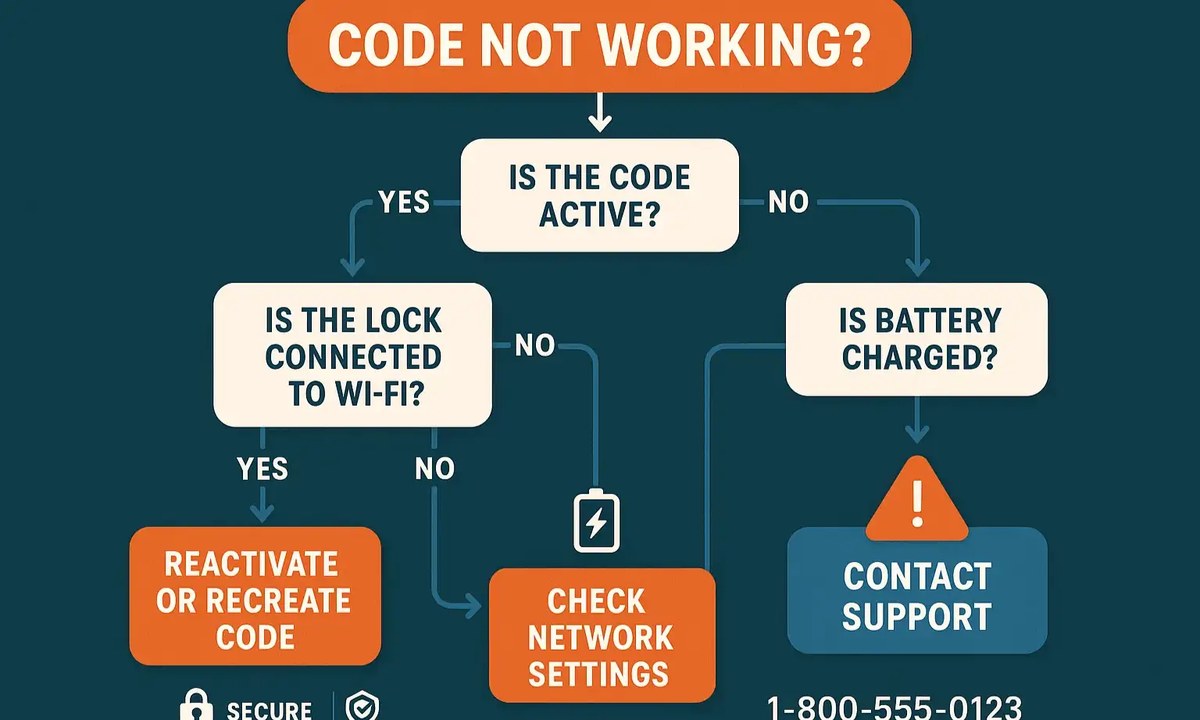
Most guest code problems come from small habits. These mistakes are easy to fix once you know them.
Reusing the same PIN across multiple guests and over time
If every guest gets the same PIN, you lose the audit trail. You cannot tell who entered. A former guest still knows the code.
Give each guest a unique code. Revoking one person’s access then does not affect anyone else.
Choosing guessable patterns: birthdays, repeated digits, and sequential numbers
Codes like 1234 or a birth year are easy to guess. Someone watching you type can memorize a simple pattern. Use long, random codes.
Many locks support 4 to 8 digit PINs. Longer codes are harder to guess.
Keypad visibility, shoulder-surfing, and physical code-sharing risks
A keypad in plain view makes shoulder-surfing easier. Someone can watch a guest enter the code and use it later. Position the keypad away from public view.
Remind guests not to share the code in public. A code overheard at the door is no longer private.
Overlooking auto-lock behavior when a guest forgets to lock up
Auto-lock re-engages the deadbolt after the door closes. Set a short delay, such as 30 seconds. Test it with your own door.
If your lock lacks auto-lock, a guest who forgets to lock leaves your home open.
Smart Lock Cybersecurity: MFA, Firmware, and Account Recovery
Guest codes are only as secure as the app that manages them. Strong account security protects every code you have issued.
Enabling multi-factor authentication on your smart lock app
Multi-factor authentication adds a second step to sign in. Even a stolen password is not enough. Turn this on in the app’s security settings.
MFA protects your lock account, access history, and active guest codes.
Keeping lock firmware updated to close known vulnerabilities
Firmware updates fix bugs and close security holes. Check the app regularly and install updates promptly. Some locks update automatically.
An outdated lock can miss patches for known issues.
Managing shared users, app permissions, and account recovery options
Review who has access to your lock app. Remove former household members. Check phone permissions and limit what the app can access.
Set up account recovery before you need it. A recovery email or backup code helps if you lose your phone.
Why vendor support lifecycle matters for long-term lock security
A lock with no updates becomes a growing risk. Check how long the manufacturer supports the model. Older locks may stop receiving security patches.
If your lock no longer gets updates, consider replacing it.
Connectivity, Power, and Backup Entry: Keeping Guest Codes Reliable
A guest code is useless if the lock is offline or the battery is dead. Plan for connectivity and power before you need them.
Wi-Fi, Bluetooth, and hub-based locks: how each affects code delivery and remote access
Wi-Fi locks connect directly to your router. They allow remote code management from anywhere. Bluetooth locks only work when your phone is nearby unless a hub bridges the connection.
Hub-based locks use a bridge to reach Wi-Fi. Check whether the lock works without a hub and what happens during an outage. Our guide on whether smart locks need a hub explains the differences.
Battery monitoring and what happens when a lock loses power mid-visit
Most smart locks run on AA or lithium batteries. Low battery warnings appear in the app, but only if you check. Review battery levels monthly.
If the battery dies mid-visit, a guest could be locked out. Keep spare batteries and know where the physical key is. Our article on what happens when a smart lock battery dies covers this in detail.
Maintaining a physical key backup and knowing your lock’s mechanical override
Most smart locks include a physical key override. Keep that key somewhere safe. Test the key cylinder at least once a year.
The mechanical override is your fallback during power loss or app problems.
Renters vs. Homeowners: Installation and Compatibility Considerations
Renters and homeowners face different rules when installing a smart lock. Check your situation before you buy or drill anything.
What renters should check in a lease before installing a smart lock
Read your lease before changing the lock. Many leases require landlord approval. Some allow smart locks only if the original hardware is restored at move-out.
Ask in writing and keep a copy. If the landlord says no, look for a retrofit lock that fits without drilling.
Door and deadbolt fit, handing, and retrofit compatibility for your existing hardware
Not every lock fits every door. Measure door thickness, backset, and crossbore. Check the lock’s handing, which means whether the door opens left or right.
Retrofit locks replace only the inside thumb turn. This is often easier for renters. Our smart lock installation requirements guide covers the measurements and tools you need.
Integrations with doorbells, alarm systems, and smart home platforms: what to verify
A smart lock can connect to a doorbell, alarm system, or voice assistant. Verify that the exact model supports your platform before buying.
Check whether a hub or subscription is required. Confirm details with the manufacturer’s support page.
Privacy, Access History, and Subscription Costs You Should Know
Guest codes create data. That data includes who entered and when.
What guest code access logs reveal and how long your data is stored
Access logs show which code was used and at what time. Review them regularly and delete old entries when the app allows.
Retention varies by manufacturer. Check the privacy policy for your exact model. Our smart lock access log privacy guide explains what to look for.
App permissions and third-party data sharing with smart lock vendors
Lock apps may request location, contacts, or notifications. Grant only what the app needs. Review permissions in your phone settings.
Check the vendor’s privacy policy for data sharing. Some companies share data with service providers or advertisers.
Which features require a subscription and what happens if you cancel
Some locks are free to use. Others charge for cloud storage, access history, or advanced scheduling. Read the plan details before you buy.
If you cancel, find out what you lose. Some locks keep basic codes but remove remote access or logs.
Smart Lock Guest Code Security Checklist and Next Steps
Security is an ongoing habit, not a one-time setup. Use this checklist to keep guest codes safe over time.
A quick audit: reviewing active codes, schedules, and audit logs
Open the lock app and list every active code. Delete codes you no longer need. Check each schedule against the visitor’s current needs.
Review the audit log for entries you cannot explain. Do this monthly.
Ongoing maintenance: battery checks, firmware updates, and code rotation
Check battery levels monthly. Install firmware updates when they appear. Rotate guest codes on a schedule.
Rotation means creating a fresh code and deleting the old one. It keeps your access list clean.
When to upgrade, replace, or re-evaluate your smart lock setup
Replace a lock when it stops receiving firmware updates or when battery life becomes unreliable. Upgrade when you need features your current lock lacks.
Re-evaluate your setup at least once a year. Your home, visitors, and risk tolerance all change.
Guest codes are one of the safest ways to give someone entry, but only when you control their lifespan. Create unique codes, set narrow schedules, revoke them early, and keep the app and lock updated. A well-managed guest code protects your home without forcing you to hide spare keys.
Frequently Asked Questions
Usually yes. Most locks store active codes on the device, so entry codes still work offline. Remote management, such as creating or revoking codes, may stop until the connection returns.
Keep only the codes you currently need. Review active codes monthly and delete any that belong to former guests or completed jobs.
It depends on the model. Basic entry codes are often free, while remote access, activity logs, or advanced scheduling may require a paid plan. Verify the plan details for your exact lock.
Short or predictable codes are easier to guess. Use a long random PIN, avoid birthdays and repeated digits, and position the keypad away from public view.
Use your account recovery options to sign in on another device, change your password, and enable MFA. Revoke any guest codes that no longer need to be active.
Yes, with landlord approval and a retrofit model that fits the existing deadbolt. Keep the original hardware and restore it before moving out.