Does Eufy Video Doorbell E340 Need HomeBase?
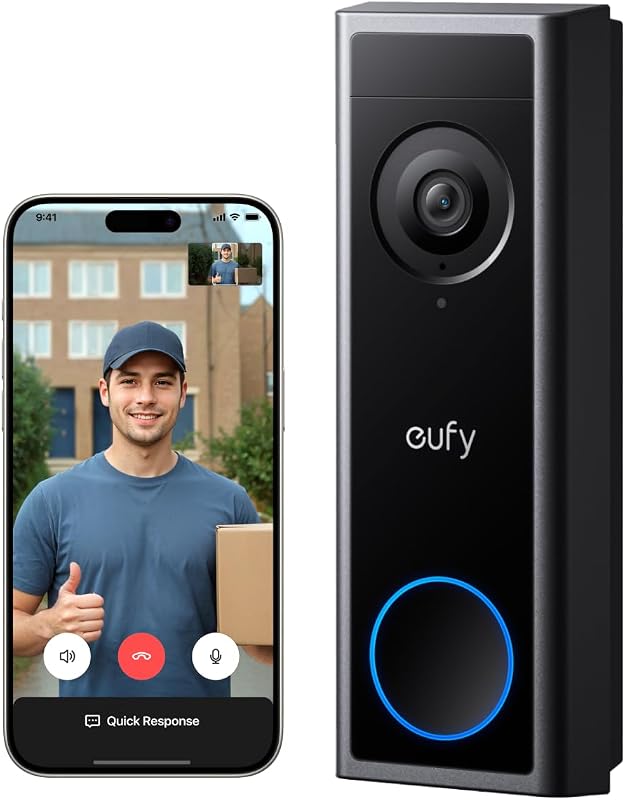
The Eufy Video Doorbell E340 can work without a HomeBase, which gives us a simpler setup option. We can connect it directly to our Wi-Fi network and use the Eufy Security app to view live video, receive alerts, and respond to visitors.
We can use the E340 without a HomeBase, but standalone use may limit storage and some smart-home features. We will explain what works on its own, what changes with a HomeBase, and which setup fits our needs.
Key Takeaways
- The E340 can operate without a HomeBase.
- Direct use supports alerts, live video, and two-way talk.
- A HomeBase can add storage and broader device support.
HomeBase Requirement Overview
We can use the eufy Video Doorbell E340 without a HomeBase. The doorbell connects directly to a wireless router, while a HomeBase can add local storage and support other eufy Security features.
Standalone Wi-Fi Operation
When connected to our Wi-Fi network, the E340 can operate independently. We can use the eufy Security app to view the live camera feed, receive motion alerts, answer visitors, and manage doorbell settings.
The E340 does not need a HomeBase for basic doorbell functions. We can also hear alerts through a compatible chime option, such as a traditional wired chime, a separately sold eufy doorbell chime, or a supported Amazon Echo device.
Without a HomeBase, we should check how the doorbell stores recordings. A HomeBase provides local storage, but standalone operation may use the doorbell’s supported storage options and app features. We also need a stable Wi-Fi connection for remote viewing and notifications.
Supported HomeBase Models
The E340 works with eufy Security HomeBase 2 and S380 HomeBase. We must purchase these units separately because they do not come as a required part of the doorbell’s basic setup.
Adding a compatible HomeBase can provide local video storage and connect the doorbell with other eufy Security devices. The S380 HomeBase may offer newer storage and system features, while HomeBase 2 supports the E340 as well.
We should confirm firmware and feature compatibility before buying. The HomeBase connects to our network and stores supported recordings, but it does not replace the need for a working Wi-Fi connection between the doorbell and our home network.
Features Available Without a HomeBase
The Eufy Video Doorbell E340 can provide live video, two-way audio, motion alerts, and local recording without a HomeBase. We need a suitable storage option and a stable Wi-Fi connection for these features to work reliably.
Live View And Two-Way Audio
We can view the E340’s live camera feed through the Eufy Security app without connecting a HomeBase. The doorbell uses our home Wi-Fi network to send video to the app, allowing us to check the front door remotely.
The E340 also supports two-way audio. We can speak to visitors through the app, and they can respond through the doorbell’s built-in speaker and microphone. This works for answering deliveries, speaking with guests, or warning away unwanted visitors.
The doorbell still needs power, either from its battery or a wired installation. A strong Wi-Fi signal near the entrance helps reduce delays, connection drops, and poor video quality.
Motion Alerts And Video Recording
Without a HomeBase, the E340 can detect motion and send alerts to our phones through the Eufy Security app. Its AI features can help identify people and packages, which may reduce alerts caused by general movement.
The E340 can record video to its built-in local storage, so we do not need a HomeBase for basic clip storage. We can review recorded events in the app, subject to the model’s storage capacity and recording settings.
Without a HomeBase, we should check the E340’s storage options and settings before installation. The doorbell does not provide the same central storage role as a HomeBase, and advanced Eufy device integration may require a compatible HomeBase 2 or S380 HomeBase.
Limitations of Standalone Use
Using the Eufy Video Doorbell E340 without a HomeBase keeps the setup simple, but it limits storage and some security features. We can still view the doorbell through the Eufy app, yet we may need separate equipment or a subscription for capabilities that HomeBase normally provides.
Storage Constraints
Without a HomeBase, the E340 stores recordings in its built-in local storage, if available for the selected setup. Storage space remains limited, so older clips may be overwritten when the memory fills. We should check the Eufy app for storage settings, recording length, and available space.
Standalone use also means we cannot use HomeBase as the central storage location for the doorbell. If we want a larger local archive or storage shared with other Eufy devices, adding a compatible HomeBase provides more options.
We should also consider what happens if someone damages or removes the doorbell. Any footage stored only on the device could become unavailable. To reduce this risk, we can export important clips from the app and keep copies in a secure location.
Missing AI And Backup Capabilities
The E340 can operate without HomeBase, but some connected features may not be available or may depend on the exact firmware and setup. HomeBase can link the doorbell with other Eufy devices and provide a central point for managing recordings and alerts.
Without that hub, we may miss centralized backup, broader device integration, and HomeBase-based storage. Some advanced detection or automation features may also work differently when the doorbell operates alone. We should confirm feature support in the Eufy app before relying on person detection, activity zones, or related alerts.
A HomeBase can also keep recordings separate from the doorbell itself. This gives us an additional layer of protection if the doorbell is stolen or damaged.
Setup Options for Direct Connection
We can operate the eufy Video Doorbell E340 without a HomeBase by connecting it directly to a compatible 2.4 GHz or 5 GHz Wi-Fi network. We can manage alerts, live video, and device settings through the eufy Security app, while local storage remains limited to the doorbell’s supported storage options.
Connecting Through the eufy Security App
We begin by installing the eufy Security app on a phone and signing in to a eufy account. After selecting Add Device, we choose the Video Doorbell E340 and follow the pairing instructions.
The app guides us through connecting the doorbell to our home Wi-Fi network. We should keep the doorbell near the router during setup and enter the Wi-Fi password carefully. The E340 can then send motion and doorbell alerts to our phones, show live video, and support two-way audio without a HomeBase.
We can also adjust motion detection, notification settings, activity zones, and other device controls in the app. If we use the included rechargeable battery, we must remove it for charging when needed. With existing doorbell wiring, we can configure the E340 for wired power instead.
Configuring Local Storage
Without a HomeBase, we should check the E340’s storage requirements before installation. The search results confirm that the E340 supports local video storage, but they do not specify whether every storage feature works directly through the doorbell or requires a particular accessory.
We can open the device settings in the eufy Security app and review the Storage section. The available options depend on the doorbell’s firmware, power setup, and supported storage hardware. We should follow the E340 manual when inserting or formatting any storage device.
Local storage keeps recordings at home instead of relying on a monthly cloud plan. We still need a stable Wi-Fi connection for app access, alerts, and remote viewing. If the doorbell loses power or network access, it may stop recording or stop sending notifications until the connection returns.
When Adding a HomeBase Makes Sense
The Eufy Video Doorbell E340 can work without a HomeBase when connected directly to Wi-Fi. Adding one makes sense when we want centralized storage, stronger local reliability, and better coordination with compatible Eufy devices.
Expanded Storage And Reliability
The E340 can operate independently, but a compatible HomeBase gives us another place to store recordings. The doorbell works with HomeBase 2 and S380 HomeBase, which are sold separately. This setup can reduce our reliance on the doorbell’s own storage options and keep recordings managed in one location.
Local storage also gives us more control over our footage. We can avoid depending entirely on cloud storage, account services, or a single device. If we use several Eufy cameras, a HomeBase can make it easier to manage their recordings through the Eufy Security app.
A HomeBase also keeps the doorbell connected to a central hub within our network. This may provide a more consistent setup for homes with multiple Eufy devices, though the E340 still needs a working Wi-Fi connection for normal network access and remote features.
Enhanced Detection And Ecosystem Integration
A HomeBase can add value when we plan to build a larger Eufy security system. It can connect compatible cameras and other devices through one Eufy Security setup, allowing us to manage them from the same app instead of treating each device as a separate system.
HomeBase support may also help us use features that depend on centralized processing or storage, such as managing motion events and saved clips across multiple devices. The exact features depend on the HomeBase model, doorbell firmware, and other connected products.
We should choose the S380 HomeBase or HomeBase 2 only after checking compatibility with our existing Eufy devices. For a single E340 that only needs live viewing, alerts, and basic recording, the direct Wi-Fi connection may be enough.
Frequently asked questions
Can we use the Eufy Video Doorbell E340 without a HomeBase?
Yes. We can set up and use the E340 on its own through the Eufy Security app. We need a suitable Wi-Fi connection and the Eufy account used during setup.
Can we view live video without a HomeBase?
Yes. We can view the live camera feed, answer calls, and receive motion alerts in the app without a HomeBase.
Where does the E340 save recordings?
The E340 includes built-in storage for video clips. We can also use a compatible Eufy HomeBase 2 or S380 HomeBase for supported storage and expanded system features.
Can we use a chime without a HomeBase?
The E340 can work with a compatible existing wired chime, depending on the wiring and installation setup. We should check Eufy’s compatibility details before connecting it. A separate Eufy chime may have different requirements.
What do we gain by adding a HomeBase?
A HomeBase can provide central storage, connect the doorbell with other Eufy devices, and support selected security features. It is optional for basic E340 operation, but it may suit users who want a larger Eufy system.
Conclusion
We can use the eufy Video Doorbell E340 without a HomeBase. The doorbell can connect to our Wi-Fi network and let us view live video, receive alerts, and manage settings through the eufy Security app.
Without a HomeBase, storage and other features may work differently. The E340 can use its built-in storage for video clips, while a HomeBase can provide additional storage and connect the doorbell with other eufy devices.
| Setup | What we can expect |
|---|---|
| E340 without HomeBase | App access, alerts, live view, and local storage |
| E340 with HomeBase | Centralized storage and wider eufy system integration |
We should check the E340’s current storage and compatibility options before buying extra equipment. A HomeBase remains optional for basic doorbell operation, but it may suit us if we want shared storage or a larger eufy security system.





One Comment