Do Water Leak Sensors Need a Hub Heres the Answer
Do water leak sensors need a hub? Only hub-based models using Zigbee, Z-Wave, Thread, or a proprietary alarm system need one. Direct Wi-Fi sensors connect to your router and require no extra hardware.
Do water leak sensors need a hub? The answer is no for direct Wi-Fi models. The answer is yes for sensors built around Zigbee, Z-Wave, or Thread. This guide explains how each type works. It shows what changes when a hub is involved. It helps you choose the best setup for your home.
Do Water Leak Sensors Need a Hub? The Short Answer
Direct Wi-Fi leak sensors do not need a hub. They connect to your router and send alerts through the internet. Hub-based sensors need a hub or border router to translate their signals. This includes most Zigbee, Z-Wave, and Thread models.
There is no single universal answer because the sensor market splits into two groups. One group speaks Wi-Fi. The other group speaks a smart-home protocol that needs a translator. That translator is the hub.
Why Some Water Leak Sensors Rely on a Hub: Connectivity Standards Explained

Water leak sensors use different radios to talk. Wi-Fi sensors send data directly to your router. Zigbee, Z-Wave, and Thread sensors are built for low power and mesh networking. Mesh networking means devices pass signals through each other. But these sensors cannot talk to your router by default. They need a hub that speaks their protocol. The hub also shares alerts over your network.
Direct Wi-Fi Sensors: No Hub Required
Direct Wi-Fi sensors connect to your 2.4 GHz network like a phone does. You add them through the manufacturer’s app. They start reporting within minutes. Most track leak detection, battery level, and temperature through the same app.
These sensors are a common starting point for renters and first-time buyers. Setup is simple. Mount the sensor, open the app, join Wi-Fi, and test. There is no separate hub to place, power, or configure.
For specific models, see our guide to the best water leak sensors for smart homes. It breaks down features across both Wi-Fi and hub-based types.
Hub-Based Sensors: Zigbee, Z-Wave, and Matter/Thread
Zigbee and Z-Wave are low-power mesh protocols. Protocols are the languages devices use to talk. A network of compatible devices can pass messages across a larger home. Not every battery-powered sensor repeats signals, though. Your router does not understand these protocols. That is the catch. A hub, bridge, or smart speaker with the right radio translates them.
Thread is newer and often grouped with Matter. Thread devices need a Thread border router. This is a hub-like component inside some smart speakers, hubs, and routers. Matter is a compatibility standard. It lets devices from different brands work together. It still needs a network transport such as Thread, Wi-Fi, or Ethernet.
Check the spec sheet before you buy. The protocol on that page decides the answer for your specific sensor.
Hub-Based vs. Standalone Water Leak Sensors: What Actually Changes for You
Choosing between a hub-based and a standalone sensor changes more than the box contents. It affects alert speed, reliability, range, upfront cost, and where you can place each unit in your home.
Alert Speed, Reliability, and Range
Hub-based systems usually trigger alerts faster within their own ecosystem. The sensor and hub are designed to work together. They also tend to handle local alerts, like a siren, even when the internet drops.
Standalone Wi-Fi sensors depend on your router and internet. A weak signal, a crowded 2.4 GHz band (a Wi-Fi frequency range), or an internet outage can delay or block an alert. Range depends on router coverage, walls, floors, and interference from appliances.
Upfront Cost and Per-Sensor Pricing
Standalone Wi-Fi sensors are often cheaper to start. You buy one and go. Hub-based ecosystems require the hub purchase first. Many starter kits bundle the hub with one or two sensors. That can raise the initial price.
Adding sensors later changes the math. Some hubs support many sensors without extra fees. Each Wi-Fi sensor needs its own stable connection to the router.
Home Layout and Coverage: Basements, Dead Zones, and Hub Placement
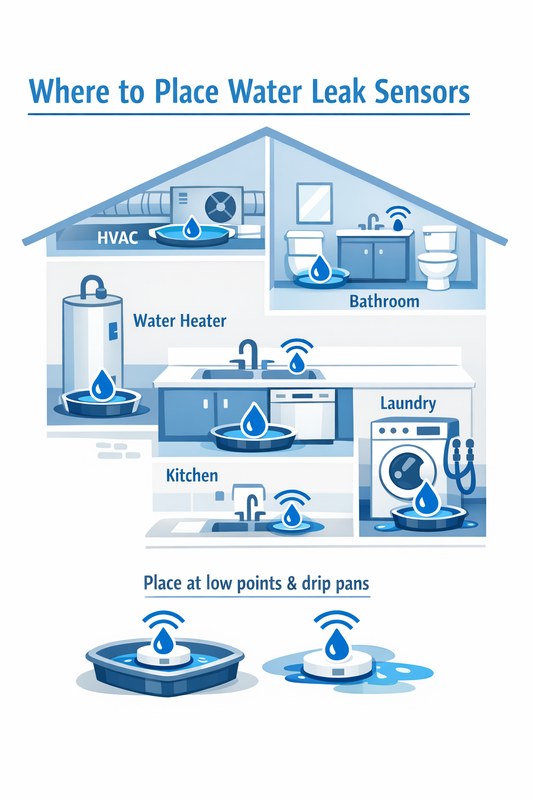
Leak sensors are usually placed near water sources. Common spots include under sinks, behind toilets, beside water heaters, and in basements. Basements are often far from the router, which is a problem for Wi-Fi sensors.
Hub-based mesh protocols can route data through other devices. That helps in large or multi-level homes. The trade-off is the hub needs a good location. It should be central, powered, and within range of the farthest sensor.
For a room-by-room plan, see our guide on where to place water leak sensors.
| Type | Hub needed | Typical reach | Best suited to | Main limitation |
|---|---|---|---|---|
| Direct Wi-Fi | No | Router coverage area | Renters, small homes, quick setup | Depends on router signal and internet |
| Zigbee or Z-Wave | Yes | Mesh through compatible devices | Larger homes, expandable systems | Requires hub and compatible devices |
| Thread / Matter | Yes, border router | Mesh through Thread devices | Newer ecosystems, multi-brand homes | Needs a border router and compatible app |
When Is a Hub Mandatory? Compatibility and Ecosystem Lock-In

A hub is not optional with some sensors. It is a hard requirement written into the product page and manual. Knowing this before purchase prevents a return and a frustrating weekend.
Leak Sensors Built Into Smart Alarm Systems
Many DIY alarm systems only work with their own leak sensors. The base station is the hub. The sensor does not offer a Wi-Fi mode and cannot pair with another app or system.
This design gives you one app, one ecosystem, and often one monitoring plan. It also means the sensor becomes useless if you switch systems later.
Hub-Optional Sensors and the Matter Standard
Matter aims to reduce this lock-in. A Matter-certified sensor can work with different ecosystems. You still need a Matter controller or Thread border router. This is still a hub-like device.
Some sensors come in both Wi-Fi and Zigbee or Thread versions. Read the exact model number, not just the brand name. A product line can include both types. Only one may match your home setup.
Installation, Placement, and Power: How a Hub Changes the Setup
A hub adds a step to setup and a decision about its placement. Standalone sensors skip that step but demand a strong Wi-Fi signal at the sensing location. The right choice depends on your home’s layout and your tolerance for extra hardware.
Where to Install Water Leak Sensors for Real Coverage
Place sensors where water first appears. Common spots include under kitchen and bathroom sinks. Others are near the water heater and behind the washing machine. Also check next to the dishwasher and around the sump pump.
Check whether the manufacturer recommends mounting the sensor flat on the floor. Some models include sensor leads that extend reach to the exact spot where a leak would pool.
Keep sensors away from steam, mist, and dripping condensation. These can cause false alarms. Follow the manual’s distance and mounting guidance so the detection plate stays dry until a real leak occurs.
Battery Life, Power Options, and Hub Placement
Most leak sensors run on batteries and sit in places without easy power access. Battery life varies by model, network, and how often the sensor transmits. A hub-based sensor may save battery better because the low-power protocol wakes only to send data.
If you use a hub-based system, place the hub in a central, elevated spot. Keep it away from metal and large appliances. Stay within the range listed in the manual. If the sensor and hub lose connection, the alert may never leave the sensor.
For more on related networking questions, read whether alarm sensors need Wi-Fi.
Privacy, Cybersecurity, and Local vs. Cloud Monitoring
Leak sensors send small amounts of data, but that data travels somewhere. Understanding the path helps you decide between a local-only setup and a cloud-connected one. Privacy and security choices start before installation.
Cloud Dependence, Data Retention, and Local Event History
Most standalone Wi-Fi sensors push events to the manufacturer’s cloud. The app then pulls alerts to your phone. If the cloud service goes down, you may lose alerts even when the sensor detects a leak.
Hub-based systems vary. Some keep event history locally on the hub and use the cloud only as a relay. Others depend fully on the cloud. Check the manual or support page for outage behavior and retention details.
Think about what happens to your data. Know which events are stored and how you can delete them. Some vendors allow deletion from the app. Others require a support request.
Firmware Updates, MFA, and Vendor Support Lifecycle
Every connected device needs updates. Firmware is the software built into the device. Firmware fixes bugs and closes security gaps. A hub-based system may update automatically. A standalone sensor may require app approval.
Use a unique password for your vendor account. Enable multi-factor authentication (MFA) if the app supports it. MFA asks for an extra step to prove your identity. Create a separate user profile for each household member instead of sharing one login.
Support lifecycle matters too. A vendor that stops updating a hub can weaken the whole system. Check how long the company commits to software support. Confirm whether the hub still works after support ends.
Maintenance, Subscriptions, and Total Cost of Ownership
The sticker price is only part of the cost. Maintenance, optional monitoring, and replacement parts add up over the life of the sensor. Comparing total cost helps you avoid surprises later.
Self-Monitoring vs. Professional Monitoring Fees
Most standalone leak sensors are self-monitored. You get an app alert, hear the local siren, or both. You decide what to do next, such as shutting off the water or calling a plumber.
Some smart alarm ecosystems offer professional monitoring for an additional monthly fee. A monitoring center may contact you when a leak sensor triggers. Response depends on the plan, the event, and your local rules.
- The household receives alerts and decides what action to take.
- Usually has lower ongoing cost.
- Does not guarantee emergency dispatch.
- A monitoring center may review eligible alarms.
- Dispatch availability depends on the plan and event.
- Fees, contracts, permits, and false-alarm rules may apply.
Testing, Battery Replacement, and Sensor Lifespan
Test every leak sensor monthly. The app usually has a test mode. The manual explains the correct trigger method, such as pressing the test button or dampening the probe. A sensor that sits untested for years can fail silently.
Battery replacement depends on the model and usage. Some sensors last about a year. Others last several. Keep spare batteries on hand and replace them at the vendor’s recommended interval.
Sensor lifespan also varies. Humidity, temperature swings, and battery corrosion can shorten it. Factor in replacement cost when comparing a cheap standalone unit with a hub ecosystem.
For more on response options, read our comparison of a water leak sensor versus a water shutoff valve.
Limitations, False Alarms, and Troubleshooting
Leak sensors are helpful but not perfect. Knowing their limits prevents disappointment and wasted trips to check a false alarm.
Common False Alarms and Placement Mistakes
False alarms usually come from placement, not hardware failure. A sensor can trigger on vapor instead of liquid water. Steam, a humidifier, or a dishwasher vent can cause this. Keep the sensor away from those sources.
Placing the sensor inside a cabinet where a leak pools elsewhere means the sensor stays dry. Position the detection surface where water would actually travel. Check that the sensor sits flat so a small drip contacts the probes.
If an alarm repeats without visible water, wipe the sensor dry. Move it away from the vapor source, then re-test. Note the time of day the alarm triggers. Morning condensation and dishwasher cycles are common culprits.
Wi-Fi Outages and Hub Disconnects: What Happens to Alerts
During a Wi-Fi outage, a standalone sensor cannot reach the cloud. The local siren may still sound on the device. The push alert will not arrive until connectivity returns. A hub-based system with a local siren behaves similarly. It may rely on the hub’s internet for remote alerts.
Some ecosystems offer cellular backup through the hub or a separate module. That backup usually requires a plan. Coverage varies by location. If a leak happens during a power or internet outage, use the battery-powered local siren. That is your most reliable alert.
Renter or Homeowner: Which Approach Fits Your Situation — and the Next Step
Renters and homeowners have different constraints. Your next step depends on whether you can install, change, or move equipment later.
Renters usually prefer standalone Wi-Fi sensors. They are easy to install, remove, and relocate. They do not require a permanent hub. Battery-powered models avoid drilling and wiring. Check your lease and ask the landlord before mounting anything, even with adhesive strips.
Homeowners may benefit from a hub-based ecosystem. They may want broader coverage, integration with a security system, or automatic water shutoff later. The hub is a long-term investment that can support many sensors.
Before buying, write down answers to three questions:
- What protocol does the exact model use?
- Do I have a stable Wi-Fi signal at each planned sensor location?
- Can I place and power a hub if the sensor requires one?
Test the sensor right after setup. Then schedule a monthly test. This is the most reliable way to know the alert path works.
Do water leak sensors need a hub? Only sensors using Zigbee, Z-Wave, Thread, or a proprietary alarm system do. Direct Wi-Fi sensors work alone. Choose based on router coverage, home layout, and whether you plan to expand later. Verify the protocol on the exact model, test monthly, and keep a local siren as your safety net.
Frequently Asked Questions
No, not all of them. Direct Wi-Fi sensors connect to your router on their own. Zigbee, Z-Wave, and Thread models require a hub, bridge, or border router.
A Wi-Fi sensor can still sound its local siren, but the push alert may not arrive until the internet returns. Some hub systems offer cellular backup with a paid plan.
Place them under sinks, near the water heater, behind the washing machine, beside the dishwasher, and around the sump pump. Keep sensors away from steam and direct vapor to reduce false alarms.
Most standalone models do not. Some smart alarm ecosystems may require a monitoring plan for professional alerts. Check the vendor’s plan page for current terms.
Only if the sensor and security system share a compatible protocol, such as Zigbee, Z-Wave, or the same proprietary ecosystem. Read the exact model compatibility before buying.
Test monthly. Use the app’s test mode or the method described in the manual. Replace batteries at the recommended interval.