Do Home Alarms Work Without Internet
Yes, home alarms can work without internet for local siren and sensor functions. Remote alerts, app control, and cloud video stop unless you have cellular backup.
Homeowners often ask do home alarms work without internet, and the answer is yes, with limits. This guide explains how offline alarms behave, what still works, and what stops. You will also learn about backup options, costs, and maintenance.
Direct Answer: What do home alarms work without internet Means for a US Home
Yes, most home alarm systems keep working when the internet goes down. The siren, sensors, and keypad still function locally. What stops is remote control, app alerts, and cloud video unless the system has cellular backup.
For a US home, this means a break-in can still trigger a loud siren. Neighbors may hear it. But you may not get a phone alert if your internet is out and you have no backup connection.
Professional monitoring changes the picture. Many monitored systems use a cellular radio, not your home Wi-Fi, to reach the monitoring center. That path can keep working during a home internet outage.
Self-monitored systems depend on your Wi-Fi for notifications. Without internet, they become local-only alarms. That still has value, but it is not the same as a connected system.
For renters, the answer is the same. A basic alarm with a siren works offline. App features do not. Check your lease before installing anything that needs screws or wiring.
How It Works and What It Can Actually Do
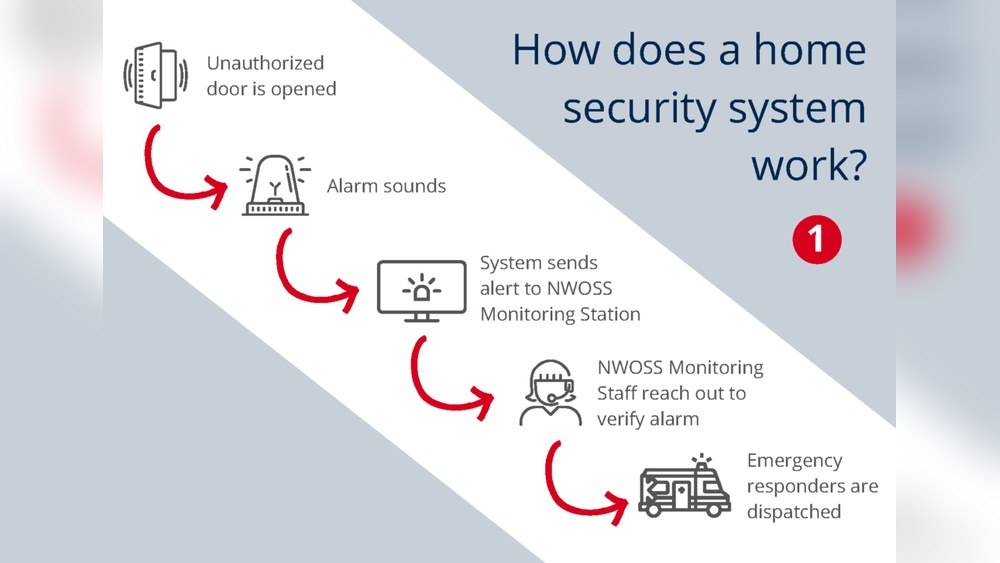
Most alarm systems use door and window sensors that talk to a central hub. The hub listens for a trigger and sounds the siren. This process is local and does not need the internet.
Sensors often use Z-Wave, Zigbee, or a proprietary radio signal. These protocols work between devices in your home. They do not need Wi-Fi or a broadband connection.
The hub is the brain of the system. It receives signals from sensors, runs the siren, and sends status to the app when connected. Without internet, the hub still does its local jobs.
Some hubs include a backup battery. Others do not. If the power goes out too, a plug-in hub without a battery goes silent. Battery-powered sensors still work, but nothing listens to them.
What an offline alarm can do:
- Sound a loud siren when a sensor opens.
- Trigger a keypad panic button, if present.
- Record events on a local hub or SD card, if supported.
- Send signals to a monitoring center through cellular backup, if active.
What it cannot do without internet or cellular backup:
- Send push alerts to your phone.
- Let you arm or disarm from an app.
- Stream or store video to the cloud.
- Notify emergency dispatch.
Some systems also include glass break sensors and motion detectors. These add detection but still depend on the same hub. The hub decides what triggers the siren.
For more detail on how sensors communicate, read our guide on do alarm sensors need Wi-Fi.
Compatibility, Power, Wi-Fi, and Platform Requirements
Compatibility varies by brand and model. Some systems need a hub or base station. Others connect sensors directly to Wi-Fi. Always verify the exact requirements in the manual.
Power matters too. A plug-in hub with a backup battery can keep working during a power outage. Battery-only sensors last months or years, depending on use.
Check the hub’s battery backup before you buy. Some hubs only last a few hours on battery. Others can run for a day or more. The manual should list the backup time.
Voice assistants like Alexa and Google Home are optional. They usually need a working internet connection. Matter and Thread support depends on the exact model and firmware.
Cellular backup is the key feature for keeping alerts alive during an internet outage. It uses a built-in SIM card and a mobile network. That signal is separate from your home internet.
Not every system offers cellular backup. Some charge extra for it. Others include it only in a paid monitoring plan. Verify what your plan covers.
Learn more in our guide on what cellular backup in a home alarm system means.
Placement, Installation, and Household Considerations

Placement affects how well an alarm works. Door sensors go on the door frame. Window sensors go on the sash or frame. The siren should be loud and central.
Renters should check their lease before drilling. Many systems use adhesive mounts, but some need screws. Ask your landlord if you are unsure.
Households with children or pets need careful placement. Keep sensors out of reach. Avoid placing them where pets can trigger them.
Think about daily life. A sensor on a frequently used door will cause false alarms if the system is armed. Plan your arming schedule around your routine.
For siren placement tips, see our guide on where to place a home alarm siren.
Some systems are easy to install in under an hour. Others need professional setup. Check the manual before you start. If you are not comfortable with tools or wiring, call a pro.
Privacy, Cybersecurity, Storage, and Subscription Limits
Alarm systems collect data about your home. That includes sensor events, schedules, and sometimes video or audio. Know what your system records and where it stores that data.
Storage options differ. Local storage keeps video on an SD card or hub. Cloud storage uploads video to the vendor. No internet means no cloud upload. Local storage may still record, depending on the device.
Consider what happens if a thief takes the hub. Local recordings go with it. Cloud recordings stay safe but need internet to upload. Choose the option that fits your risk.
Review the vendor’s data policy before buying. Some companies share data with third parties. Others keep it strictly for your account. The privacy policy should say which.
Subscriptions are another limit. Some systems require a plan for cloud video, cellular backup, or professional monitoring. Others work without one.
- Your household receives alerts and decides what to do.
- Usually has lower ongoing cost.
- Does not guarantee emergency dispatch.
- A monitoring center may review eligible alarms.
- Dispatch depends on the plan and event.
- Fees, contracts, permits, and false-alarm rules may apply.
For a closer look at no-monthly-fee options, read our guide on alarm systems without a monthly fee.
Troubleshooting and Ongoing Maintenance
Test your alarm regularly. Most systems have a test mode. Use it monthly to confirm sensors, siren, and notifications work. The test takes only a few minutes.
Replace batteries on schedule. Low batteries cause missed alerts. Keep spares on hand.
Update firmware when the app prompts you. Updates fix bugs and close security gaps.
If your internet goes out, check whether the hub has battery backup. If it does, the siren may still work. If not, the system may go silent.
Test the offline behavior on purpose. Turn off your router and trigger a sensor. See if the siren sounds. Then turn the router back on and check the app.
Write down what happens. That record tells you exactly what your system can do without internet. Keep it near the hub for reference.
Check the siren volume too. Some sirens are adjustable. Make sure yours is loud enough to hear from every room. A siren that is too quiet is easy to miss.
Some US cities require an alarm permit. Repeated false alarms can bring fines. Verify your local rules before relying on dispatch.
Common Mistakes and When to Get Professional Help
A common mistake is assuming the app works during an outage. It does not, unless you have cellular backup. Test your system with the Wi-Fi off to see what happens.
Another mistake is ignoring battery levels. A dead sensor does not protect your home. Check the app or keypad for low-battery warnings.
Poor placement is also common. A siren hidden in a closet is useless. Sensors mounted too high or too low may not trigger.
Some users skip firmware updates. That leaves known security holes open. Set a reminder to check for updates each month.
Others buy a system without checking the contract. Some monitoring plans lock you in for years. Read the terms before you sign.
Call a professional when you need help with wiring, monitoring contracts, or permits. Do not bypass safety features to silence false alarms.
If you live in an area with frequent outages, ask your installer about cellular backup and battery options. These add cost but keep alerts flowing.
Final Takeaway
Home alarms can work without internet, but only as local sirens and sensors. Remote alerts, cloud video, and app control need a connection. Cellular backup restores alerts for many monitored systems. No alarm replaces locks, fire safety, or emergency services. Check your manual, test your setup, and know your limits.
Frequently Asked Questions
Yes, most systems still sound a siren and detect sensors locally. Remote alerts and app control stop unless you have cellular backup.
The local siren and sensors keep working. Push alerts, cloud recording, and app control stop unless the system has cellular backup.
It depends on the brand and plan. Some systems include cellular backup in a monitoring plan. Others charge extra for it.
Yes. Many self-monitored systems work without a plan. You lose cloud video and professional monitoring, but the siren and sensors still function.
No. Most sensors use Z-Wave, Zigbee, or a proprietary radio to talk to the hub. Wi-Fi is only needed for remote features.
Turn off your router, trigger a sensor, and listen for the siren. Then restore the internet and check the app for any missed alerts.