Smart Water Leak Sensor vs Standalone Leak Alarm Explained
A smart water leak sensor sends remote alerts through Wi-Fi, a hub, or an app. A standalone leak alarm only sounds locally and works without any network.
Comparing a smart water leak sensor vs standalone leak alarm starts with one question: who needs to know about a leak, and how fast? This guide explains how each type works, what it needs from your home, and what it cannot do, so US homeowners and renters can choose with confidence.
Direct Answer: What Smart Water Leak Sensor vs Standalone Leak Alarm Means for a US Home
A smart water leak sensor detects water and sends a wireless signal to an app, hub, or smart speaker. A standalone leak alarm detects water and sounds a loud siren at the device. Both catch the same problem. They differ in alerts, power, setup, and long-term cost. There is a cost gap too. Standalone alarms often cost less, and there is nothing to pay after purchase. Smart sensors may cost more, and optional cloud plans can add a recurring fee.
| Option | Best for | Power and network | Alert type | Main limit |
|---|---|---|---|---|
| Smart water leak sensor | Remote alerts and household sharing | Battery or plug-in; Wi-Fi or hub | App, push, voice, siren | Needs setup and network |
| Standalone leak alarm | Simple local protection | Battery only | Local siren | No alert when you are away |
Some smart sensors include a built-in siren, so the two types overlap in practice. Some standalone models can link to extra sensors or even a strobe light. Check the exact model manual to confirm what is included.
How It Works and What It Can Actually Do

Both types use metal probes or sensor pads. When water touches the contacts, the device completes a circuit and sounds an alert. A smart sensor then sends a signal through Wi-Fi or a hub to an app or speaker.
That is the core job. A leak sensor can warn you, sound an alarm, and trigger a connected scene in some smart home systems. It cannot stop water by itself. That takes a separate motorized valve or an integrated water shutoff system. Our guide on water leak sensor vs water shutoff valve explains the difference clearly.
Detection is local by design. A unit under the dishwasher will not detect a leak beside the washing machine. Coverage depends on placement, not range. That single fact shapes most of the advice in this guide.
Compatibility, Power, Wi-Fi, and Platform Requirements
Smart leak sensors are not interchangeable. Each brand uses its own app, hub, or protocol, so match the device to your network first. Some connect directly to 2.4 GHz Wi-Fi. Others need a hub that supports Z-Wave, Zigbee, Thread, or Matter. Alexa, Google Home, and Apple Home support varies by model and firmware. Platform lock-in is real, so buy a model with a clear support lifecycle and a US support page.
Standalone leak alarms need none of that. They run on batteries and make sound without a network, app, or account. That offline reliability is their strongest point.
Power matters too. Many smart sensors use batteries rated for months, but real battery life varies by brand, signal strength, and alert frequency. Some plug into an outlet, and a few use low-voltage wiring. Hardwired units may need professional installation. For related facts on alarm sensors, see do alarm sensors need wifi.
Placement, Installation, and Household Considerations
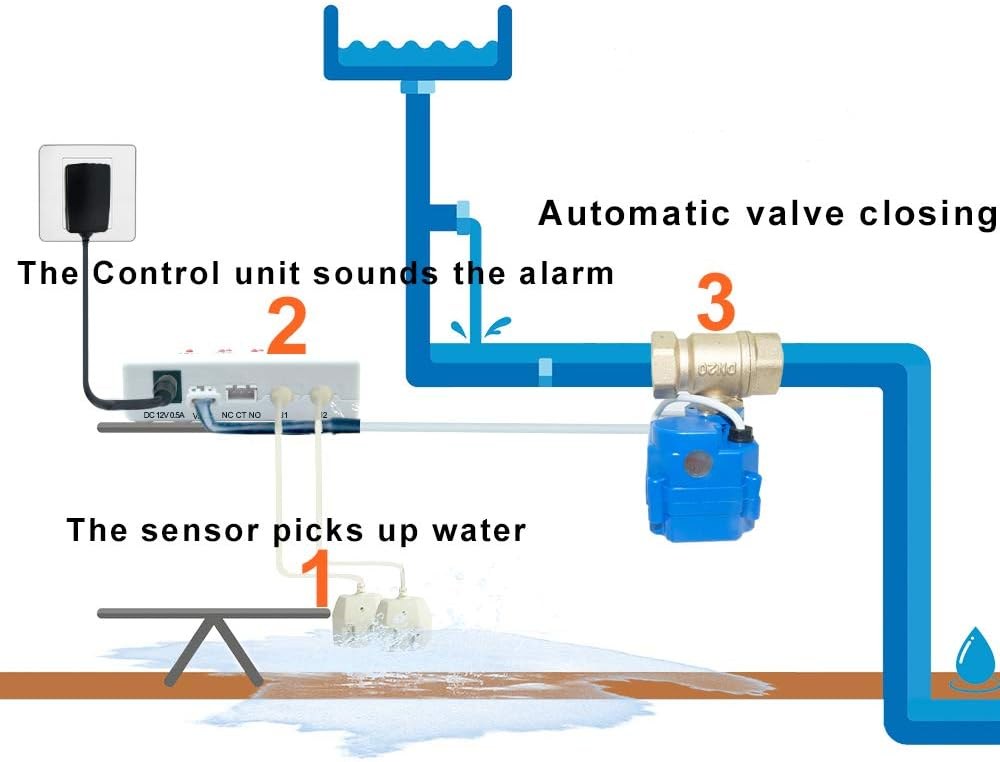
Installation is simple for most units. Sensors sit flat on the floor or stick with double-sided tape. Some have wired probes that reach into tight spots. Few tools are needed, so most US homeowners and renters can install one without a pro.
Set sensors at the base of each water source, usually within a few inches of where a leak would pool. Good spots include under sinks, behind toilets, near water heaters, beside washing machines, behind refrigerators with ice makers, and along basement floor drains. For a room-by-room look, see our guide on where to place water leak sensors.
Renters should stay non-destructive. Tape and floor placement leave no permanent marks. Ask the landlord before drilling or running wires. Tell cleaners or maintenance staff about the sensor so nobody moves it.
Think about noise too. A loud standalone siren can startle pets, kids, or sleeping adults. Some smart sensors offer app-only alerts or mute windows. Check the exact manual before relying on quiet settings. Caregivers can place sensors in a relative’s kitchen or laundry room and still get alerts on their own phone, but only if both phones share the same smart home account. Multi-floor homes work best with one sensor per water source, not one per house.
Privacy, Cybersecurity, Storage, and Subscription Limits
Smart leak sensors collect data. That includes alert history, account details, and sometimes Wi-Fi information. That data may live on the vendor’s cloud servers. Read the privacy policy before setup, and check how long records are kept and how you delete them.
Standalone alarms collect nothing. No Wi-Fi, no app, no cloud account, and no data trail. For maximum privacy, a standalone unit is the simpler choice.
Subscriptions vary by brand. Some companies include free basic phone alerts. Cloud history, extra sensors, or advanced automations may require a monthly or annual plan. Standalone alarms never ask for a subscription, but they also provide no remote history. Check the current plan page for your exact model because prices and features change.
Troubleshooting and Ongoing Maintenance
Most sensor problems come from dead batteries, weak Wi-Fi, or a sensor that shifted. Start with the easiest fix: dry the probes and clean them. Hard-water minerals can cause false alerts.
Test each sensor monthly. Press the test button or touch a probe with a damp cloth, then confirm the siren or app alert works. Replace batteries on the schedule in the manual. Keep the app updated and make sure at least two household members receive alerts. Write the test date on a small label near the sensor, especially if you own several units.
If a sensor stops reporting, work through this order:
- Replace the battery and wet the probes to test again.
- Check that the sensor is within range of the router or hub.
- Restart the app or hub, then follow the manual reset steps.
- Repeat the damp-cloth test after every fix.
If the device still fails, contact the manufacturer’s US support or check its support page for known issues.
Common Mistakes and When to Get Professional Help
The biggest mistake is buying before checking compatibility. A sensor that needs a hub will not work without one. The second mistake is trusting one sensor to cover a whole house. Water only triggers the sensor it touches.
Do not ignore false alerts. A beeping sensor may have condensation, dust, or a damaged probe. Fix the cause instead of unplugging the alarm. Disabling a sensor leaves the home unprotected.
You rarely need a professional for leak sensors. Call for help when a unit is hardwired. Also call if you want to connect the sensor to a plumbing shutoff valve or a monitored alarm panel. A plumber should handle real water damage, and an electrician should handle anything near power.
In any immediate emergency, call 911 when it is safe to do so. A leak sensor is a warning device. It does not replace emergency services or a plumber.
Final Takeaway
Choose a smart water leak sensor when you need remote alerts, household sharing, or smart home integration. Choose a standalone leak alarm when you want simple, offline, low-cost local protection. Place the sensor correctly, test it monthly, and remember that a sensor warns — it does not stop water. For model-level options, review the current best water leak sensors for smart homes before you buy.
Frequently Asked Questions
Most do, but some work through a hub or bridge instead. Check the exact model requirement before buying. Standalone leak alarms need no Wi-Fi at all.
Most run on batteries and keep working when the power goes out. Check the battery type in the manual and replace it on schedule.
Place them under sinks, near water heaters, behind toilets, beside washing machines, and along basement floor drains. Water must touch the probe for the sensor to alert.
Some brands offer free basic alerts, while cloud history and extra features may need a plan. Standalone alarms have no subscription at all.
No. A sensor only detects and warns. Shutting off water requires a separate motorized valve or an integrated system designed for that task.
Press the test button or touch the probe with a damp cloth. Confirm the siren or app alert works, then dry the probes completely.