Motion Sensor False Alarm Causes and How to Stop Them
Most motion sensor false alarms come from pets, temperature changes, poor placement, or low batteries. Fix the environment first, adjust sensitivity second, and replace the sensor only if problems continue.
Motion sensor false alarm causes are easy to find once you know what to look for. Pets, HVAC vents, sunlight, low batteries, and placement mistakes top the list. This guide explains each cause and shows you how to stop the alerts without losing real security.
What Counts as a Motion Sensor False Alarm?
A motion sensor false alarm is any alert that fires when no real threat exists. The sensor detects heat or movement that does not match an intruder. It could be a pet, a warm air blast, or headlights through a window.
False Alarm vs. Real Intrusion: How to Tell the Difference
A real intrusion involves a person entering a protected area. A false alarm involves everything else. Ask yourself three questions:
- Does the event happen at a predictable time, like every morning?
- Does the alert line up with HVAC cycles, sunlight, or pet movement?
- Does camera footage show a person or just motion?
If you see a pattern, you are dealing with a false alarm trigger, not a break-in.
Why This Problem Matters More Than Ever
Smart home security is more common now, and so are nuisance alerts. Too many false alarms create alert fatigue. You start ignoring notifications, and that is dangerous.
Some US cities also track false alarms and issue fines after repeated events. Fixing the cause protects your wallet and your safety.
The Most Common Causes of Motion Sensor False Alarms
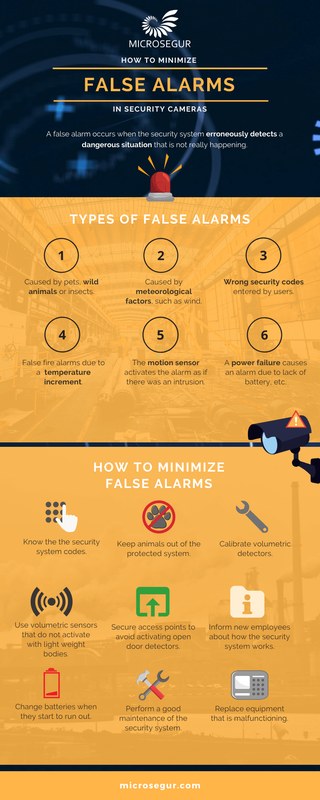
Most false alarms trace back to four everyday sources. Each one has a simple fix once you identify it.
Pets, Rodents, and Small Animals Triggering PIR Sensors
Most motion sensors use passive infrared (PIR) technology. PIR detects body heat and movement.
A medium-size dog walking past the sensor can trigger it just like a person. Cats, birds, and even rodents inside walls can set it off.
Many modern sensors include pet immunity. This feature ignores heat signatures below a certain size.
But pet immunity has limits. A large dog that jumps on furniture near the sensor can still cause alarms.
HVAC Vents, Sunlight, and Rapid Temperature Changes
PIR sensors react to rapid temperature changes. A heating vent blowing warm air across a room can mimic a person’s heat signature.
Direct sunlight warming a floor can do the same. Radiators, space heaters, and refrigerator heat exhaust can also trigger alerts.
Low Batteries, Wi-Fi Dropouts, and Firmware Bugs
A sensor with low battery voltage can send unstable signals. Some sensors report tamper or offline alerts when power dips.
Wi-Fi dropouts can produce false offline notifications. Firmware is the software built into the device. Bugs in it occasionally cause sensors to fire without motion.
Check the app for updates and battery status first.
Insects, Dust, and Debris on the Sensor Lens
A spider web across the lens can reflect heat and trigger the sensor. Dust buildup reduces detection quality.
Small insects crawling on the lens can create false signals. A gentle cleaning with a microfiber cloth usually solves this.
Placement Mistakes That Guarantee False Alarms
Where you place a sensor matters as much as the sensor itself. Poor placement creates false alarms that no setting can fully fix.
Mounting Too Close to Vents, Windows, or Heat Sources
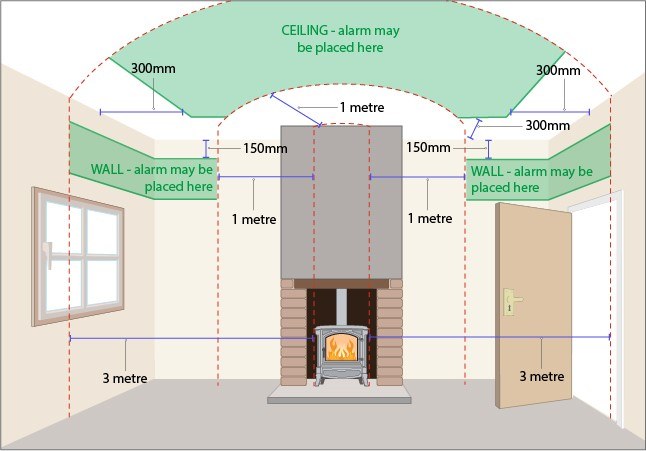
Sensors should not face windows, heating vents, radiators, or kitchen appliances. Direct sunlight through a window warms the floor and can trigger the PIR element. Move the sensor or angle it away from these heat sources.
Field of View Blind Spots and Overlapping Coverage
Every sensor has a limited field of view, usually measured in degrees. Mounting it in a corner creates blind spots behind the unit.
Two sensors pointing at the same area cause duplicate alerts. Map your coverage and adjust angles so each sensor owns one zone.
Video doorbells face similar coverage challenges. Our guide on Ring Video Doorbell not sensing motion explains how placement and field of view affect detection.
Renter-Friendly Placement vs. Permanent Mounting
Renters often avoid drilling holes. Adhesive strips and tabletop stands work, but they can shift over time.
A tilted sensor may point at a window or vent, causing false alarms. If you use temporary mounting, check the angle after cleaning.
Permanent mounting is more stable but may need landlord approval.
How to Stop Motion Sensor False Alarms

You can stop most false alarms with app settings and smart automations. The key is changing one thing at a time.
Adjusting Sensitivity, Pet Immunity, and Motion Delay Settings
Open the sensor’s app and look for three settings:
- Sensitivity: lower it in small steps.
- Pet immunity: enable it if your sensor supports it.
- Motion delay: increase the time between triggers.
Test after each change. Walk across the room and confirm the sensor still catches you. Then let your pet walk through and confirm it ignores them.
Using Smart Home Automations and Schedules to Reduce Alerts
Smart sensors can follow a schedule. Arm them only when you are away or asleep.
Use geofencing to disarm the system when your phone arrives home. You can also disable motion alerts during daytime hours when pets are active.
These automations cut false alarms without reducing night protection.
When to Add a Second Sensor Instead of Turning One Down
Lowering sensitivity too much creates blind spots. If you keep turning the sensor down, you may lose real coverage.
A better fix is adding a second sensor with a different angle. Two sensors covering separate zones catch real motion while reducing nuisance triggers.
The same principle applies to doorbells. If your Ring Video Doorbell is not sensing motion, check sensitivity and zone settings first.
Troubleshooting a Sensor That Keeps False-Alarming
When a sensor keeps false-alarming, work through the problem in order. Start with the simplest check and move to the hardest.
Isolating the Trigger Source Using App Event Logs
Most security apps keep an event log. Check the timestamps of each false alarm. Look for patterns:
- Do alerts happen at the same time daily?
- Does the time match when the HVAC kicks on?
- Does it match when your pet moves through the room?
Patterns show the source faster than guessing.
Testing with a Factory Reset and Firmware Update
If patterns do not help, try a clean restart. Remove the sensor from the app, update its firmware, and pair it again.
A factory reset clears corrupted settings. Re-test the sensor in the same spot.
If false alarms stop, the issue was software. If they continue, the issue is environmental or hardware.
Knowing When a Sensor Is Failing and Needs Replacement
Sensors do not last forever. Physical damage, water exposure, or years of use can wear down the PIR element.
If cleaning, repositioning, sensitivity changes, and a factory reset all fail, the sensor may be failing.
Compare the cost of a replacement with the cost of repeated false-alarm fines. A new sensor is often the cheaper path.
How False Alarms Affect Monitoring, Permits, and Fees
False alarms are not just annoying. They can affect your monitoring service, your permit status, and your local emergency response.
Self-Monitoring vs. Professional Monitoring: What Changes
- The household receives alerts and decides what action to take.
- Usually has lower ongoing cost.
- False alarms waste your time but not a monitoring center’s.
- A monitoring center may review eligible alarms before dispatch.
- Dispatch availability depends on the plan and event.
- Repeated false alarms can lead to dropped service or fees.
With professional monitoring, false alarms have real consequences. The monitoring center may call your home first.
If no one answers, they may dispatch police. Every unnecessary dispatch costs public resources.
False Alarm Ordinances, Permits, and Dispatch Limits
Cellular Backup and Battery Backup: Why They Matter
A sensor that loses Wi-Fi may send an offline alert that looks like a false alarm. Cellular backup keeps the system connected during internet outages.
Battery backup keeps sensors running during power loss. Both reduce confusing alerts and keep your system honest.
Maintenance That Keeps Motion Sensors Reliable
Regular maintenance prevents most false alarms before they start. A few simple tasks keep sensors accurate all year.
Cleaning Lenses and Checking Battery Health
Wipe the sensor lens with a dry microfiber cloth every few months. Do not use sprays directly on the lens.
Check battery levels in the app. Replace batteries before they hit the critical warning level.
Seasonal Adjustments for Heating, Cooling, and Daylight Changes
Winter heating changes temperature patterns in your home. Summer sun angles shift and may hit sensor lenses directly.
Spring and fall are good times to re-check sensor angles. A small adjustment can prevent months of nuisance alerts.
Building a Simple Quarterly Maintenance Routine
Set a reminder every three months to:
- Clean all sensor lenses.
- Test each sensor with a walk test.
- Update firmware in the app.
- Review the event log for new patterns.
This routine takes about 15 minutes and prevents most recurring false alarms.
Privacy and Cybersecurity for Connected Motion Sensors
Connected motion sensors are part of your home network. That means they need the same security care as your router and phone.
Securing Your Wi-Fi Network and Enabling MFA
Your motion sensors connect to your home network. A weak Wi-Fi password puts them at risk.
Use WPA2 or WPA3 encryption. Create a unique password for each security device account.
Enable multi-factor authentication (MFA) so a stolen password is not enough to access your system.
Hub Compatibility, Firmware Support, and Vendor Lifecycles
Some sensors need a hub or bridge. Others connect directly to Wi-Fi.
Check compatibility before buying. Also check how long the vendor supports firmware updates.
A sensor that stops receiving updates becomes a security risk over time. Replace unsupported devices rather than keeping them online.
Cloud Storage, Subscriptions, and Who Can Access Your Footage
If your sensor pairs with a camera, footage may go to the cloud. Review the subscription terms and retention period.
Know who else has access to your account. Remove old household users and revoke access for former residents.
Check whether the app offers local storage as an alternative.
Renter vs. Homeowner: Installation and Next Steps
Your installation options depend on whether you rent or own. Both paths can produce a reliable, false-alarm-free system.
No-Drill Options for Renters That Still Work Well
Renters can use adhesive strips, magnetic mounts, or tabletop stands. These work, but they need occasional re-checking.
A sensor that tilts over time may point at a heat source. If your lease allows it, use small finishing nails and patch the holes before moving out.
Homeowner Upgrades: Hardwired Power and Expanded Coverage
Homeowners have more options. Hardwired sensors eliminate battery changes.
Expanded coverage means more sensors in more rooms. You can also integrate sensors with smart lights, sirens, and professional monitoring.
These upgrades reduce false alarms because each sensor covers a smaller, cleaner zone.
Your Next Step: Building a False-Alarm-Free System
Start with the cheapest fix first. Check placement, clean the lens, and adjust sensitivity.
Review your event logs for patterns. If the sensor still false-alarms, try a factory reset.
Only then consider replacement or professional help.
For doorbell issues, our troubleshooting guide for Ring Video Doorbell not sensing motion covers the opposite problem. That is a sensor that misses real motion.
Most motion sensor false alarm causes are environmental, not mechanical. Pets, temperature shifts, poor placement, and low batteries account for most nuisance alerts.
Start with placement and sensitivity, keep the lens clean, and set a quarterly maintenance routine.
If a sensor keeps failing after all fixes, replace it before it costs you fines or ignored alerts.
Frequently Asked Questions
Nighttime false alarms often come from HVAC cycles, temperature shifts, or pets moving through the room. Check the app event log for timestamps and look for a pattern that matches your heating or cooling schedule.
Yes. PIR sensors detect body heat and movement, so pets can trigger them. Enable pet immunity if your sensor supports it, or adjust the sensitivity and mounting height.
Start with placement. Move the sensor away from vents, windows, and heat sources. Then clean the lens, lower sensitivity, and check the battery level in the app.
It can. Low voltage may cause erratic signals or offline alerts. Replace the batteries and see if the false alarms stop.
Some US cities and counties require alarm permits and may fine for repeated false alarms. Check with your local police or city office for the rules at your address.
Clean the lens every three months with a dry microfiber cloth. Also test each sensor and review the event log as part of a quarterly maintenance routine.