Pet Immune Motion Sensor Explained What You Need to Know
A pet immune motion sensor lets you arm your home security system while your dog or cat roams freely by ignoring heat and movement from pets under a specified weight threshold (typically 25–50 lbs). The key limitation is that immunity is not absolute—pets that jump on furniture or exceed the weight limit can still trigger false alarms, so you must mount the sensor strategically with the right height and angle to maintain reliability.
If the phrase “pet immune motion sensor explained” brought you here, you likely want one practical answer: how does a security sensor ignore your dog or cat without ignoring a real intruder? This guide walks through the technology, placement, limitations, power and network needs, privacy considerations, and troubleshooting in plain American English.
What a Pet Immune Motion Sensor Is
A pet immune motion sensor is a security device designed to detect human movement while ignoring household pets up to a stated size or weight. These sensors are common in indoor security cameras and standalone motion detectors used with smart home alarm systems.
The goal is simple: a 50-pound dog trotting across the living room should not trigger an alert, but a person walking through that same room should. When the feature works well, you get fewer false alarms and a security system your household actually trusts. Pet immunity, however, is never absolute. It is a tuning of detection hardware and software, and it has real limits.
How a Pet Immune Motion Sensor Works
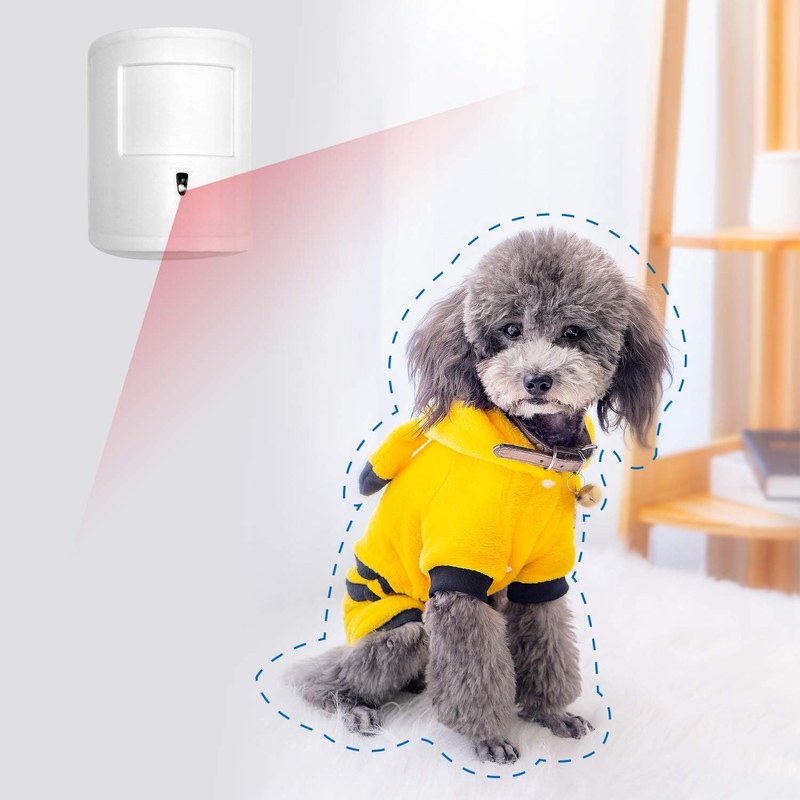
Most pet immune sensors rely on passive infrared (PIR) technology. A PIR sensor detects changes in infrared radiation, which is essentially heat. Warm objects — people, pets, radiators, sunny spots on the floor — emit infrared energy. When a warm object moves across the sensor’s field of view, the change in the infrared pattern triggers a detection.
Inside the sensor, a pyroelectric element works with a Fresnel lens that splits the view into detection zones. As a heat source moves from one zone to another, the sensor sees a changing signal. The classic problem is that a dog and a person both emit body heat and both move. Pet immune sensors solve this with several techniques, often in combination:
- Signal pattern analysis: The processor compares the size, shape, and speed of the moving heat signature against a human reference pattern. A small, low, fast-moving blob looks like a pet and is suppressed.
- Lens and zone design: The Fresnel lens can be designed or masked so the lower detection zones, where pets move, are less sensitive or excluded while higher zones stay active for human detection.
- Sensitivity thresholds: The firmware can ignore signals below a certain size, which roughly corresponds to a pet under a stated weight such as 40 or 50 pounds.
- Dual-technology sensing: Some models combine PIR with microwave or another motion technology. Both must agree that a human-sized target is present before an alarm is generated.
It is important to understand that most pet immune sensors do not “recognize” your pet. They do not use image recognition to identify a dog. Instead, they suppress heat signatures that look too small and too close to the floor to be a person. That distinction explains most of the feature’s limitations.
| Sensor type | How it filters | Best suited to | Main limitation |
|---|---|---|---|
| Standard PIR | Detects any moving heat source | Unoccupied rooms with no pets | Frequent false alarms from pets |
| Pet immune PIR | Suppresses floor-level heat signatures below a rated pet size | Homes with dogs or cats under the rated weight | Large, climbing, or multiple pets can still trigger it |
| Dual-technology PIR plus microwave | Requires both heat and motion confirmation | Higher-security areas with strict false-alarm limits | Higher cost; pet immunity depends on the model |
The Real Limits of Pet Immunity
Manufacturers typically advertise pet immunity up to a specific weight, often 40 or 50 pounds, and sometimes higher. That rating assumes the pet stays on the floor and moves like a typical pet during testing. Real pets do not always cooperate.
Watch for these common failure modes:
- Large breeds: A Great Dane or a heavy retriever can produce a heat signature close to a small human, especially if the sensor is mounted low.
- Jumping and climbing: A cat on a counter or a dog that rears up moves its body into the human detection zone.
- Multiple pets: Two pets moving together can create a combined heat signature large enough to look human.
- Furniture: A dog sleeping on a couch at human torso height can trigger detection when it shifts.
- Fast movement near the lens: A pet running directly toward the sensor can overwhelm the suppression algorithm.
Placement and Mounting: Getting the Angle Right

Placement determines whether pet immunity works. A sensor mounted at ankle height sees every pet as a large heat source. A sensor mounted too high may miss crouching intruders. The right height and tilt are specified in each product’s manual, so treat the manual as the source of truth.
General guidance that applies to most pet immune PIR sensors:
- Mount at the manufacturer’s recommended height, which is often between 6.5 and 8 feet for pet immune models.
- Angle the sensor so its detection pattern covers the room at human height rather than sweeping the floor.
- Keep the sensor away from heating vents, radiators, space heaters, sunny windows, and drafty areas where temperature changes can mimic motion.
- Aim the sensor across the room’s main walkways rather than directly at a pet’s bed or feeding area.
- Use the sensor’s walk test mode, if available, to confirm that a person is detected while your pet is ignored.
For renters, avoid permanent drilling when possible. Many sensors mount with adhesive strips or removable brackets, but check with your landlord or property manager before installing anything.
Power and Network Considerations
Pet immune motion sensors come in battery-powered, plug-in, and hardwired forms, and they may connect over Wi-Fi, Z-Wave, Zigbee, or a proprietary hub. The right choice depends on your home and your existing security setup.
Battery-powered sensors are easy to place but add a recurring maintenance task. Cold temperatures, frequent alerts, and weak Wi-Fi signals all drain batteries faster. If you are using a battery-powered sensor with a camera, the battery drain topic is similar to what you see with video doorbells; our guide to Google Nest doorbell battery life explained covers the same cold-weather and usage factors that affect many smart home devices.
Plug-in and hardwired sensors avoid battery swaps but limit placement to where outlets or wiring exist. If you are not comfortable with low-voltage wiring, have a qualified installer do the work.
If your sensor connects over Wi-Fi, keep it within a reasonable distance of the router or a mesh node. A weak signal causes delayed alerts and dropped connections. If the sensor connects to a hub, the hub’s placement matters more than the sensor’s. During an internet outage, many local sensors continue to detect motion, but cloud notifications and remote viewing will not work until the connection returns.
Where Recorded Events Go: Local and Cloud Storage
If your pet immune sensor includes a camera, recorded clips need to go somewhere. The two main options are local storage and cloud storage, and the choice affects privacy, cost, and reliability.
Local storage keeps video on a microSD card, a network video recorder, or a hub inside your home. You control the footage and pay no monthly fee, but a thief can remove the device, and a power outage or hardware failure can destroy unbacked-up clips.
Cloud storage uploads clips to the manufacturer’s servers. It protects footage from local theft and usually makes clips easier to view from anywhere, but it typically requires a subscription and raises questions about retention, account security, and third-party access. For a deeper look at the trade-offs, see our local storage security camera explained guide.
Privacy and Data for US Households
A sensor that ignores your dog is still a device that watches your home. If it includes a camera or microphone, you are making recording decisions that affect everyone in the household and sometimes your neighbors.
Before installing, think about where the sensor points. Hallways, entryways, and main living areas are common placements, but any camera that captures other people raises privacy concerns. Some states have laws about recording conversations, and landlord or HOA rules may restrict where cameras can be aimed. Point sensors away from neighbors’ windows, public sidewalks, and shared spaces.
Troubleshooting Common Pet Motion Sensor Problems
False alerts and missed detections are the two most common complaints with pet immune sensors. Work through these checks in order before contacting support.
- Clean the lens: Dust, smudges, or a spider web can distort detection.
- Re-check mounting height and angle: Compare your installation to the manual’s diagram. A tilt of a few degrees can change which zones are active.
- Adjust sensitivity: Most sensors let you lower sensitivity or switch to a major-motion-only mode.
- Check Wi-Fi or hub signal: A weak signal causes missed events and delayed notifications.
- Update firmware: Manufacturers often improve detection algorithms and fix bugs through updates.
- Run a walk test: Walk through the room at a normal pace and have a pet move through separately, then compare the recorded events.
If the sensor misses motion entirely, the problem is usually placement or network rather than pet immunity. The same root causes apply across many smart home devices; our guide to a Ring video doorbell not sensing motion lists the placement, angle, and sensitivity checks that typically resolve this class of issue.
Securing the Sensor and Your Account
A motion sensor is only as trustworthy as the network and account behind it. An unsecured smart home device can be accessed by someone who should not have access, which is a serious privacy risk when the device includes a camera.
A pet immune motion sensor is a practical way to reduce false alarms in homes with dogs or cats, but it is not magic. It works by suppressing small, floor-level heat signatures, which means large pets, climbing pets, and poor mounting can still cause alerts. Verify the rated pet weight for your exact model, mount the sensor at the recommended height, test it with both a person and your pet, and secure the device account with a strong password and MFA. If alerts continue, re-check placement before replacing the hardware.
Frequently Asked Questions
Compatibility varies by brand, so you must verify the specific model against your hub or app before buying. Check the manufacturer’s spec sheet for support with Alexa, Google Home, SmartThings, or HomeKit, and confirm the sensor’s Z-Wave, Zigbee, or Wi-Fi protocol matches your setup.
Most pet immune sensors are battery-powered and require no wiring, making installation a simple peel-and-stick or screw-mount process. Place them 2 to 4 feet off the ground, angled to avoid floor-level pet movement, and test the detection zone to ensure your pet’s size is truly ignored.
Battery-powered sensors typically remain operational during a home power outage because they do not rely on your electrical system. However, if your Wi-Fi router or hub loses power, the sensor cannot transmit alerts until connectivity is restored, so a backup battery for your network is recommended.
Some models connect directly to Wi-Fi, while others require a proprietary hub or a Z-Wave/Zigbee bridge to function. Cloud-based features like remote alerts and video integration may require a monthly subscription, but local-only operation and basic motion notifications are usually free.
Motion event data is typically encrypted in transit and stored either locally on an SD card or in the manufacturer’s cloud. Review the privacy policy for data retention and sharing practices, and enable two-factor authentication on your account to reduce cybersecurity risks.
Ownership costs include periodic battery replacement (usually every 6 to 12 months) and optional subscription fees for advanced features. Limitations include reduced sensitivity for very large pets, false triggers from rapid temperature changes, and the inability to distinguish between a pet and an intruder if the pet jumps onto furniture within the detection zone.