Best security camera for detached garage without Wi-Fi
Yes, you can secure a detached garage without Wi-Fi using a cellular camera, a local-recording camera, or a simple network upgrade. The best choice depends on your garage’s power, your budget, and whether you need live phone alerts.
Choosing a security camera for detached garage without wifi starts with one useful fact: you have more options than most people realize. This guide covers cellular cameras, local-recording cameras, and simple network upgrades.
Yes, You Can Use a Security Camera in a Detached Garage Without Wi-Fi
A detached garage often sits 30 to 100 feet from the main house. That distance can block or weaken your home Wi-Fi signal. Many homeowners assume a camera cannot work there. That assumption is wrong.
You have three practical paths:
- A 4G LTE cellular camera that uses a mobile data network
- A local-recording camera that stores video on an SD card or network video recorder (NVR)
- A network upgrade that extends your existing Wi-Fi to the garage
Each path has different costs, power needs, and limits. The right choice depends on whether your garage has electricity, whether you want live viewing from your phone, and how much monthly cost you can accept.
First, Define What “No Wi-Fi” Really Means for Your Garage

“No Wi-Fi” can mean several things. Before buying anything, check which situation matches your garage.
- Weak signal: Your phone shows one bar in the garage. The camera may connect but drop alerts or video.
- No signal at all: Your router cannot reach the garage. You need a network fix or a camera that does not use Wi-Fi.
- No internet at the property: A cabin, workshop, or rural building may lack broadband entirely. Cellular or local-only cameras are your main choices.
The term also matters for live viewing. Some cameras record without Wi-Fi but send alerts only when they reconnect. A fully local camera may not offer live phone viewing at all.
For a broader look at cameras that work without a home network, read our guide on security camera without wifi options.
Option 1: 4G LTE Cellular Cameras That Work Without Wi-Fi
Cellular cameras act like small smartphones. They use a SIM card and a mobile data plan to send video and alerts over a carrier network such as AT&T, T-Mobile, or Verizon.
These cameras are the best choice when:
- The garage has no Wi-Fi and no easy way to run cable
- You want live viewing and push alerts from anywhere
- The property has good cell coverage
Setup is straightforward. You insert a SIM card, connect the camera to power, and pair it with the manufacturer’s app. Many models also accept an SD card for local backup.
US Carrier Coverage and Data Plans for Cellular Cameras
Carrier coverage is not the same everywhere. A camera that works well in one state may struggle in another. Check the carrier’s coverage map for your exact garage address before buying.
Some camera brands sell their own data plans. Others let you use a SIM from a major carrier. Plans usually fall into two groups: monthly plans with a set amount of data, or prepaid plans you add to when needed.
Verizon, AT&T, and T-Mobile all offer data lines that may work in a camera. Verify current plans on the carrier’s website before purchase.
Data Usage and the Real Monthly Cost
Video uses data quickly. A single camera streaming or uploading clips can use 50 to 300 GB per month, depending on resolution and activity. Some plans charge per GB. Others offer unlimited data for a higher monthly price.
Realistic monthly costs usually range from $10 to $40. That cost is on top of the camera price. If you want 24/7 live viewing, expect higher data use.
The monthly fee is the main drawback. Over three years, the plan can cost more than the camera itself.
Option 2: Local-Recording Cameras With SD Cards or an NVR
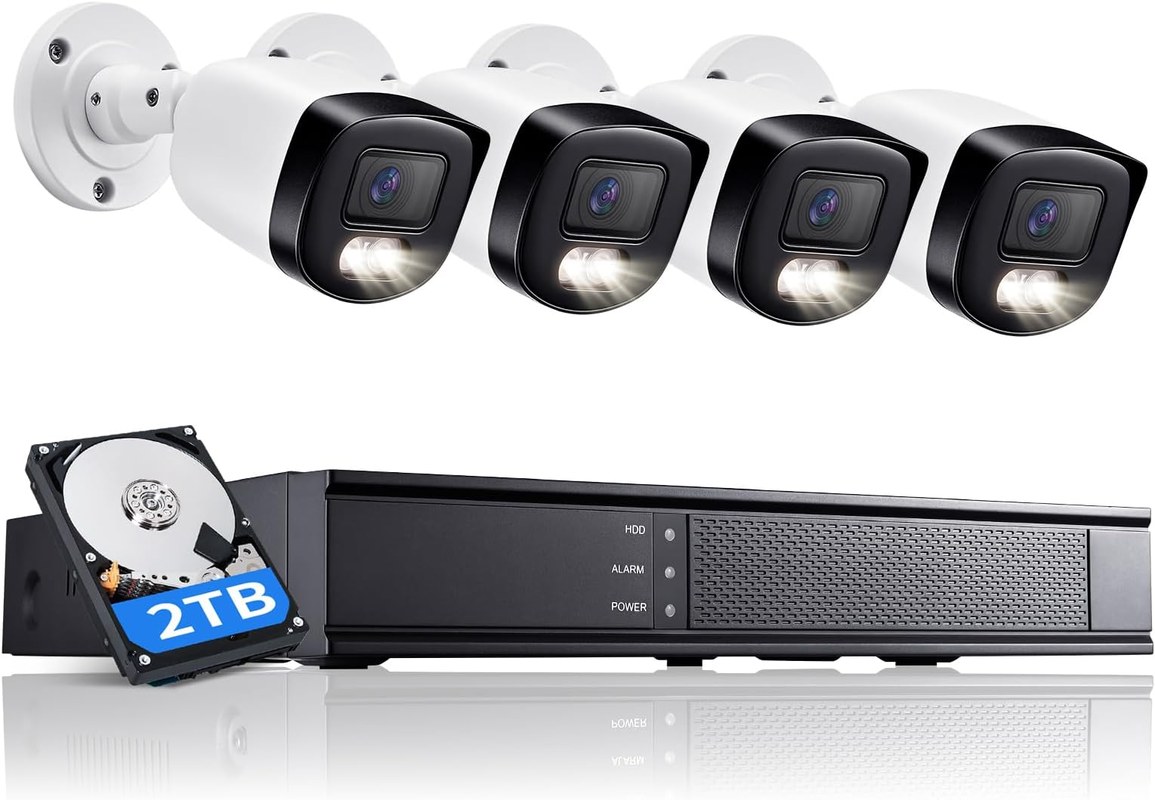
Local-recording cameras store video on a memory card or a network video recorder (NVR). An NVR is a device that stores video from multiple cameras on a hard drive. These cameras do not need internet for recording. They only need Wi-Fi if you want remote viewing, and some models work fully offline.
This option is best when:
- You want no monthly fees
- The garage has power
- You can walk to the garage to check the footage
Most battery cameras and many wired cameras support microSD cards. An NVR system connects several cameras with cables and stores everything on a hard drive. Some models record continuously when you want constant coverage.
For a deeper look at a popular battery camera that records without Wi-Fi, see our guide on how the Reolink Argus works without Wi-Fi.
Battery and Solar Power for Completely Off-Grid Placement
A battery camera can run for weeks or months on one charge. Add a small solar panel, and the camera can keep itself powered in a sunny location. This works well for garages without outlets.
Consider these points:
- Battery life varies with motion activity, night vision, and temperature
- Cold winters drain batteries faster
- Solar panels need direct sunlight for several hours a day
Check the exact model’s battery rating and operating temperature range. Some cameras stop charging below freezing, which matters in northern states.
How to Retrieve Footage Without an Internet Connection
Without internet, you cannot watch the camera from your phone. You retrieve footage directly from the device.
Three common methods:
- Remove the microSD card and read it on a computer
- Connect the camera to a small local monitor or NVR screen
- Use the camera’s own Wi-Fi hotspot mode in the app while standing near it
Each method takes a few minutes. Plan for this step with local recording. If you need quick remote access, a cellular camera may fit better.
Option 3: Extend Your Home Wi-Fi to the Garage Instead
Sometimes the smartest fix is not a different camera. It is a stronger network. If your home Wi-Fi almost reaches the garage, extending it can let you use any standard Wi-Fi camera.
Mesh Systems, Extenders, and Powerline Adapters
Three tools can expand your network:
- Mesh systems use multiple access points to cover a larger area. A node near the garage pushes signal farther.
- Wi-Fi extenders rebroadcast the existing signal. They are cheap but can cut speed in half.
- Powerline adapters send network data through your home’s electrical wiring. One adapter plugs into the house, another into the garage, and the second one broadcasts Wi-Fi.
Powerline adapters often work well for garages on the same electrical panel. Older wiring or a separate subpanel can reduce their performance.
Point-to-Point Bridges for Long or Obstructed Runs
A point-to-point bridge is a pair of small radios that beam Wi-Fi between two buildings. You mount one unit on the house and one on the garage, pointing at each other.
Bridges handle longer distances and obstacles better than extenders. Many support ranges of several hundred feet. They do require clear line of sight, some outdoor mounting, and a bit of network setup.
This option has a higher upfront cost but no monthly fees. It also keeps your camera choices wide open.
| Option | Best for | Power and network | Storage or plan | Main limitation |
|---|---|---|---|---|
| Cellular camera | Remote live viewing without home Wi-Fi | Battery or plug-in with mobile data | Monthly plan, often with SD backup | Ongoing data cost and coverage limits |
| Local recording | Zero monthly fees and offline recording | Battery, solar, plug-in, or PoE | SD card or NVR hard drive | No live remote viewing without extra setup |
| Wi-Fi extension | Keeping any standard Wi-Fi camera | Existing power plus network gear | Same as any Wi-Fi camera | Upfront cost and setup effort |
How to Power a Detached Garage Camera
Every camera needs power, and your garage may or may not have it. Know your options before you buy.
- Plug-in cameras need a standard 110V outlet. Most garages have at least one.
- Battery cameras need no wiring but require recharging every few weeks or months.
- Solar-powered cameras use a small panel to keep the battery topped up.
- PoE cameras receive power and data through one Ethernet cable. This requires a compatible NVR or PoE switch and cabling.
If your garage has no power and you cannot run a cord, battery with solar is the most practical path. If you have power, wired cameras offer the most reliable recording.
What You Sacrifice Without Wi-Fi — and How to Plan Around It
Every no-Wi-Fi option has a trade-off. Knowing the trade-off ahead of time prevents frustration.
- Cellular cameras: monthly cost, carrier coverage limits, and possible data caps
- Local-recording cameras: no live remote viewing and manual footage retrieval
- Wi-Fi extension: upfront cost, setup effort, and possible signal issues
You also give up some convenience. Cloud storage, voice assistant control, and smart-home routines may not work. A cellular camera keeps remote alerts. A local camera keeps recording but not remote access.
Consider how your camera behaves during an internet outage. Many Wi-Fi cameras stop remote viewing but keep local recording if they have an SD card. For more on that behavior, read our guide on how security cameras work during an internet outage.
Placement, Privacy, and Physical Security for Garage Cameras
Where you put the camera matters as much as how it connects.
Placement tips:
- Mount the camera 8 to 10 feet high for a good view and to keep it out of reach
- Aim at the garage door, driveway, and approach path
- Avoid pointing at neighbors’ windows, doors, or yards
- Angle the lens to reduce glare from direct sun or car headlights
Privacy is a real concern. Recording audio may be restricted in some states. Pointing a camera at a public sidewalk is legal in most places, but it can create neighbor tension. Use privacy zones if your camera offers them. Tell household members and frequent visitors that the camera records.
Physical security also matters. A thief can steal a camera mounted within reach. Use tamper-resistant screws and mount it high. For outdoor placement guidance, see our guide on which camera is best for outside.
Cybersecurity and Long-Term Ownership Costs
A camera without Wi-Fi still connects to something. Cellular cameras connect to the internet. Local cameras may connect to your phone through a hotspot. Protect each device the same way you protect any smart home gear.
Long-term costs include more than the camera price:
- Cellular plan: $10 to $40 per month
- Replacement batteries: every 1 to 3 years, depending on model
- Solar panel: one-time cost, but may need replacement over time
- SD card: $15 to $40 for a reliable high-endurance card
- NVR hard drive: replacement every 3 to 5 years is common
Add these to your budget before you decide. A $60 camera with a $20 monthly plan costs $300 over one year. A $150 local camera with an SD card costs almost nothing after purchase.
You can secure a detached garage without Wi-Fi. Choose a cellular camera for remote live viewing and alerts, a local-recording camera for zero monthly fees, or extend your home network to keep your camera options open. Match the choice to your garage’s power, your budget, and how often you want to check the footage.
Frequently Asked Questions
Yes. A cellular camera uses a mobile data plan, a local-recording camera stores video on an SD card or NVR, and a Wi-Fi extension can make any standard camera work. Choose based on your garage’s power, budget, and remote viewing needs.
Yes. A 4G LTE camera needs a SIM card and a monthly or prepaid data plan from a carrier. The camera cannot send live video or alerts without that connection.
A camera that streams often can use 50 to 300 GB per month. A camera that only uploads short motion clips uses much less. Check the plan’s data cap before you buy.
Only if the camera connects to your home Wi-Fi or creates its own hotspot for direct viewing. Without any network, you must remove the SD card or use a local monitor to review footage.
Use a battery camera, ideally with a small solar panel in direct sunlight. Some battery cameras stop charging below freezing, so check the operating temperature range for your climate.
Recording video on your own property is legal in most US states, but audio recording rules vary by state. Avoid pointing the camera at neighbors’ private areas and review your state’s consent rules for audio.





One Comment