Interconnected Smoke Alarms vs Smart Smoke Alarms Guide
Interconnected alarms make every unit sound when any one detects smoke. Smart alarms add phone alerts, app controls, and home-automation features, and many also interconnect with matching units.
The choice between interconnected smoke alarms vs smart smoke alarms comes down to how warnings are delivered. Interconnected alarms make every unit sound when any one detects smoke.
Smart alarms add phone alerts, app controls, and home-automation features. This guide compares both. It helps you pick the right fit for your home, budget, and daily routine.
Direct Answer: What Interconnected Smoke Alarms vs Smart Smoke Alarms Mean for a US Home
An interconnected smoke alarm links with other units. One alarm triggers every alarm in the house.
A smart smoke alarm connects to Wi-Fi or a hub, a central device for smart-home products. It sends alerts to your phone. Many smart alarms also interconnect with matching units from the same brand.
For most US homes, the practical answer is clear. Set up interconnected detection first.
It wakes the whole household. Then add smart features when remote alerts matter to you.
Interconnected wiring is required in many new US homes. Battery-powered wireless units bring the same whole-home warning to older homes. They need no new wiring.
Smart alarms are useful for frequent travelers and large houses. They also help anyone who wants a status check from anywhere.
How It Works and What It Can Actually Do
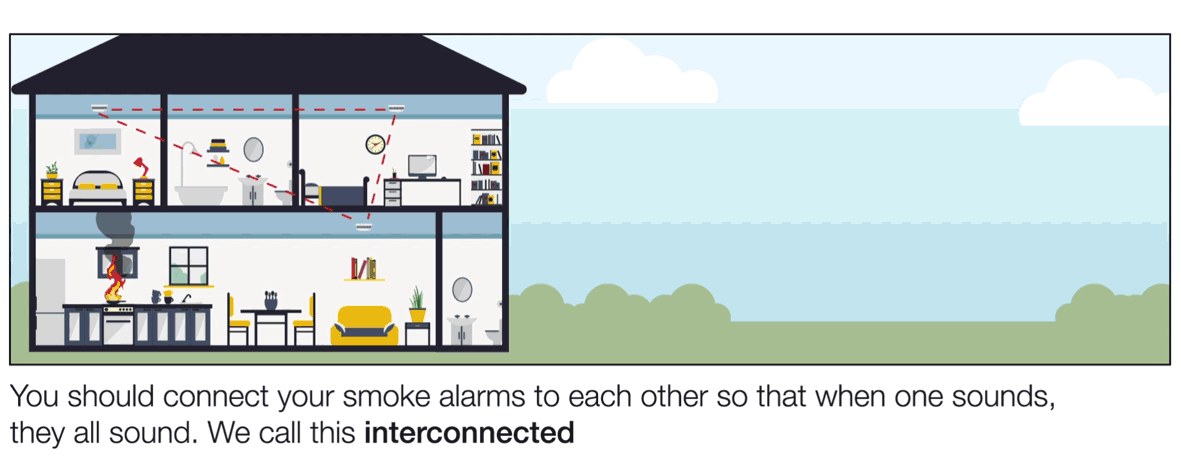
An interconnected smoke alarm is a standard smoke alarm. It links to other units. One detection makes every unit sound.
A smart smoke alarm adds Wi-Fi or hub connectivity. It also adds phone alerts and app controls. Many smart models also interconnect with matching units.
This gives you both whole-home warning and remote alerts.
Hardwired interconnected alarms use a three-wire connection. The wires are hot, neutral, and a shared signal wire.
When one unit detects smoke, it sends a pulse down the signal wire. All connected units sound.
Wireless interconnected alarms use short-range radio signals. They need no extra wires.
The radio link is usually brand-specific. Units from different manufacturers generally cannot join the same group.
Smart smoke alarms add a network connection. They use Wi-Fi or a hub to send status updates and alerts to a phone app.
Many models include voice alerts, self-test reports, and app-based history. Some work with Alexa, Google Home, Apple Home, or a security system keypad.
Many smart alarms also interconnect with other units from the same brand. You can get whole-home sirens and phone alerts together.
For a side-by-side look at models, see our guide to the best smart smoke and carbon monoxide detectors.
There are limits. A smart alarm sends a push alert when it detects smoke. It does not call 911 by itself.
If a real emergency occurs, leave the home. Call 911 when it is safe.
During a Wi-Fi outage, the sensor and local siren still work. Remote phone alerts pause.
| Capability | Interconnected (non-smart) | Smart smoke alarm |
|---|---|---|
| Whole-home siren | Yes, when linked | Yes, when linked to matching units |
| Phone alerts away from home | No | Yes, through the app |
| Works during Wi-Fi outage | Yes | Siren: yes. Phone alerts: no |
| Needs Wi-Fi or hub | No | Usually yes |
| Typical power | Battery or hardwired 120V | Battery, hardwired, or hub-powered |
| Subscription for core alerts | None | Often none. Verify plan terms |
Compatibility, Power, Wi-Fi, and Platform Requirements
Interconnected systems need hardwired 120-volt power. They can also use a compatible battery-power radio link.
Smart alarms need Wi-Fi, an app, and a supported platform. Before you buy, confirm power, brand compatibility, and network requirements.
These choices decide whether your units work together and stay online.
Hardwired alarms run on standard household circuits. They include a battery backup.
Battery-only alarms are simpler to install. They still need regular battery checks.
Many newer units use a sealed 10-year battery. You replace the whole unit instead of the battery.
Never install a hardwired alarm on a wall-switch circuit. The unit could lose power without your knowledge.
Interconnection compatibility is a common trap. Wireless links work only between compatible units. They must come from the same brand family.
Hardwired links are also safest when the units match. Check the manual before mixing any brands.
Smart alarms also depend on system support. Check the app, mobile operating system, voice assistant, and hub requirements before purchase.
Some products support Matter or Thread. These are smart-home standards. Others rely on a hub made by one brand.
Our comparison of Matter vs Zigbee for home security devices explains how these radios differ.
Placement, Installation, and Household Considerations

Follow the same placement guidance for every smoke alarm. Put one in each bedroom. Put one outside sleeping areas.
Put one on every level of the home. Interconnection helps most in large homes. Sound travels between linked units.
Household needs, rental rules, and wiring affect installation steps.
Keep units at least 10 feet from cooking appliances. This reduces false alarms.
Think about your household. Families with children, older adults, or people with hearing loss may need extra devices. Examples include strobe lights and vibration.
A standard audible alarm may not wake someone with hearing loss.
Battery units are usually a simple do-it-yourself task. They need basic tools.
Hardwired replacement involves 120-volt wiring. It may require a permit and a licensed electrician in your area.
Wireless battery-powered interconnected alarms are the least invasive option. They work well for apartments and older homes.
Privacy, Cybersecurity, Storage, and Subscription Limits
Smart smoke alarms send status and alert data to the cloud. Privacy and security deserve attention before setup.
Subscription terms vary by brand and model. How long cloud history is kept varies.
Plan for a unique password. Turn on multi-factor authentication (a second login step). Update software regularly.
Most smart units send status, event alerts, and test logs to the company’s cloud. Some models include a microphone and speaker for voice warnings.
Review the microphone setting. Mute it when you prefer.
Subscription costs vary. Basic phone alerts are often free.
Extended history, professional monitoring, or advanced smart-speaker features may require a paid plan. Read the current plan page for the exact model. Terms change.
Our guide to smart smoke detectors without a subscription shows which models keep useful app features free.
How long history is stored varies. Some companies keep event history in the cloud for a limited period.
Others let you delete or export your data through the app. Check the company’s privacy page if data control matters to you.
Troubleshooting and Ongoing Maintenance
Monthly testing is the core maintenance task. Press the test button on one unit. Confirm every linked unit sounds.
Clean vents. Respond to chirps. Replace units at the end of their service life.
Press and hold the test button until the siren sounds. Ask someone to verify that all linked units sound.
Clean the vents with a vacuum attachment or soft brush. This removes dust.
Chirping needs attention. A single chirp every minute or two usually means low battery.
It can also mean a dirty sensor. It can signal the end of the alarm’s life.
Check the manual. Replace the battery if needed. Replace the entire unit after about 10 years.
False alarms happen near kitchens and steamy bathrooms. Use the hush button to silence a non-emergency alert.
Then clean the unit. If cleaning and fresh batteries do not help, replace the unit.
Wi-Fi troubles are common with smart alarms. The app may show offline while the local siren still works.
Restart your router. Check the supported Wi-Fi band. Reconnect the alarm through the app.
Band steering on newer routers can block older devices. Choose a compatible network if needed.
Common Mistakes and When to Get Professional Help
Most serious problems come from brand mixing. They also come from disabled alarms and bad placement.
Match compatible units. Never remove a battery to stop an alarm. Keep units away from cooking areas.
If a task involves hardwired wiring or landlord rules, call for help.
Mixing incompatible brands is the biggest mistake. Wireless interconnection links are brand-specific.
Hardwired units work most reliably when they match. Mismatched units may sit silent.
Removing the battery to silence a false alarm is dangerous. Use the hush button or fix the cause instead.
Placing alarms too close to the kitchen causes frequent false alarms. Follow the manufacturer’s clearance guidance for cooking appliances.
Assuming a smart alarm interconnects with any other brand leads to quiet gaps. Verify the feature before you buy.
Ignoring end-of-life chirps leaves a home unprotected. A 10-year-old alarm should be replaced, not silenced.
Get professional help for hardwired changes. Also get help for unknown wiring, permit questions, or multi-unit buildings.
Renters should contact the landlord or property manager when alarms are missing. They should also do this when alarms are damaged or over 10 years old.
Landlord-tenant rules usually assign smoke alarm maintenance to the property owner.
Interconnected smoke alarms give you the whole-home warning that saves time in an emergency. Smart alarms add phone alerts, voice status, and app convenience.
The strongest setup is often a smart alarm that also interconnects with matching units. Verify power, brand compatibility, subscription terms, and local code before you buy.
Test every unit monthly. Replace alarms after about 10 years.
Frequently Asked Questions
Some do. Models from the same brand family, such as Google Nest, can link together so one detection sounds every unit. Check the product manual for the exact interconnection feature before buying.
Usually not. Wireless interconnection links are often brand-specific, and hardwired links are most reliable when units match. Mixing brands can leave some alarms silent when they should sound.
Yes, the local sensor and siren still work if the unit has battery backup or a sealed battery. Phone alerts depend on Wi-Fi and router power, so remote alerts may not arrive during an outage.
Basic phone alerts are often free, but extended cloud history, professional monitoring, or certain integrations may require a paid plan. Read the current plan page for the exact model you are considering.
Install one in every bedroom, outside each sleeping area, and on every level of the home. Keep units at least 10 feet from cooking appliances to reduce false alarms.
They send status data to the vendor’s cloud, and some include a microphone or speaker for voice alerts. Set a unique password, enable multi-factor authentication, update firmware, and review shared users.