Smart Lock Latch vs Deadbolt Explained in Plain English
Smart deadbolts provide real security because a solid bolt blocks shimming and kick-in attacks. Smart latches are easier to install and fit rental doors, but they only stop casual entry.
This smart lock latch vs deadbolt explained guide covers how each lock works, where they fail under real break-in attempts, and which one fits your door, lease, and daily routine.
The Short Answer: Smart Deadbolts Win on Security, Smart Latches Win on Simplicity
The core difference in one sentence
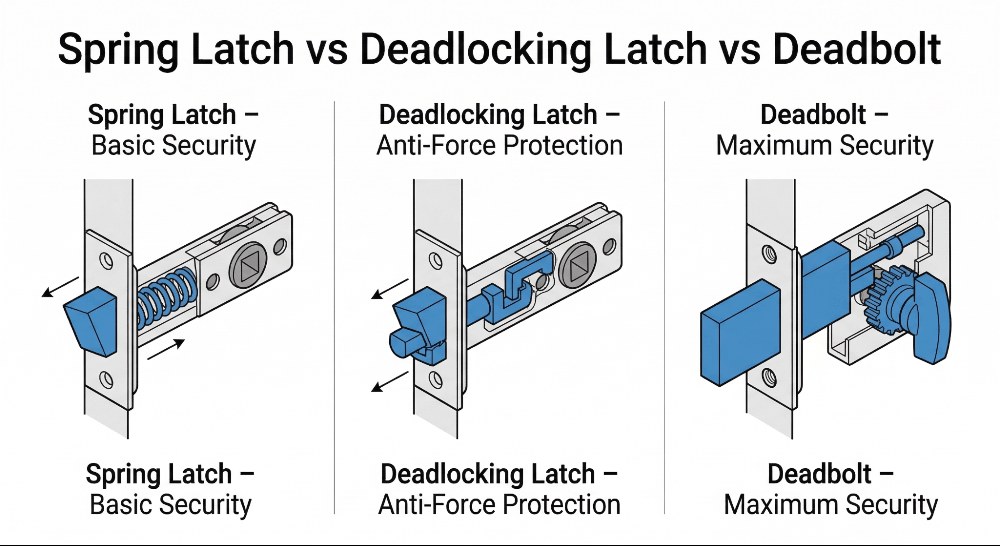
A smart deadbolt pushes a solid metal bolt deep into the door frame. A smart latch uses a spring-loaded bolt that a thin tool can push back. That difference drives everything else.
Deadbolts are the standard for exterior doors in the US. Smart latches are common on interior doors, closets, and some apartment doors where drilling is not allowed.
When the “latch is enough” argument actually holds
A smart latch is enough when the door is not a primary entry point. Bedrooms, offices, closets, and utility rooms rarely need deadbolt-level security. The latch keeps people out without the hassle of a key.
Renters often face a different situation. Many leases forbid drilling new holes or replacing the lockset. A smart latch that fits the existing hole can be the only practical option. It is better than no smart lock at all, as long as you understand the trade-off.
Smart Lock Latch Explained: The Spring-Loaded Bolt That Got Smarter
How a spring latch works mechanically
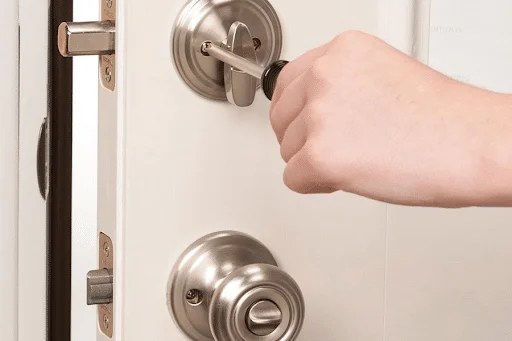
A spring latch has a beveled bolt. The angled edge lets the door push the bolt back when it closes. A spring then snaps the bolt into the strike plate. That is why a latch locks automatically when you close the door.
The same spring makes the latch easy to open. Turning the knob or lever retracts the bolt.
What the smart electronics actually control
A smart latch replaces the manual turn with a small motor. The motor rotates the same mechanism you would turn by hand. The keypad, app, or fingerprint reader tells the motor when to turn.
The smart features work like they do on a deadbolt. You get access codes, auto-lock, and remote control. The electronics do not make the physical latch stronger.
The shimming problem and why latches fail the credit-card test
The credit-card test is simple. Slide a thin card between the door and the frame, right at the latch. Push the card against the beveled edge. The latch slides back, and the door opens.
This attack works on almost every spring latch. It takes seconds and needs no tools. A deadbolt has no beveled edge, so the same trick fails.
Smart Deadbolt Explained: The Solid Bolt That Stops Forced Entry
How a deadbolt works mechanically
A deadbolt has a solid metal bolt with a flat face. No spring pushes it forward. You turn a key, a thumb turn, or a motor to extend it into the strike plate.
Because the bolt has no spring and no bevel, a card cannot push it back. The bolt stays locked until something rotates it out of the way. That is the core security advantage.
Smart deadbolt designs: full-body, retrofit, and integrated handles
Full-body smart deadbolts replace the entire lockset. The keypad, motor, and bolt live in one unit. These are the most common type and usually the easiest to install.
Retrofit smart deadbolts mount over your existing deadbolt. You keep the original key cylinder. The smart device turns the thumb turn from inside. This works well for renters.
Integrated handles combine a deadbolt and handle in one unit. They need a larger cutout in the door. Check your door’s existing holes first.
Security Comparison: Latch vs Deadbolt Under Real-World Break-In Attempts
Shimming, bumping, and kick-in attacks
Shimming defeats latches. It barely touches a deadbolt. Bumping uses a specially cut key to force the pins inside a key cylinder. Many smart deadbolts have no key cylinder at all, which removes that risk.
Kick-in attacks test the bolt, the strike plate, and the door frame together. A deadbolt with a reinforced strike plate and long screws resists a kick far better than a latch.
ANSI/BHMA grades and what they mean for smart hardware
ANSI and BHMA grade locks from 1 to 3. Grade 1 is the strongest. Grade 2 is standard residential. Grade 3 is basic.
Many smart deadbolts carry a Grade 2 or Grade 3 rating. Grade 1 exists but costs more. Check the grade on the exact model. A latch rarely carries a high grade because the mechanism is weak.
The strike plate factor: where most latch failures happen
The strike plate is the metal piece on the door frame that catches the bolt. Most cheap strike plates use short screws that only reach the trim, not the frame stud behind it.
Upgrading to a reinforced strike plate with 3-inch screws makes a real difference. This applies to both latches and deadbolts. A deadbolt with a weak strike plate is still vulnerable to a strong kick.
Installation and Door Fit: What Your Door Actually Accepts
Bore holes, backsets, and handing: the measurements that matter
Most US doors use a 2-1/8-inch bore hole for the lock body. The backset is the distance from the door edge to the center of that hole. Standard backsets are 2-3/8 or 2-3/4 inches.
A deadbolt needs its own bore hole above the handle. A latch uses the existing hole. If your door only has one hole, a smart latch fits without drilling.
Handing refers to which side the hinges are on. Most smart locks are reversible. For a full walkthrough, see our smart lock installation requirements guide.
When a smart latch is the only practical option
Some doors cannot take a deadbolt. Metal apartment doors, glass doors, and unusual frames are common examples. Drilling can damage the door or void a warranty.
In those cases, a smart latch is the practical choice. Pair it with a door sensor or camera for extra awareness. The latch alone is weak, but the combination helps.
Reversible installation and keeping the original hardware
Most smart latches and many smart deadbolts install without permanent changes. Keep the original hardware in a box so you can reinstall it at move-out.
Before buying, check the door compatibility details for your door thickness and bore hole size. Our smart lock door compatibility guide explains how to measure and match the right lock to your door.
Renter vs Homeowner Constraints: What You Can Install Without Breaking Your Lease
Lease clauses about door hardware and security devices
Most leases say you cannot change the locks without permission. Some leases specifically ban drilling or replacing entry hardware. Read your lease before buying anything.
If the lease is silent, ask the landlord in writing. A short email saying you will keep the original hardware and restore it at move-out often works.
Landlord approval and documenting your installation
Get approval in writing. Save the email or signed note. Take photos of the door before and after installation. Keep receipts for the lock and any tools.
This documentation protects you at move-out. It also helps if the landlord needs a key or access code for emergencies. Our guide on whether renters can install smart locks covers the process in more detail.
Power, Connectivity, and Smart Features: The Shared Backbone
Battery life: motorized latches vs deadbolts
Both smart latches and smart deadbolts run on batteries, usually AA or CR123A cells. A motorized deadbolt has to push a heavier bolt, so it can draw more power. A latch moves less mass, so it may last longer on the same batteries.
Connectivity matters more than the bolt type. Wi-Fi drains batteries faster than Bluetooth or Z-Wave. Check the battery level monthly and keep spares on hand. If the battery dies, most smart locks still work with a physical key or backup power. See what happens when a smart lock battery dies for the full picture.
Wi-Fi, hubs, and the connectivity checklist
Direct Wi-Fi locks connect to your router. They work anywhere you have internet but use more power. Bluetooth locks connect only when your phone is nearby. Z-Wave and Thread locks need a hub but use less power.
Matter lets locks work across Apple, Google, and Amazon platforms. Check which protocol your lock uses. If Wi-Fi goes down, a Bluetooth or Z-Wave lock still works locally, but remote access stops.
Auto-lock, geofencing, and shared access
Auto-lock re-engages the bolt after the door closes. This works on both latches and deadbolts. It solves the “did I lock the door?” problem.
Geofencing uses your phone’s location to lock or unlock as you arrive or leave. It can be unreliable if your GPS drifts. Shared access lets you create temporary codes for guests, cleaners, or dog walkers.
Maintenance, Subscriptions, and Total Cost of Ownership
What wears out first: springs, motors, and battery contacts
Springs in a latch lose tension over time. The latch may stop snapping into the strike plate. Motors in a deadbolt can wear out after years of use. Battery contacts can corrode in a humid environment.
Clean the lock face and keypad with a dry cloth. Replace batteries before they hit zero. Lubricate with dry graphite, not oil, which attracts dust.
Subscription traps and firmware support lifecycles
Some brands charge a monthly or yearly fee for remote unlock, activity logs, or cloud storage. Read the plan page before buying. Many locks work fine without a subscription.
Firmware support matters too. A lock that stops receiving updates can develop security issues. Check the vendor’s update commitment before you buy. Budget for the lock, batteries, hub, and any subscription.
How to Choose: A Practical Decision Framework
The door test: what type of door do you have?
Measure the bore hole and backset. Check the door thickness. Look for an existing deadbolt hole. If the door only accepts a latch, your choice is made.
The security test: what’s your entry point worth?
Is this a front door or an interior door? What is behind it? Bikes, tools, documents, or sleeping family members raise the stakes. A front door deserves a deadbolt. A closet door does not.
The lifestyle test: who needs access and how often?
Do you have kids who lose keys? Guests who come and go? Smart locks solve these problems with codes and schedules. The question is whether you need deadbolt security or latch simplicity.
Choose a smart deadbolt for any exterior door that guards your home and family. Choose a smart latch for interior doors, low-risk entries, or rental situations where drilling is not allowed. Measure your door, check your lease, and verify the lock’s security grade before you buy.
Frequently Asked Questions
No, not for security. A smart latch uses a spring-loaded bolt that a credit card can push back. Use a smart deadbolt for exterior doors that need real protection.
Most smart latches fit standard 2-1/8-inch bore holes with 2-3/8 or 2-3/4-inch backsets. Measure your door before buying and check the product manual for exact requirements.
Most smart locks keep a physical key backup or a 9V emergency power port on the outside. Replace batteries promptly and test the backup method when you first install the lock.
No. Bluetooth and Z-Wave locks work locally without internet. You only need Wi-Fi for remote access from outside your home. Check which protocol your lock uses.
Only with written landlord approval. Many leases ban changing locks. Offer to keep the original hardware and restore it at move-out to increase your chances of approval.
Battery life varies by model and usage. Most smart locks run 3 to 12 months on a set of batteries. Wi-Fi locks drain faster than Bluetooth or Z-Wave models.