Can Smart Locks Be Picked Heres What You Should Know
Yes, smart locks can be picked, but most real break-ins use force instead of lock picks. The bigger risks are weak passwords, outdated firmware, and a poorly installed door.
You may wonder can smart locks be picked, and the short answer is yes — but the real threat is usually not what you expect. This guide explains how picking works, what matters more, and how to choose a smart lock that fits your door, budget, and daily routine.
The Short Answer: Yes, Smart Locks Can Be Picked — But Not the Way You Think
Most smart locks keep a traditional key cylinder for backup. That cylinder can be picked with the same tools used on a standard deadbolt. The electronic parts are a separate attack surface.
Traditional Picking vs. Electronic Bypass: Two Different Threat Models
Traditional picking uses thin metal tools to lift pins inside the cylinder. It takes skill, patience, and time. Electronic bypass targets the circuit board, Bluetooth signal, Wi-Fi connection, or mobile app instead.
Both methods can open a door. They just require different skills and tools. A lock can be mechanically strong but electronically weak, or the reverse. The differences between a smart lock and a traditional key lock matter here.
Why Burglars Rarely Pick Locks in Real-World Break-Ins
Most real break-ins use force, not finesse. Kicking a door, prying a frame, or breaking a window is faster and needs no special skill. Lock picking is rare because it is slow and uncertain.
Door and frame strength matter more than the lock cylinder. A solid door, a reinforced strike plate, and long screws do more to slow entry than a fancy lock.
How Smart Lock Design Affects Pick Resistance
The Physical Key Override Is the Weakest Link
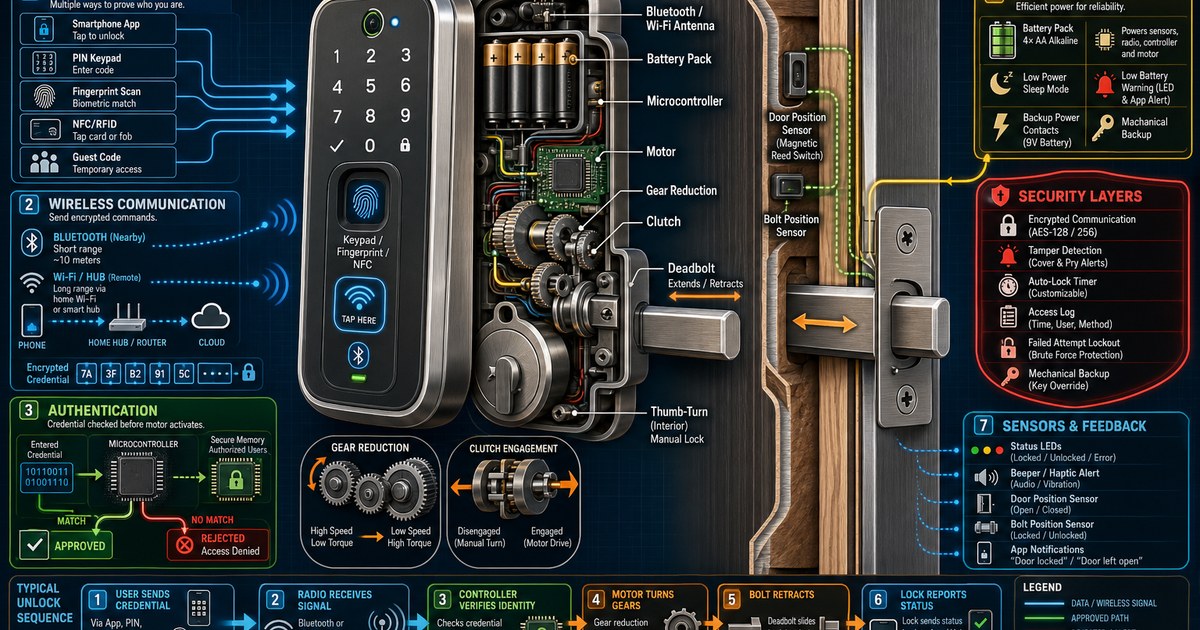
Many smart locks include a physical key override. That keyway is often the easiest target. Some models hide the keyway behind a sliding cover. Others use a higher-security cylinder with anti-pick pins.
If a lock has no keyway, traditional picking is not an option. But keyless models create other trade-offs, which we cover later.
Electronic Attack Vectors: Spoofing, Replay, and Firmware Exploits
Spoofing means a hacker pretends to be your phone or hub. Replay means recording a valid unlock signal and sending it again. Firmware exploits find bugs in the lock’s software.
These attacks need technical skill and usually close proximity. They are far less common than physical break-ins, but they are possible.
Bump Keys, Raking, and Single-Pin Picking: What Actually Works
Single-pin picking works on any pin-tumbler cylinder, including many smart locks. Raking is faster but less precise. Both leave no visible damage.
Why Bump Keys Are a Bigger Practical Threat Than Picking
A bump key is a specially filed key that can open many pin-tumbler locks. A quick tap with a hammer can set the pins. Bumping takes seconds, while picking takes minutes.
Cheap cylinders are the most vulnerable. Higher-grade cylinders often include anti-bump and anti-pick features.
Snap Guns and Drilling: Physical Attacks That Bypass Skill
A snap gun vibrates the pins open quickly. Drilling destroys the cylinder entirely. Both are noisy and leave visible damage.
Many quality smart locks use hardened steel pins or drill guards to slow these attacks. No consumer lock stops a determined attacker forever. The goal is to make entry slow and loud.
The Cybersecurity Risks That Matter More Than Lock Picking
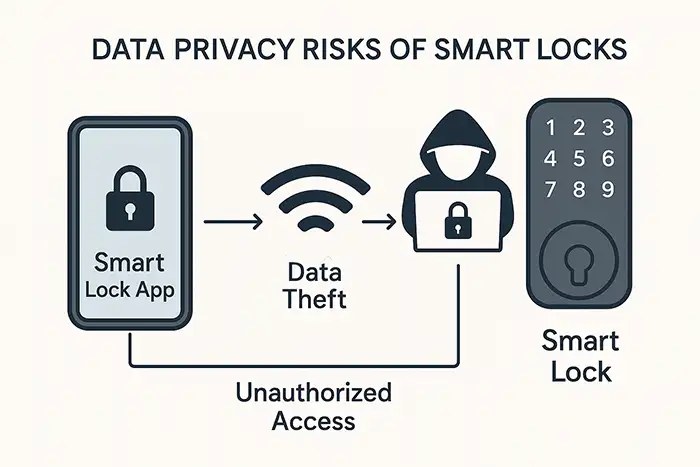
For most owners, the bigger risk is not a pick set. It is a weak password, an outdated app, or a forgotten firmware update.
Relay Attacks and Bluetooth Vulnerabilities
A relay attack uses two devices to extend the signal between your phone and your lock. This can trick the lock into thinking your phone is nearby. Modern locks use encrypted handshakes to reduce this risk, but not all models are equal.
Firmware, App Permissions, and the Vendor Support Lifecycle
Firmware updates fix known security bugs. Check that your lock, hub, router, and app are current. Review app permissions and remove access you no longer need.
Vendor support matters. If a company stops updating a lock, that lock may become riskier over time. Check the support page before you buy.
Account Security: MFA and Shared-User Management
Use a unique password for your lock account. Turn on multi-factor authentication (MFA) when offered. Review shared users and revoke old access.
What to Look For in a Pick-Resistant Smart Lock
ANSI/BHMA Grades and Cylinder Quality
ANSI/BHMA grades rate mechanical strength. Grade 1 is the strongest, Grade 2 is residential grade, and Grade 3 is the basic entry level. A higher grade usually means a better cylinder and tougher housing.
Check the cylinder type. Some use standard pin-tumbler cores. Others use sidebars, dimple keys, or electronic-only access.
Keyed vs. Keyless Models: Backup Entry Trade-Offs
Keyed models give you a physical backup if the battery dies. But the keyway can be picked or bumped. Keyless models remove the keyway but leave you reliant on batteries, a keypad, or an external power option. Not every smart lock has a physical key, and the choice affects your backup plan.
| Type | Backup entry | Best suited to | Main limitation |
|---|---|---|---|
| Keyed smart lock | Physical key | Homeowners who want a mechanical fallback | Keyway can be picked or bumped |
| Keyless smart lock | Keypad or external power | Renters and minimalists who avoid keys | No key backup if electronics fail |
Installation and Door Fit: Getting the Basics Right
Door Handing, Deadbolt Alignment, and Strike Plate Fit
A poorly installed lock is easier to force. Check that the deadbolt aligns with the strike plate. A misaligned bolt can wear out the lock and reduce security.
Use the longest screws that fit your door frame. A reinforced strike plate adds real strength. If the door is loose or the frame is weak, no lock will fix it.
Renter vs. Homeowner: What You Can and Can’t Modify
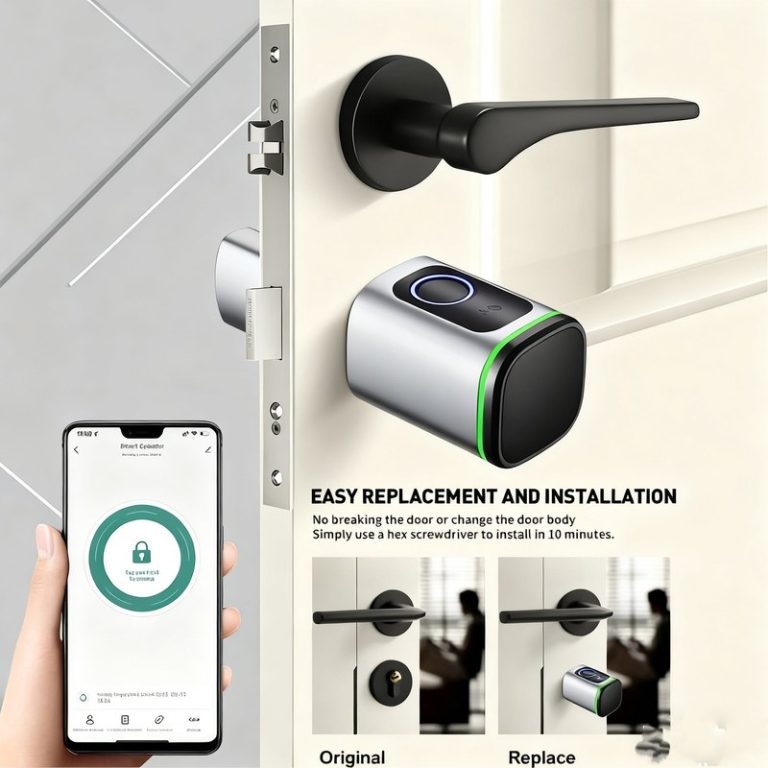
Renters must follow lease rules. Many smart locks replace the interior thumb turn and keep the original deadbolt. That can be a good fit for apartments. Some landlords require written permission or a specific lock type. The question of whether renters can install smart locks depends on your lease and local rules.
Power, Connectivity, and Backup Entry Plans
Battery Life, Low-Battery Warnings, and Emergency Jump Options
Many smart locks run on AA or CR123 batteries. Expect months of use, not years, depending on Wi-Fi use and motor strength. Low-battery warnings give you time to plan.
Some models include a 9V battery terminal on the outside for emergency power. Others rely on a physical key or keypad. Know your backup before you need it. It helps to know what happens if a smart lock battery dies.
Wi-Fi, Bluetooth, and Hub Requirements
Direct Wi-Fi is convenient but drains batteries faster. Bluetooth uses less power but needs a hub or bridge for remote access. Z-Wave and Thread also need a hub.
Check your router and network before buying. A weak signal can cause missed responses or delayed alerts.
Backup Entry: Physical Key, Keypad, or External Power
A physical key is the simplest backup. A keypad lets you enter a code without a phone or key. External power, like a 9V terminal, can wake a dead lock long enough to unlock it.
Choose at least one backup that works when the phone is dead, the Wi-Fi is down, and the battery is empty.
Auto-Lock, Shared Access, and Daily-Use Considerations
Auto-Lock Behavior and Timing Adjustments
Auto-lock re-locks the door after a set time. Short delays can lock you out while you grab groceries. Long delays reduce security. Pick a lock with adjustable timing.
Guest Codes, Access Logs, and Rental Use
Guest codes let you give temporary access without sharing a key. Access logs show who entered and when. This is useful for cleaners, dog walkers, and short-term rentals.
Review logs regularly and delete old codes. Shared accounts need the same care as your own. Smart lock access log privacy is worth understanding before you rely on these features.
Maintenance, Firmware, and Long-Term Ownership Costs
Cleaning, Lubrication, and Mechanical Wear
Wipe the exterior with a damp cloth. Avoid harsh cleaners that strip coatings. Use only the lubricant recommended by the manufacturer. Many locks should not be oiled with WD-40.
Mechanical parts wear over time. A lock that feels loose or sticks should be checked before it fails.
Firmware Update Lifecycle and Total Cost of Ownership
Budget for batteries, a hub if needed, and possible subscription features. Some locks store logs or remote access behind a plan. Check the current terms before you buy.
Total cost includes the device, installation, batteries, hub, and any cloud plan. A cheap lock with a required subscription can cost more over time.
A smart lock is one part of a larger security plan. Pick resistance matters, but door strength, firmware updates, and a reliable backup entry matter just as much. Choose a quality lock, install it correctly, maintain it, and review who has access.
Frequently Asked Questions
Yes, if the lock has a physical key override with a standard pin-tumbler cylinder. Higher-grade cylinders resist bumping better, and keyless models remove the keyway entirely.
Many do, but not all. Keyed models include a backup key cylinder, while keyless models use a keypad, fingerprint reader, or external power. Check the exact model before buying.
Most locks give low-battery warnings before the battery is empty. Some accept a 9V battery on the outside for emergency power, while others need a physical key or keypad backup.
Most smart locks still unlock at the door using Bluetooth or a keypad. Remote access and some alerts require Wi-Fi or a hub. Check the model’s connection requirements.
No device is unhackable. Unique passwords, multi-factor authentication, and regular firmware updates reduce the risk. Review shared users and revoke old access.
It depends on the lease and landlord rules. Many renters use locks that replace only the interior thumb turn and keep the original deadbolt. Get written permission first.