Battery-only is usually the simplest choice, especially for renters or shaded entries. A solar charger is most useful when the porch gets regular sun and you want fewer manual charging cycles.
The ring battery doorbell solar charger vs battery choice depends on upkeep, sunlight, and recording use. For many U.S. homes, battery-only is the simplest path. Solar charging helps when the porch gets steady light and you want fewer charging breaks.
Ring Battery Doorbells Power Their Cameras, Alerts, and Recording
Ring battery doorbells run on a rechargeable battery pack. That battery powers the camera, motion sensor, microphone, speaker, Wi-Fi radio, and app alerts.
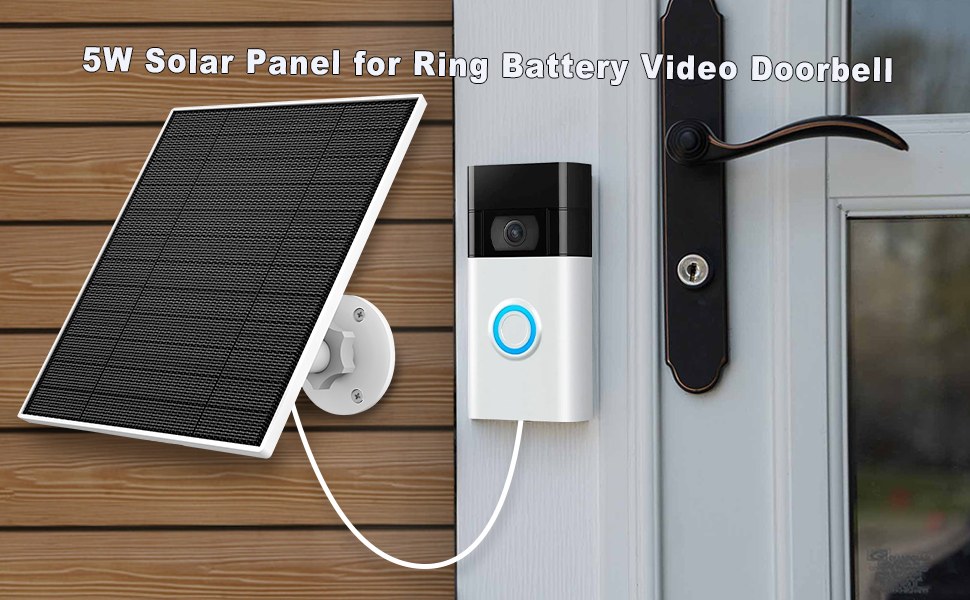
A solar charger does not replace that battery in most setups. It mainly helps keep the battery topped off between manual charges.
Battery-only operation, removable packs, and what “solar charging” really supplements
Battery-only use is straightforward. You charge the pack indoors, reinstall it, and keep using the doorbell until the battery runs low again.
Solar charging adds a steady trickle of power when the panel gets enough light. It can reduce how often you remove the battery. It does not remove the battery from the system.
The doorbell still depends on the battery at night, during cloudy stretches, and during heavy use. If your porch gets limited sun, the solar panel may help less than expected. If your entry gets strong afternoon light, the panel may reduce maintenance a lot.
Why motion frequency, live view, and video length affect battery drain
Battery drain rises when the doorbell wakes up often. Frequent motion, repeated live view checks, long recordings, and many app alerts all use more power.
Busy sidewalks, delivery traffic, and pets can also increase wake-ups.
Settings matter too. Shorter recording times, tighter motion zones, and fewer unnecessary alerts can help extend battery life. For a deeper look at image tradeoffs, see our Ring Battery Doorbell 2K Vs 4K guide.
Solar Charger vs Battery: The Real Tradeoffs for Homeowners and Renters
Comparison of solar charging and battery power for a Ring doorbell setup
The biggest difference is maintenance. A battery-only setup is simple, but you must remember to recharge it.
A solar charger can reduce that chore. The catch is placement, weather, and porch light exposure.
Convenience, upkeep, and reduced charging downtime
With battery-only use, you control the charging cycle. That can be useful if you want a clean setup with fewer parts.
The downside is downtime. When the battery runs low, you need to bring it inside and wait for a charge.
A solar charger helps most when the doorbell sees regular daylight. It can stretch the time between manual charges and reduce the chance that the doorbell goes offline because the battery was forgotten. For homes with frequent visitors or deliveries, that convenience can matter.
Installation limits for apartments, condos, and leased homes
Renters usually face more limits than homeowners. Battery-only is often easier because it avoids hardwiring and can be removed more cleanly.
Solar panels may still work, but you need to check lease rules, HOA rules, and building policies before mounting anything outside.
In apartments and condos, outdoor placement can also be tricky. Shared hallways, limited sunlight, and property restrictions may make solar less practical. If you are comparing other battery-powered options, our Ring Battery Doorbell alternatives overview can help you frame the tradeoffs.
Climate, porch exposure, and how much sun a charger actually needs
Solar charging works best with direct or near-direct sun. Shade from trees, deep overhangs, upper balconies, or narrow entryways can reduce output.
Winter sun can also sit lower in the sky. That changes how much light reaches the panel.
Cold weather can affect battery performance too. In many parts of the U.S., winter means less sun and more battery drain. That does not make solar useless. It just means the charger may only slow the drain instead of fully replacing manual charging.
Placement, Field of View, and Power Planning Before Installation
Good placement affects more than video quality. It affects battery life, alert quality, privacy, and how often you need to recharge.
Before mounting anything, think about where the doorbell will see people, how much sun it gets, and what it will capture beyond your own entry.
Door height, porch angle, and motion detection coverage
Mounting height changes what the camera sees. Too high, and faces may be harder to identify. Too low, and you may miss visitors or capture too much of the ground.
The best height depends on the exact model and your doorway layout, so check the manual.
Angle also matters. A doorbell pointed across a walkway can catch more motion than one aimed straight ahead. If you want help with mounting and setup basics, our Ring Battery Doorbell Plus installation guide covers the general planning process.
Weather exposure, shade, overhangs, and seasonal sun changes
A solar charger needs enough light, but it also needs a safe mounting spot. Heavy rain, snow, and wind can affect exposed hardware.
Overhangs protect the doorbell, but they can also block the sun.
Seasonal changes matter more than many buyers expect. A porch that gets good light in summer may sit in shade during winter. If you rely on solar, check the entry at different times of day before you buy.
Neighbor privacy, sidewalk capture, and privacy-zone setup
Doorbell cameras often see public space, sidewalks, and parts of neighboring property. That is normal, but it should still be handled carefully.
Use privacy zones, motion zones, and angle adjustments to reduce unnecessary capture.
Also think about audio. A doorbell may record sound as well as video, and state or local rules can affect that use. Keep the view focused on your entry when possible, and avoid aiming at windows or private areas.
Wi-Fi, App Setup, and Account Security Requirements<
Wi-Fi, app setup, and account security are required before device installation.
Power is only part of the setup. A battery or solar doorbell still needs a stable Wi-Fi connection, an app account, and secure sharing rules.
Weak network setup can cause delayed alerts, missed clips, or trouble viewing live video.
2.4 GHz network considerations, signal strength, and router placement
Many video doorbells use 2.4 GHz Wi-Fi because it reaches farther than 5 GHz. That helps at the front door, where routers are often farther away.
Still, weak signal can hurt performance even if the doorbell powers on correctly.
If alerts lag or video loads slowly, check router placement, mesh coverage, and interference from walls or metal doors. For network basics and compatibility questions, review the exact product support page before buying.
Shared users, permissions, and multi-device household access
Families often need more than one person to see alerts. Shared users can help caregivers, partners, or property managers stay informed.
But each added user increases account management needs.
Check what each person can do. Some accounts can view video but not change settings. Others may manage devices, delete clips, or add more users. Set permissions carefully so the right people have the right access.
MFA, password hygiene, and account recovery best practices
Use a unique password for the doorbell account. Turn on multi-factor authentication, or MFA, if the service supports it.
That adds a second step during sign-in and helps protect the account if a password is stolen.
Also review recovery email access and phone numbers. If you lose access to the account, recovery details matter. Keep the app updated, and remove old shared users you no longer need.
Subscription, Storage, and Ownership-Cost Comparison
Cost is not only the device price. Ownership also includes charging time, accessories, possible cloud plans, and how much value you place on recorded history.
The best choice depends on whether you want the simplest setup or the least upkeep.
Cloud recording, event history, and what Ring plans typically unlock
Many video doorbells use cloud storage for recorded events, but exact features can vary by plan and model. Some services limit how long events stay available.
Others require a subscription for playback, sharing, or advanced alerts.
Before you buy, confirm what the exact Ring plan includes for the model you want. Features can change, so verify current terms on the manufacturer’s plan page. If you want to compare power-related tradeoffs with another battery camera category, see our Blink Outdoor 4 Vs Ring comparison.
Local Storage
Hardware stores clips at home or on a local device.
Can reduce monthly cost in some setups.
May still need power, backup, and physical security.
Cloud Storage
Clips are stored with the provider.
Usually depends on internet and account access.
Retention, export, and deletion rules vary by plan.
How battery upkeep compares with solar charger cost over time
Battery-only setups often cost less at the start if you already have the doorbell. The ongoing cost is time, not money.
You have to recharge the pack and keep track of battery status.
A solar charger adds hardware cost, but it can reduce charging trips. Over time, that may be worth it for busy households. If your porch gets poor sun, though, the added accessory may not save much effort.
Long-term ownership costs for frequent motion zones versus low-traffic entries
High-traffic entries drain batteries faster. That can make solar more attractive because it helps offset frequent wake-ups.
Low-traffic entries may do fine with battery-only charging every so often.
Think about your actual use, not a marketing promise. A quiet front porch and a busy townhouse walkway are very different situations. The right choice follows the traffic pattern.
Installation and Maintenance: What Changes with Each Option
Battery-only and solar-assisted setups both need basic upkeep. The difference is how often you must handle the battery and how much attention the exterior hardware needs.
Good maintenance keeps alerts more reliable and helps you spot problems early.
Mounting the doorbell, charging cycles, and seasonal cleaning
Battery-only use means a repeating charge cycle. You remove the battery, charge it indoors, and reinstall it.
That is simple, but it creates gaps in coverage while the battery is out.
Solar setups still need occasional cleaning. Dust, pollen, and grime can reduce light reaching the panel. Wipe the panel gently as the manual allows, and check the battery status after storms or long cloudy periods.
Solar panel positioning, cable management, and weather durability
Panel position is the key difference in a solar setup. It should get enough light without blocking the camera view or creating a messy cable run.
Keep cables secured so they do not snag or pull loose.
Also check the exact weather rating for the model and accessory. Do not assume every outdoor accessory handles the same conditions. Verify the listed rating for your exact version before mounting it outside.
Firmware updates, battery health, and routine inspection checklist
Firmware updates can fix bugs, improve alerts, and adjust power behavior. Keep the app updated too.
If the battery seems weaker over time, check for app settings, signal issues, or a dirty panel before assuming the battery failed.
A simple routine helps: check battery level, confirm live view works, test motion alerts, review shared users, and inspect the mount after severe weather. If the doorbell is wired or uses a transformer, follow the exact manual and get help when wiring is unclear.
Troubleshooting Common Problems with Battery and Solar Setups
Most problems have simple causes. Start with charging, Wi-Fi, placement, and app settings before assuming the device is defective.
If a fix involves wiring or roof-level access, stop and use the manual or a qualified pro.
Battery not charging, slow charging, or unexpected drain
If the battery will not charge, first check the charger, cable, and outlet. Then confirm the battery is seated correctly.
A poor connection can look like a dead battery.
Unexpected drain often comes from frequent motion, repeated live view use, or poor Wi-Fi. Solar may not be the cause. It may simply be unable to keep up with a busy entry or a shaded location.
Weak Wi-Fi, delayed alerts, and motion detection misses
Delayed alerts usually point to network trouble. Check signal strength at the front door, not just near the router.
Mesh systems can help if the signal drops outside.
Motion misses can happen if the camera angle is wrong, the motion zone is too narrow, or the subject moves through the frame too quickly. Recheck placement before changing power settings.
Cloudy weather, shaded porches, and performance limits in winter
Solar chargers are weather dependent. Several cloudy days can reduce charging, and shaded porches may never get enough light for strong results.
Winter can make both issues more noticeable.
That does not mean solar is a bad idea. It means the charger is best viewed as a helper, not a full replacement for the battery. If your entry stays shaded, battery-only may be the more predictable choice.
How to Choose the Right Setup for Your Home in 2026
The right answer depends on your entry, your schedule, and your housing situation. If you want the easiest setup, battery-only is usually the safest bet.
If you want fewer charging chores and have good sun exposure, a solar charger can be a smart add-on.
Best fit by home type: single-family home, townhouse, apartment, or rental
Single-family homes often have the most flexibility. You may have better sun exposure, simpler mounting, and fewer property-rule issues.
Townhouses can also work well if the porch gets light and the HOA allows exterior accessories.
Apartments and rentals need more caution. In those cases, battery-only is often easier to approve and remove later. Solar may still work, but only if the lease or building rules allow it.
When to prioritize simplicity, when to prioritize lower maintenance
Choose simplicity if you want fewer parts and less to think about. Choose lower maintenance if you know the battery will be hard to reach or if the doorbell gets a lot of use.
Both choices can work well when the placement is right.
If you are still comparing brands and power styles, our Eufy E340 Vs Ring Doorbell article can help you think through power, storage, and installation differences.
Practical next steps before buying or installing
Before you buy, check four things: sun exposure, Wi-Fi strength, privacy concerns, and property rules.
Then verify the exact model’s power, storage, and mounting requirements. That small checklist prevents most early mistakes.
If you want a clean final decision, ask one question: do you mind charging the battery on a routine schedule? If yes, solar may be worth it. If no, battery-only is often the simplest and most predictable setup.
Final Takeaway
For most U.S. homes, a battery-only Ring doorbell is the simplest choice. A solar charger is best when the porch gets enough light and you want fewer charging breaks.
Verify your exact model, your Wi-Fi signal, and your mounting rules before you decide.
Usually, no. The solar charger helps keep the rechargeable battery topped off, but the battery still powers the doorbell.
Often, yes, because it is easier to install and remove. Renters should still check lease rules and any building restrictions before mounting accessories.
It needs regular light to help meaningfully. Shaded porches, deep overhangs, and winter sun can reduce performance.
It depends on the exact Ring plan and model. Verify the current plan page to see what cloud history, playback, and alert features are included.
Frequent motion, repeated live view use, weak Wi-Fi, and long recordings can all increase drain. Placement and alert settings often matter as much as the power source.
Check Wi-Fi strength, sun exposure, privacy zones, mounting height, and property rules. Also verify the exact model’s power and storage requirements before you buy.
Hi, I'm Marcus Sterling, a smart home security expert with over 5 years
of hands-on experience testing and reviewing hundreds of security cameras, smart locks, and alarm systems. My mission is to make smart home security accessible, affordable, and easy to understand—and every review I publish is 100% independent, unbiased, and honest. I don't accept payments for positive reviews, just practical advice to help you secure your home with confidence.
Compare best outdoor camera for security, privacy, compatibility, setup, subscriptions, and value. Read the guide to choose the right option for your home.
Quick Security Answer A Ring battery doorbell is usually set up by charging the battery, adding the device in the app, and mounting it in a spot with a clear front-door view. The most common problems are weak Wi-Fi, poor placement, or skipped privacy settings. If you want to know how to setup ring battery…
Quick Security Answer Most Ring battery doorbells charge by removing the battery pack, plugging it into a USB power source, and reinstalling it after the light shows full. The exact steps can vary by model, so check your manual or the Ring app first. If you need how to charge ring battery doorbell help, the…
Quick Security Answer Ring Chime is usually the simpler choice if you want a dedicated doorbell sound, while Alexa works better when you already use Echo devices and want alerts in multiple rooms. The best fit depends on your layout, privacy comfort, and how much smart-home setup you want. For ring battery doorbell chime vs…
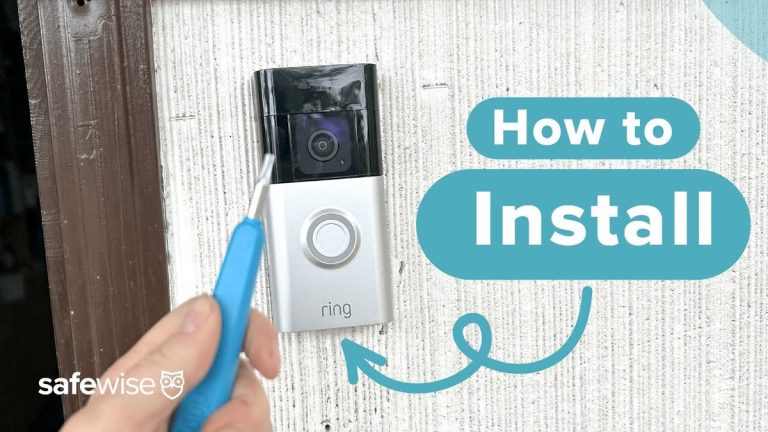
Quick Security Answer Install the doorbell by charging the battery, choosing a clear and private mounting spot, securing the bracket, and finishing setup in the Ring app. The most important checks are Wi-Fi strength, permission to drill, and any model-specific wiring or chime requirements. Learning how to install ring battery doorbell is mostly about safe…
Choosing between the Ring Indoor Cam 2nd Gen and Blink Mini 2 depends on how much coverage, control, and ongoing cost you want. Both offer 1080p video, motion detection, two-way audio, and simple plug-in setup. I recommend the Ring Indoor Cam 2nd Gen for wider coverage and stronger monitoring, while the Blink Mini 2 makes…