PoE Security Camera vs Wi-Fi Camera Which Is Better
For most homeowners, PoE cameras are the better choice because they deliver stable, interference-free power and data over a single Ethernet cable, while Wi-Fi cameras are best for renters or quick setups where drilling and cabling aren’t possible. The biggest limitation to weigh is that PoE requires a compatible PoE switch or NVR and permanent cabling (often a dealbreaker for renters), whereas Wi-Fi cameras depend on strong wireless signal and may push you toward cloud subscription plans for reliable storage.
The question of poe security camera vs wifi camera comes up for nearly every US homeowner planning a security system, and the answer depends on your home, network, and plans. Both approaches can capture useful footage, but they differ significantly in how they receive power, transmit video, handle internet outages, and fit into your home network. This guide explains those differences in plain American English so you can choose the approach that fits your property and budget.
What Is a PoE Security Camera?
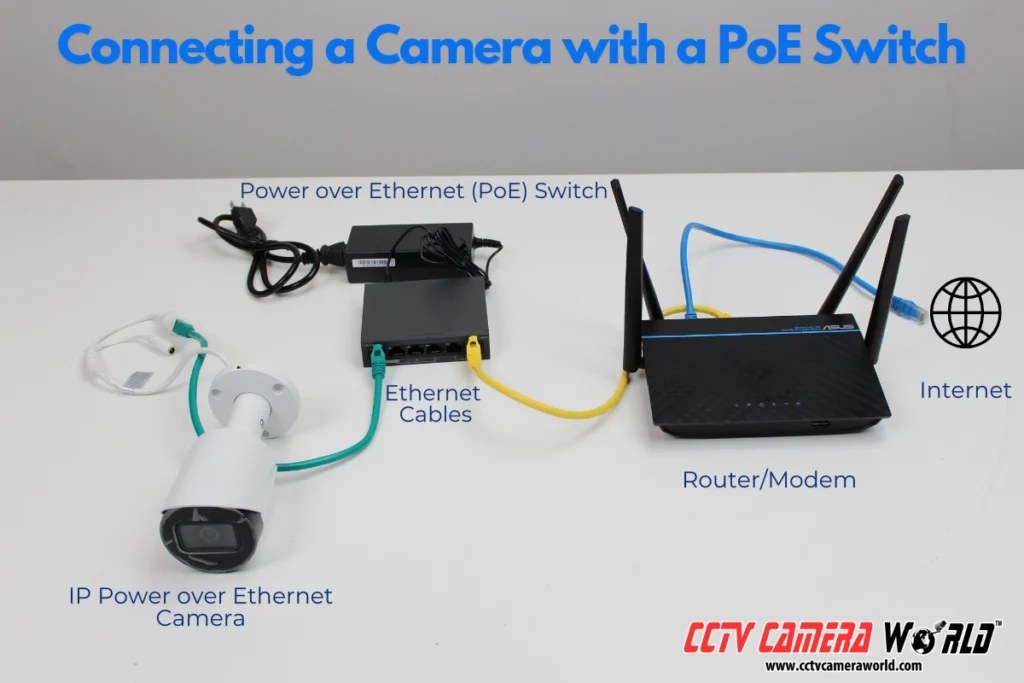
PoE stands for Power over Ethernet. A PoE security camera receives both electrical power and network data through a single Ethernet cable. That cable runs from the camera to a PoE switch, a PoE injector, or a network video recorder (NVR) with built-in PoE ports.
The practical result is that a PoE camera needs only one cable for everything. According to the Ethernet standard, a typical cable run can extend up to 328 feet (100 meters), which covers most residential installations. Because the camera is physically wired to your network, it does not compete with your Wi-Fi for bandwidth and is not affected by wireless interference.
PoE cameras are commonly sold as part of multi-camera kits with an NVR, though single-camera setups with a PoE switch are also common. The NVR typically handles recording, playback, and alerts in one box, and it often includes a hard drive for local storage.
What Is a Wi-Fi Security Camera?
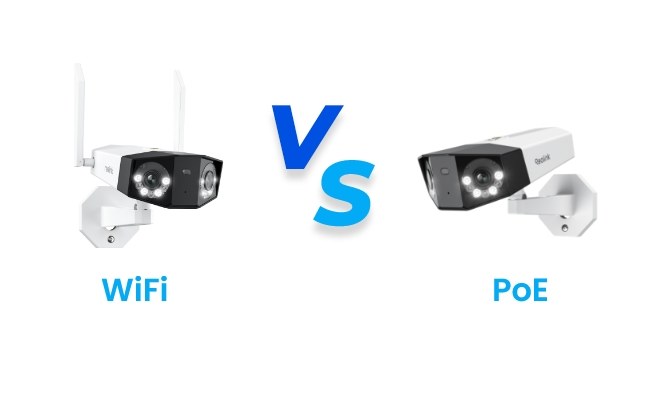
A Wi-Fi security camera connects to your home network wirelessly. Power comes from a separate source: a plug-in adapter, a rechargeable battery, or existing doorbell wiring in some models.
Because there is no Ethernet cable, placement is more flexible. Battery models can be mounted almost anywhere within range of your Wi-Fi signal, including fences, sheds, and other spots where running cable would be impractical. Plug-in models need a nearby outlet. This makes Wi-Fi cameras popular with renters and anyone who wants a quick, low-mess installation.
The trade-off is that Wi-Fi cameras depend on wireless signal strength, router placement, and your internet upload speed. Walls, floors, and household interference can all affect performance. If the camera is far from the router, you may need a mesh Wi-Fi system or range extender.
PoE vs Wi-Fi: Side-by-Side Comparison
| Factor | PoE Camera | Wi-Fi Camera |
|---|---|---|
| Power source | Ethernet cable carries power | Battery, plug-in adapter, or existing wiring |
| Data connection | Wired Ethernet | Wireless Wi-Fi |
| Installation effort | Higher; requires running cable | Lower; mount and connect to Wi-Fi |
| Placement flexibility | Limited by cable reach | High, especially for battery models |
| Internet outage behavior | Local recording may continue with NVR or microSD | Depends on model; cloud-only models may stop |
| Bandwidth reliability | Consistent, not affected by Wi-Fi congestion | Shared with other devices; subject to interference |
| Monthly fees | Usually none for local recording | Cloud plans often required for full features |
| Typical best use | Permanent, multi-camera installations | Rentals, quick setups, single-camera needs |
Installation: What Each Option Really Requires
The biggest practical difference between these two camera types is installation.
PoE installation involves running Ethernet cable from each camera location back to a PoE switch or NVR. In a single-story home, that often means fishing cable through attic space, crawlspaces, or wall cavities. In a finished home, this can be time-consuming and may require drilling. If you own your home and plan to stay for years, the effort is often worth it. If you rent, running cable through walls is usually not allowed.
Wi-Fi installation is simpler in most cases. Battery-powered models require no wiring at all: you mount the camera, pair it with the app, and connect it to your Wi-Fi network. Plug-in models need an outlet within reach of the power adapter. For renters, this is a major advantage because you can take the cameras with you.
Both options share one safety concern: mounting cameras at height involves ladders, and drilling into siding or brick requires the right drill bit and technique. If you are not comfortable with that work, a qualified installer can handle it. Follow the mounting instructions in the product manual, and check with your landlord or HOA before drilling exterior holes.
Network Reliability and Internet Outages
Network behavior is where PoE and Wi-Fi cameras diverge most sharply. A PoE camera’s data travels over a physical cable, so it does not compete with your streaming, video calls, or smart home devices for Wi-Fi bandwidth. It is also immune to wireless interference from neighbors’ networks, microwave ovens, and thick walls. For continuous recording at high resolution, a wired connection is the more dependable choice.
A Wi-Fi camera depends on the strength and stability of your wireless signal at the mounting location. If the camera is far from the router, you may need a mesh system or extender. Wi-Fi performance can also degrade during peak evening hours when many devices are competing for bandwidth.
Internet outages affect both types, but not identically. A PoE camera connected to an NVR with local storage can often continue recording during an internet outage, though remote viewing will not work until the connection returns. Wi-Fi camera behavior during an outage varies by model: some continue recording to a microSD card, while cloud-only models may stop recording entirely. If outage behavior matters to you, check the exact model’s specifications before buying. Our guide on whether a security camera works during an internet outage explains the common scenarios in more detail.
Similarly, if you are considering a camera for a location with weak or unreliable internet, read our breakdown of security camera options that work without Wi-Fi.
Video Quality and Bandwidth
Video quality depends on the camera’s sensor, lens, and resolution, not just the connection type. However, the connection affects how reliably the camera delivers that quality.
Wired PoE connections provide consistent bandwidth, which matters for 4K continuous recording and for reviewing smooth playback without stuttering. Wi-Fi cameras can also deliver 4K video, but the quality you actually see depends on your router, the distance between camera and router, and your internet upload speed. If your upload speed is limited, remote viewing may buffer or drop to lower quality.
For most households, a well-placed Wi-Fi camera on a modern router is perfectly adequate. The gap becomes noticeable when you install many cameras, record continuously, or place cameras far from the router.
Storage: Local vs Cloud
Storage is a decision that cuts across both camera types.
Many PoE systems record to an NVR, which is a dedicated device with a hard drive. You own the footage, it stays on your property, and there is no monthly fee for storage. Some PoE cameras also accept microSD cards for backup or standalone recording.
Wi-Fi cameras are more likely to rely on cloud subscriptions, where footage is uploaded to the manufacturer’s servers. Cloud storage lets you view clips from anywhere and protects footage if the camera is stolen. The trade-offs are ongoing fees, retention limits, and dependence on the provider’s servers.
Some Wi-Fi cameras also support local microSD storage, and a few offer a home base station with a hard drive. If avoiding monthly fees is important, look for a camera that supports local storage without requiring a cloud plan.
Security and Privacy Considerations
Both PoE and Wi-Fi cameras are internet-connected devices that need basic cybersecurity hygiene.
Wi-Fi cameras transmit video over the air. Modern cameras use encryption, but the security of that connection depends on the manufacturer’s implementation and your home network settings. A PoE camera sends data over a cable, which is inherently harder to intercept, but the footage is still vulnerable if someone gains access to your network or account.
Cost Considerations
Costs vary widely by brand, resolution, and features, so compare total cost of ownership rather than just the sticker price.
PoE systems typically have a higher upfront cost because you may need an NVR or PoE switch, Ethernet cable, and possibly professional installation. Once installed, there is usually no monthly fee for local recording. Over several years, that can make PoE more economical for multi-camera setups.
Wi-Fi cameras often have a lower upfront cost per camera, but cloud subscriptions can add up over time. Battery models may require replacement batteries or solar charging accessories. If you need multiple cameras, the subscription cost multiplies.
For a single camera, Wi-Fi is usually cheaper. For a multi-camera permanent system, PoE can be more economical over several years because you avoid monthly cloud fees.
Which Should You Choose?
There is no universal winner in the poe security camera vs wifi camera decision. The right choice depends on your housing situation, your willingness to run cable, and your tolerance for monthly fees.
Choose PoE if you own your home and can run Ethernet cable, want a permanent multi-camera system, prefer local recording without monthly fees, or need reliable continuous recording.
Choose Wi-Fi if you rent or move frequently, want the simplest installation without drilling through walls, need flexible placement for battery cameras, or prefer a small setup with a cloud subscription.
If you are still deciding, our guide on which camera is best for outside covers placement, weather resistance, and field-of-view considerations.
PoE cameras offer a stable wired connection and local recording, making them a strong choice for permanent multi-camera installations. Wi-Fi cameras offer flexibility and easy setup, making them ideal for renters and quick installations. Match the camera type to your housing situation, network quality, and budget, and secure every device with strong passwords and regular updates.
Frequently Asked Questions
No, PoE cameras require running a single Ethernet cable from the camera to a PoE switch or NVR, which often means drilling through walls and managing cable runs. Wi-Fi cameras only need a power outlet and a strong wireless signal, making them far easier to install in pre-wired homes or rental properties. Always check the exact-model compatibility with your chosen NVR or app before committing to one standard.
If your router goes down, Wi-Fi cameras lose connectivity unless they have a battery backup and onboard SD storage, so remote viewing stops entirely. PoE cameras powered by an uninterruptible power supply (UPS) on the switch or NVR can keep recording locally even when the internet is down. In both cases, you need a separate UPS or battery unit if you want the camera to keep functioning through an outage.
PoE cameras do not need a Wi-Fi network because they transmit data over Ethernet cables, but they do require a PoE injector, switch, or a compatible NVR as their “hub.” Wi-Fi cameras need a router and often a dedicated hub or base station, especially for multi-camera bundles. Neither system forces a monthly subscription, but many Wi-Fi brands push cloud plans for extended playback, while most PoE systems allow completely free local recording.
PoE cameras are generally more secure because they run on a closed wired network, making them harder to intercept than wireless signals. Wi-Fi cameras are vulnerable to deauthentication attacks, jamming, and default-password exploits, so you must immediately change credentials and enable two-factor authentication. For either option, verify whether the exact model supports local-only storage (SD card or NVR) to avoid mandatory cloud uploads that raise privacy concerns.
Wi-Fi cameras usually have a lower upfront cost but may require frequent battery recharging or replacement, plus cloud subscription fees that add up over years. PoE cameras have a higher initial cost due to cabling and a PoE switch or NVR, yet they are powered over the same cable, which eliminates battery swapping and reduces long-term electrical wiring expenses. Remember, a Wi-Fi camera with a microSD card has no subscription, but a PoE system’s hard drive will eventually need replacement, adding to ownership cost.
PoE is limited by a 100-meter Ethernet cable run, and you must verify the exact-model support for PoE+ if the camera has pan-tilt-zoom or heating features. Wi-Fi cameras are limited by signal strength, so verify the 2.4 GHz vs 5 GHz band compatibility, interference from walls, and the maximum number of cameras your router can handle. Always check ONVIF compatibility for PoE if you plan to mix brands, and confirm whether a Wi-Fi camera’s stated resolution drops when bandwidth is low.




One Comment