Can Glass Break Sensors Detect Tempered Glass Correctly
Yes, glass break sensors can detect tempered glass, but only certain types do it reliably. Shock sensors and dual-technology sensors are the safest choices, while older acoustic sensors may miss the shorter, quieter sound of tempered glass breaking.
Homeowners often ask can glass break sensors detect tempered glass, and the answer depends on the sensor type you choose. Standard acoustic sensors can miss tempered glass because it sounds different when it breaks. Shock sensors and dual-technology sensors detect it more reliably. This guide explains the differences, how to check your current sensor, where to place it, and what to expect after installation.
The Short Answer: Yes, But Only With the Right Sensor Type
Standard acoustic sensors are the weak link with tempered glass. They listen for the sound that ordinary annealed glass makes when it breaks. Tempered glass shatters into small pebbles with a shorter, less resonant sound. That difference can keep an acoustic sensor from triggering.
Shock sensors mounted on the glass detect the physical impact instead of the sound. That makes them more dependable for tempered glass. Dual-technology sensors combine sound and vibration for the highest accuracy. The rest of this article explains why tempered glass sounds different, how each sensor works, and what to check before you rely on one.
Why Tempered Glass Breaks Differently (And Why It Matters for Detection)
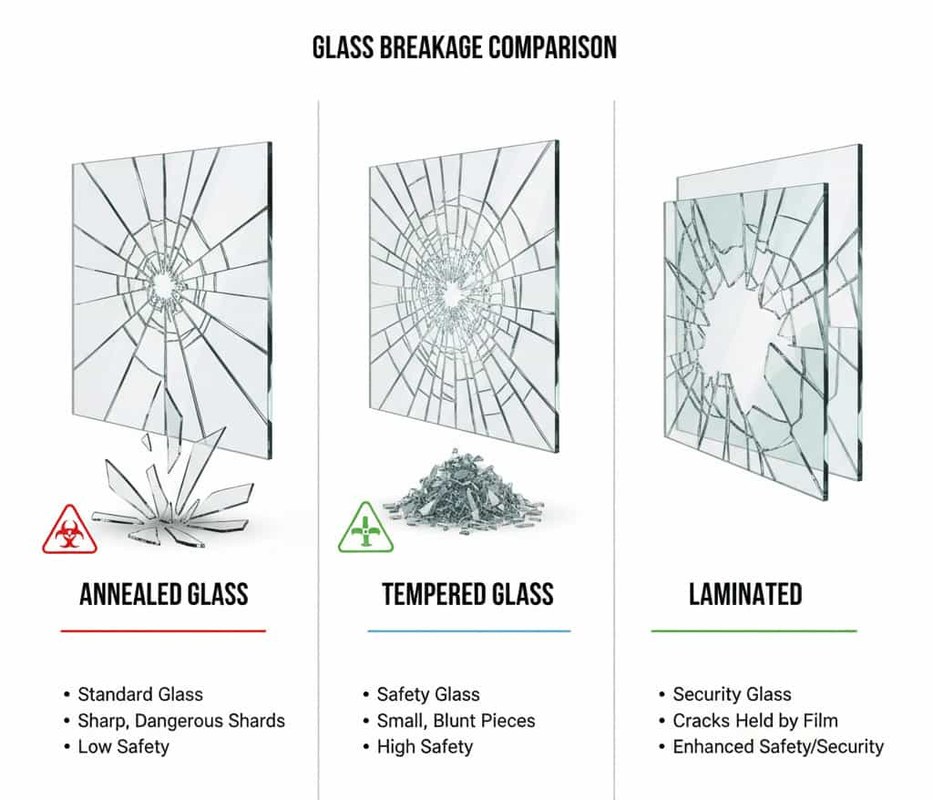
Tempered glass goes through a heat treatment that makes it much stronger than standard glass. The same process changes the way it breaks. Instead of large, jagged shards, it bursts into small, pebble-like pieces. This is a safety feature, but it also changes the sound and vibration the glass produces.
Standard annealed glass makes a longer, ringing, resonant crash. Tempered glass makes a shorter, duller burst. An acoustic sensor tuned to recognize the standard pattern may not react to that shorter burst. This is why you cannot assume every glass break sensor will catch tempered glass.
Manufacturers have responded with newer models that claim wider frequency ranges. Some do support tempered glass. Others are vague about the exact glass type and thickness they tested. That is why checking the manual is so important.
Two Main Types of Glass Break Sensors: Acoustic vs. Shock
All glass break sensors fit into two broad categories, acoustic and shock. Dual-technology sensors combine both. Knowing the difference is the key to choosing a sensor that works with tempered glass.
Acoustic Glass Break Sensors
Acoustic sensors use a tiny microphone to listen for the sound of breaking glass. Most are tuned to detect the frequency pattern typical of standard glass, usually around 3 to 5 kHz. Tempered glass can create a different frequency signature, so the sensor may never trigger.
Newer acoustic models claim a wider listening range to catch more glass types. The claim depends on the model, firmware, and room acoustics. Even a good acoustic sensor can be fooled by heavy curtains or loud noise near the window.
Shock / Vibration Sensors
Shock sensors attach directly to the glass pane. They sense the physical impact and vibration when someone strikes or breaks the glass. Because they do not rely on sound, they are generally more reliable for tempered glass.
They work well on large sliding glass doors and fixed tempered panels. The tradeoff is that you need one per glass area. The adhesive mount must also stay secure over time.
Dual-Technology Sensors
Dual-technology sensors combine an acoustic microphone with a vibration detector. The sensor checks both signals before sounding an alarm. This lowers false alarms from loud music or door slams while improving tempered glass detection.
If your home has a mix of glass types, a dual-technology sensor is the safer choice. It costs more than a basic acoustic sensor, but the added reliability is usually worth it.
| Sensor type | How it detects | Best for | Main limitation |
|---|---|---|---|
| Acoustic | Listens for the breaking-glass sound | Standard annealed windows | May miss tempered glass and can trigger on loud noises |
| Shock | Feels vibration on the glass | Tempered glass and sliding doors | Needs one sensor per glass pane |
| Dual-technology | Sound plus vibration | Mixed glass types and fewer false alarms | Higher cost and more setup |
How to Tell If Your Current Sensor Supports Tempered Glass
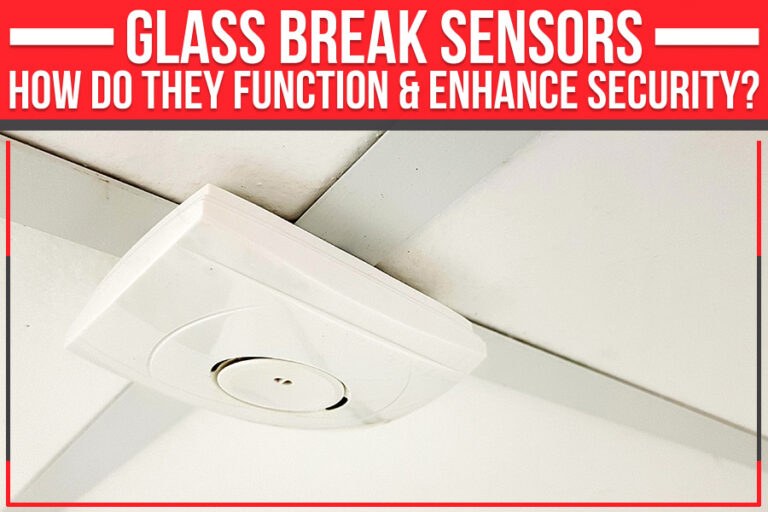
You can check your sensor without taking it off the wall. Start with the spec sheet. Look for the frequency range and any mention of tempered glass. Many manuals list the exact glass types and thicknesses used in testing.
- Find the model number and search for its manual online.
- Look for the words “tempered glass” in the compatibility section.
- Check the manufacturer’s compatibility list for your exact model.
- Check the frequency range and any listed glass thickness.
- Check the firmware version, since older firmware may miss newer detection profiles.
Age matters. Older sensors were designed before tempered glass became common in US homes. They are more likely to miss it. If the manual is silent on tempered glass, treat the sensor as unsupported until you test it. When the manual is unclear, comparing models that openly document their coverage can help. Our guide to the best glass break sensors for home security is a useful starting point.
Placement Tips for Detecting Tempered Glass Windows
Placement can make the difference between a sensor that works and one that misses a break. Acoustic and shock sensors follow different rules.
Where to Mount Acoustic Sensors
- Keep acoustic sensors within 20 to 25 feet of the protected glass.
- Give the sensor a clear line of sight to the window.
- Avoid thick curtains, heavy drapes, and tall furniture that muffle sound.
- Do not mount near HVAC vents, speakers, or noisy appliances.
Ceiling mounting often works well because sound travels in all directions. Wall mounting is fine when the window is close and unobstructed.
Where to Mount Shock Sensors
Shock sensors go directly on the glass pane. Mount them near a corner, away from the frame, where the glass vibrates most. Use the adhesive that comes with the sensor. Check that it is rated for the glass temperature range. For large sliding glass doors, consider two sensors or a dual-technology unit.
Do not mount shock sensors on the frame. The frame absorbs vibration and can prevent a clean reading.
Renter and Homeowner Constraints
Adhesive mounts avoid drilling, which makes them renter-friendly. But they may interfere with window cleaning and blinds. Remove the sensor gently when you move out and clean the glass with the correct cleaner.
Homeowners can choose wired sensors for a permanent, clean installation. Wired options usually connect to a central alarm panel and avoid battery changes.
Installation and Setup: What to Expect
Wireless Sensors and Hub Requirements
Most modern glass break sensors are wireless. They connect through Wi-Fi, Z-Wave, Zigbee, or a vendor-specific hub. Read the box before you buy. A Wi-Fi-only sensor stops working when your internet drops. A sensor that uses a local hub can keep monitoring during an internet outage.
Battery life usually ranges from one to three years. It depends on the model and how often the sensor sends signals. Choose a sensor with a low-battery alert so you know when to replace it. Not every alarm sensor needs Wi-Fi. Our article on whether alarm sensors need Wi-Fi explains the difference during outages.
Wired Sensors and Power Backup
Wired sensors connect directly to a security panel. They need drilling and cable routing, so they are a bigger project. The payoff is steady power and fewer battery chores.
During a power outage, the panel needs battery or cellular backup to keep wired sensors active. Check your panel backup options and battery runtime before you rely on it.
Pairing and Firmware Updates
Pairing is usually simple. Put the hub in pairing mode, then activate the sensor. The app guides you through the steps. Allow only the permissions the sensor actually needs, such as notifications.
Keep the sensor firmware updated. Updates can improve sensitivity, fix false-alarm issues, and patch security gaps. If a vendor stops supporting a product line, updates stop. An outdated sensor may become less reliable over time.
False Alarms and Environmental Noise: What to Expect
False alarms happen. Acoustic sensors can trigger on door slams, loud music, clinking dishes, barking dogs, and thunder. Shock sensors are less affected by sound. They can react to heavy impacts near the glass, like a ball hitting the window.
Most sensors include adjustable sensitivity. Test the sensor after installation. Then tune the sensitivity down just enough to stop nuisance alerts without losing real detection. Use a glass break simulator or a safe test with a small pane of the same glass type. If you set up a siren, keep the volume reasonable for your neighbors. Check local noise rules.
Monitoring, Subscriptions, and Self-Monitoring Options
Self-Monitoring vs. Professional Monitoring
Self-monitoring sends alerts to your phone, and you decide what to do next. It has little to no monthly cost, but it depends on you being available. Professional monitoring adds a monthly fee. A monitoring center reviews eligible alarms and can contact you or request emergency dispatch. Contracts and dispatch limits vary, so read the plan terms carefully.
- The household receives alerts and decides what action to take.
- Usually has little or no ongoing cost.
- No automatic dispatch without a separate call to emergency services.
- A monitoring center may review eligible alarms.
- Dispatch availability depends on the plan and event.
- Fees, contracts, permits, and false-alarm rules may apply.
Cellular and Battery Backup Considerations
If you use professional monitoring, your system needs a connection that survives internet outages. Cellular backup keeps the sensor reporting when Wi-Fi is down. Some plans include it, and others charge a small monthly fee. Battery backup matters too. A sensor with a dead battery cannot protect anything. Replace batteries on a regular schedule.
Privacy and Cybersecurity for Connected Sensors
A connected sensor keeps event logs that may be stored in the cloud. Protect your account with a unique password and two-factor authentication. Review who has access codes, and remove people who no longer live in the home. Keep the sensor, hub, and app updated. If the vendor discontinues the product line, check how long alerts and cloud features will keep working.
Limitations and Next Steps: Is a Glass Break Sensor Enough?
No single sensor covers everything. A glass break sensor alerts you only when glass actually breaks. It does not detect a window being opened, a frame being cut, or a door being unlocked. Window sensors report when a door or window opens. They do not detect broken glass on their own. Our guide to whether window sensors detect broken glass explains the difference.
For full coverage, pair a glass break sensor with entry sensors on doors and windows. Add motion sensors in main rooms and a clear response plan. If you are still deciding between device types, comparing glass break sensors with window sensors can help you choose. Test the sensor monthly with a simulator. Replace aging units before they fail. Review your whole security setup at least once a year.
Match the sensor to the glass. Shock and dual-technology sensors handle tempered glass well, while many acoustic sensors do not. Check the manual for tempered-glass support, place the sensor with a clear path to the window, and test it after installation. Pair it with entry and motion sensors for complete coverage.
Frequently Asked Questions
Yes, but only certain types. Shock sensors and dual-technology sensors detect tempered glass reliably. Older acoustic sensors may miss it because tempered glass produces a different sound when it breaks.
Check the spec sheet and manual for the words “tempered glass” and any listed glass thickness. If the manual is silent, assume the sensor is unsupported. Test it with a glass break simulator before you rely on it.
Acoustic sensors should be within 20 to 25 feet of the window with a clear line of sight. Shock sensors mount directly on the glass near a corner, away from the frame.
It depends on the sensor. Wi-Fi-only sensors stop reporting when the internet drops. Sensors that use a local hub with battery backup can keep working during both internet and power outages.
Not always. Many sensors work with self-monitoring at no monthly cost. Professional monitoring plans add a fee, and some sensors also require a hub from the same brand.
Glass break sensors are low-risk, but they still connect to your home network or hub. Use a unique password, enable two-factor authentication, and keep firmware updated. Review app permissions and shared user lists.