Do Smart Smoke Detectors Work Without Wi-Fi What to Know
Smart smoke detectors sound their local alarm without Wi-Fi, but remote alerts stop during an outage. Pick a model and installation that fits your network, hub, and safety needs.
Do smart smoke detectors work without wifi? Yes for the core alarm. No for remote alerts.
A smart smoke detector is a traditional detector with a network connection added. Knowing what works offline helps you choose the right unit for your home.
Do Smart Smoke Detectors Work Without Wi-Fi? The Straight Answer
Yes, but only partly. The core fire-safety job happens on the device. Smart features need an internet connection.
What Still Works Offline: Local Sensors, Sirens, and Interlinked Alarms
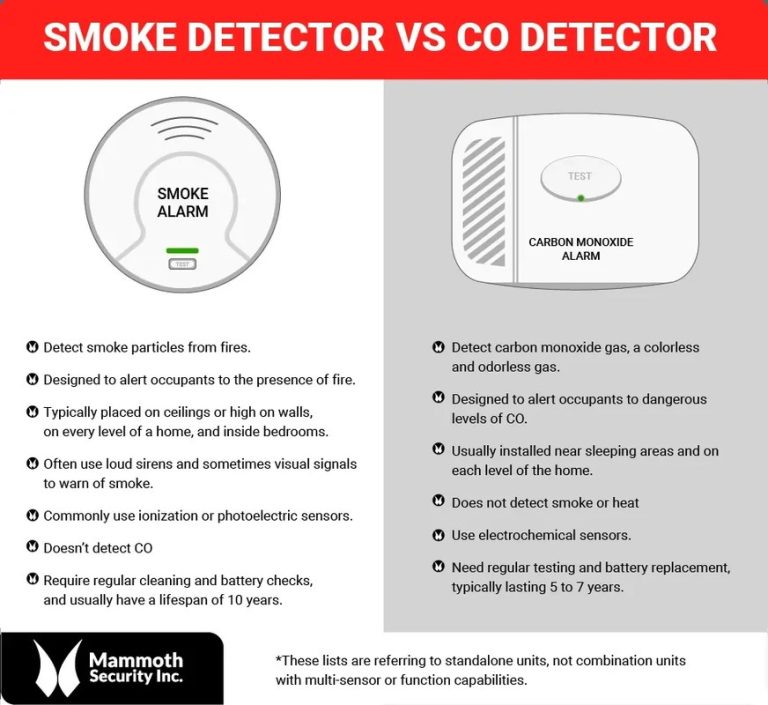
A smart smoke detector uses the same sensors as a traditional unit. It detects smoke and sounds its built-in siren. This process is fully local.
If the sensor is powered and clean, it will alarm with or without Wi-Fi.
Battery-powered smart detectors keep working during a power outage. The sensor and siren run on battery power. Wi-Fi loss and power loss do not stop the basic alarm.
Some models link with other detectors in the same home. If one unit detects smoke, linked units sound too. This can work over local radio signals or through a hub.
If the link needs Wi-Fi and the network is down, it may stop. Check the manual for exact behavior.
What You Lose When Wi-Fi Drops: Alerts, Remote Status, and Automations
When the internet goes down, you lose phone alerts. You also lose remote status checks. Voice assistant announcements stop too.
Cloud-based automations stop as well. Professional monitoring may stop unless it has cellular backup.
The detector still sounds loudly and locally. But no one gets a phone alert until the connection returns.
How Smart Smoke Detectors Connect: Wi-Fi, Hubs, and Matter

Connection type changes how the detector works offline. For a broader look, review our guide to the best smart smoke and carbon monoxide detectors.
Direct Wi-Fi Detectors and Their Band Requirements
Many smart detectors connect directly to Wi-Fi. Most support 2.4 GHz. Some newer models support 5 GHz.
Check your model’s manual for band support.
A weak signal at the ceiling can cause frequent drops. If the router is far away, the link may be unreliable. This affects alerts even when the internet is up.
Hub-Based Detectors: Z-Wave, Zigbee, and Thread/Matter
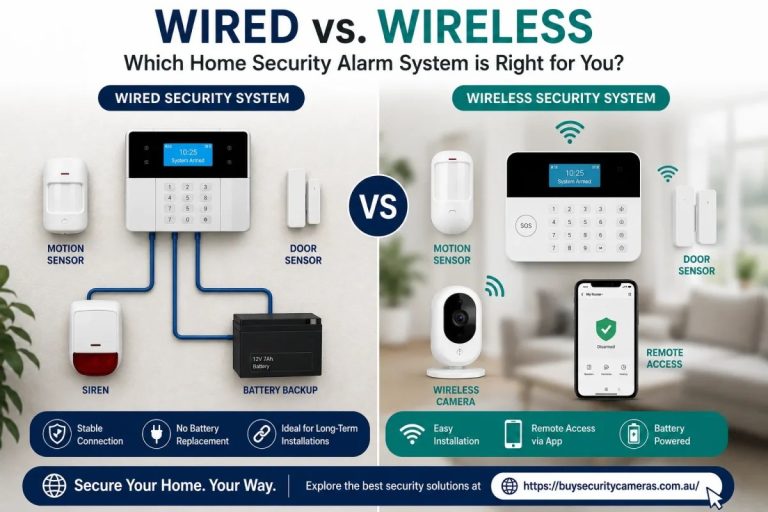
Some detectors use a hub. Common radio protocols include Z-Wave, Zigbee, and Thread. The detector talks to the hub. The hub talks to the internet.
If the internet drops but the hub stays powered, local functions may continue.
Matter is a newer standard. It improves local communication. A Matter-enabled detector can work over Thread or Wi-Fi. It may keep local automations running without the cloud.
Matter support varies by brand and firmware. Check the exact model before relying on it.
Which Connection Type Survives an Internet Outage
Hub-based local links handle outages best. Local alarms and interlinks can work without the internet. Direct Wi-Fi detectors lose app features.
They may also lose interlinking if it depends on the cloud.
No smart detector needs the internet to detect smoke. The real question is about remote alerts and automations. If you want them to survive an outage, look for cellular backup or a powered hub.
| Connection | Best suited to | Power and network | Main limitation |
|---|---|---|---|
| Direct Wi-Fi | Homes with strong router coverage | 2.4 GHz or dual-band; needs working router | Loses app alerts and cloud automations offline |
| Hub-based (Z-Wave, Zigbee) | Homes with a smart hub | Local protocol plus internet for remote features | Works offline only if the hub stays powered |
| Thread or Matter | Newer smart homes with local-control support | Local mesh plus internet for cloud features | Support varies by firmware and brand |
What Happens When the Internet Goes Out: Alerts, Monitoring, and Automations
An outage changes what the detector can do. The local siren still works. Everything remote stops.
App Notifications and Remote Status After a Drop
Without internet, the app cannot send push alerts. It cannot update the status screen. The app may show the detector as offline until the connection returns.
Professional Monitoring and Cellular Backup Options
Some monitoring plans include cellular backup. If the internet drops, the system switches to cellular. Monitoring stays active during the outage.
Not every plan has this feature. Check your exact terms.
Smart Home Routines and Alarms Without a Cloud Connection
Most smart home routines run through the cloud. When internet drops, those routines stop. Local routines on a powered hub may keep running.
That only works if the integration supports local control. Matter and Thread improve this. But verify your exact setup.
Installation and Placement: Matching the Detector to Your Home

Placement affects both fire detection and Wi-Fi reliability. Plan before mounting anything.
Hardwired vs. Battery-Powered Units and Local Codes
Hardwired detectors use household power. Most include battery backup. Battery-only models are simpler to install. They work during outages if batteries are fresh.
Local codes may require hardwired, interconnected detectors in some rooms. Check your local rules before choosing.
Placement by Room, Layout, and Airflow
Mount detectors on the ceiling or high on a wall. Place them in each bedroom, outside sleeping areas, and on every level.
Avoid windows, vents, and kitchens. Airflow there causes false alarms. Carbon monoxide detectors follow different rules. See our guide on where to place carbon monoxide detectors for details.
Renter-Friendly Setups and Landlord Constraints
Renters should check lease terms first. Battery-powered detectors need no wiring. But drilling may violate a lease.
Many landlords already supply smoke detectors. Ask for written permission before changes. A removable battery-powered smart detector is usually the easiest option.
Power, Battery Life, and Connectivity Reliability
Two reliability concerns matter here. They are power and network. Both affect how the detector behaves.
Battery Backup, Hardwired Power, and Surviving Outages
Hardwired detectors with battery backup keep working during outages. Battery-only detectors rely on battery life alone. That life usually lasts several years.
Check the manual for expected life and battery type.
A power outage that kills the router also kills the Wi-Fi. The detector battery may be fine. But the unit cannot connect to the app.
Wi-Fi Signal Strength, Mesh Networks, and Band Selection
A weak Wi-Fi signal causes dropped links and slow alerts. Ceiling spots far from the router are a common problem. Mesh networks can improve coverage in larger homes.
Some detectors only support 2.4 GHz. Confirm your router broadcasts that band. Also confirm the detector picks the right one.
Privacy and Cybersecurity for Connected Smoke Detectors
A smart smoke detector is a small computer on your network. Basic security habits keep it safe.
Account Security: MFA, Shared Users, and App Permissions
Use a unique password for the detector account. Enable two-factor authentication when supported. Review shared users. Remove people who no longer live in the home.
Check app permissions on your phone. Limit access to what the app truly needs.
What Data Is Collected, Stored, and Retained in the Cloud
Most smart detectors collect basic status and event data. Some may record audio clips during alarms. Exact data and storage vary by brand.
Read the current privacy policy for your model. For more local control, look for models with local processing.
Firmware Updates and Long-Term Vendor Support
Firmware updates fix security issues. They also improve features. Keep the detector updated through the app.
Long-term support matters for fire safety. A detector without updates may become less reliable. Check the brand’s support record before buying.
Subscriptions, False Alarms, and Total Cost of Ownership
Smart smoke detectors cost more than basic units over time. Understand the full cost before committing.
Self-Monitoring vs. Professional Monitoring Contracts
Self-monitoring means you get alerts. Then you decide what to do. It usually has no contract and lower cost.
Professional monitoring adds a monthly fee. It may require a contract. A monitoring center may respond to eligible alarms.
Dispatch depends on the plan and event. Some plans include cellular backup for outages.
- The household receives alerts and decides what action to take.
- Usually has lower ongoing cost.
- Does not guarantee emergency dispatch.
- A monitoring center may review eligible alarms.
- Dispatch availability depends on the plan and event.
- Fees, contracts, permits, and false-alarm rules may apply.
False Alarms, Permits, and Dispatch Limits
Any smoke detector can have false alarms. Repeated false alarms may bring fines in some US areas. Some cities require an alarm permit. They charge for too many dispatches.
Verify local rules for your address. To avoid monthly fees, review our guide to the smart smoke detector without subscription. It covers options with predictable costs.
Long-Term Costs: Batteries, Non-Repairable Units, and Paywalls
Battery replacement adds a small recurring cost. Many smart detectors have sealed batteries. You cannot swap them. The whole unit must be replaced at end of life.
Some smart features need a subscription. Read the terms. Know what stays free and what stops if you cancel.
Maintenance, Limitations, and Practical Next Steps
Regular upkeep keeps the detector working when you need it most.
Routine Testing and Cleaning to Prevent Nuisance Alarms
Press the test button once a month. Clean the vents with a soft brush or vacuum. Dust and insects cause false alarms.
Replace low batteries. Or replace the unit at end of service life.
Troubleshooting an Offline or Unresponsive Detector
If the app shows the detector offline, start simple. Verify Wi-Fi is working. Move closer to the router if possible.
Check the battery. Power-cycle the detector. If the siren works, your local protection is intact. The problem is likely the network, not the sensor.
Follow the manufacturer’s steps before calling support.
When a Traditional Smoke Detector Still Makes Sense
A traditional smoke detector is reliable and cheap. It needs no network. If your Wi-Fi is poor, a standard detector may be right.
You lose remote alerts. But you keep the core safety function.
Final Takeaway: What to Check Before You Buy or Install
A smart smoke detector sounds locally without Wi-Fi. But remote alerts and automations need a connection. Choose a model that fits your network, hub, battery, subscription, and local codes.
Test monthly and update firmware. Keep the detector clean for years of reliable alarms.
Frequently Asked Questions
Yes. The smoke sensor and built-in siren work locally and do not need Wi-Fi. The detector sounds an alarm as long as it has power and the sensor is clean.
Phone push notifications, remote status checks, voice assistant announcements, and cloud-based automations stop. Professional monitoring may stop unless it has cellular backup.
Not always. Basic detection and local alarms work without a subscription. Some remote features like cloud storage or professional monitoring require a paid plan. Check the exact model terms.
Yes, many work without a hub because they connect directly to Wi-Fi. Hub-based models use Z-Wave, Zigbee, or Thread and need a compatible hub.
Test at least once a month using the test button. Clean the vents regularly to reduce false alarms and replace the battery when low.
Any connected device has some risk. Use a unique password, enable MFA, update firmware, and review shared users to reduce that risk.