Check the exact model’s voltage requirement before you wire a Ring video doorbell. If the transformer, chime, or wiring is unclear, use the manual or a qualified electrician.
Ring video doorbell voltage is the first thing to check before you wire a new doorbell. The right voltage helps the device power up, ring the chime, and stay stable during daily use.
What Ring Video Doorbell Voltage Means and Why It Matters for Setup
Voltage is the electrical pressure that powers a wired doorbell. For a Ring video doorbell, it shows if your home wiring can supply enough power.
That power runs the camera, motion alerts, and chime support.
If the voltage is too low, the doorbell may not power on. It may also act unstable.
If it is too high, you can damage the device. It can also create a safety issue.
Many homeowners focus on the app first. Power matters just as much.
The exact voltage range depends on the model. Always check the product manual before wiring.
How to Check Your Existing Doorbell Transformer Voltage in a U.S. Home
Check the transformer voltage before installing a Ring Video Doorbell.
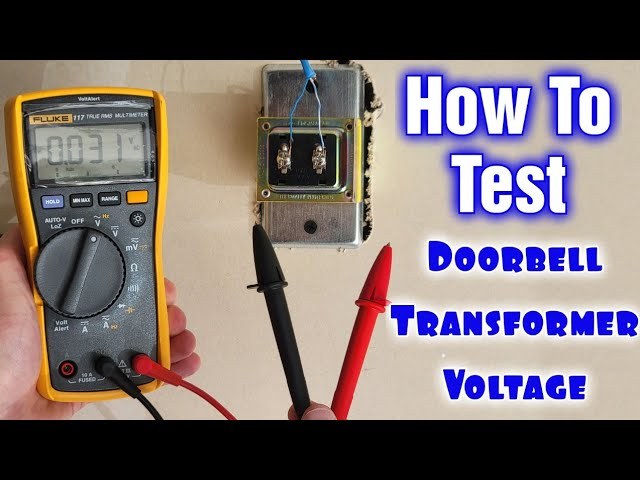
You can usually confirm transformer voltage by finding the label on the transformer itself. The label should list a voltage rating. It may also list a VA rating.
VA means volt-ampere. It shows how much power the transformer can supply.
Where the transformer is usually located
In many U.S. homes, the transformer sits near the electrical panel. It may also be in a basement, attic, garage, utility closet, or near an existing chime.
Some homes have it attached to a junction box. Others hide it behind a cover.
If you cannot find it quickly, check near the old doorbell chime first. That is often the easiest place to start.
How to read the voltage rating safely
Look for a label that may say 8V, 16V, or 24V. Those are common low-voltage doorbell transformer ratings.
Your home may use a different value. Do not guess from wire color or the age of the house.
Turn off power if you need to open a cover. Use caution around any exposed wiring.
What to do if the label is missing or unreadable
If the label is gone, do not assume the transformer is compatible. Use the exact model manual, ask a qualified electrician, or replace the transformer with one that matches the doorbell’s listed needs.
If you are unsure whether the wiring is low voltage or line voltage, stop and get help. That is not a safe guess-and-check situation.
Which Ring Video Doorbells Work With Which Voltage Ranges
Compatibility depends on the exact Ring model. Some versions are built for wired power.
Others can run on battery power and optionally connect to existing wiring.
That means voltage affects more than startup. It also affects chime support, charging behavior, and hardwired use.
Low-voltage, standard-voltage, and battery-powered installation paths
Low-voltage doorbell wiring in U.S. homes commonly falls in the range used by traditional transformers. If your transformer matches the model’s listed range, wired setup is often possible.
Battery-powered models are more flexible. They may still connect to wiring for trickle charging or chime support.
They do not depend on the wiring the same way a fully hardwired unit does.
For model-specific guidance, use the manual for the exact device. If you are comparing Ring options, a general overview like the wired vs. battery guide can help clarify the power path before you buy.
When a doorbell can be hardwired but still rely on battery backup
Some doorbells accept wiring and still keep an internal battery charged. That setup can help during short power interruptions.
It does not remove the need to meet the listed voltage range.
Hardwiring a battery model can also improve convenience. You may get fewer charging breaks, but the wiring still has to be correct.
Installation Basics for Homeowners and Renters<
Voltage requirements help homeowners and renters install a Ring video doorbell safely.
Installation is different for a homeowner, renter, or apartment resident. The right method depends on existing wiring, wall drilling, and no-drill options.
Before you start, confirm the exact model, the mounting surface, and any property rules. That saves time and reduces the chance of damage.
Replacing an existing wired doorbell
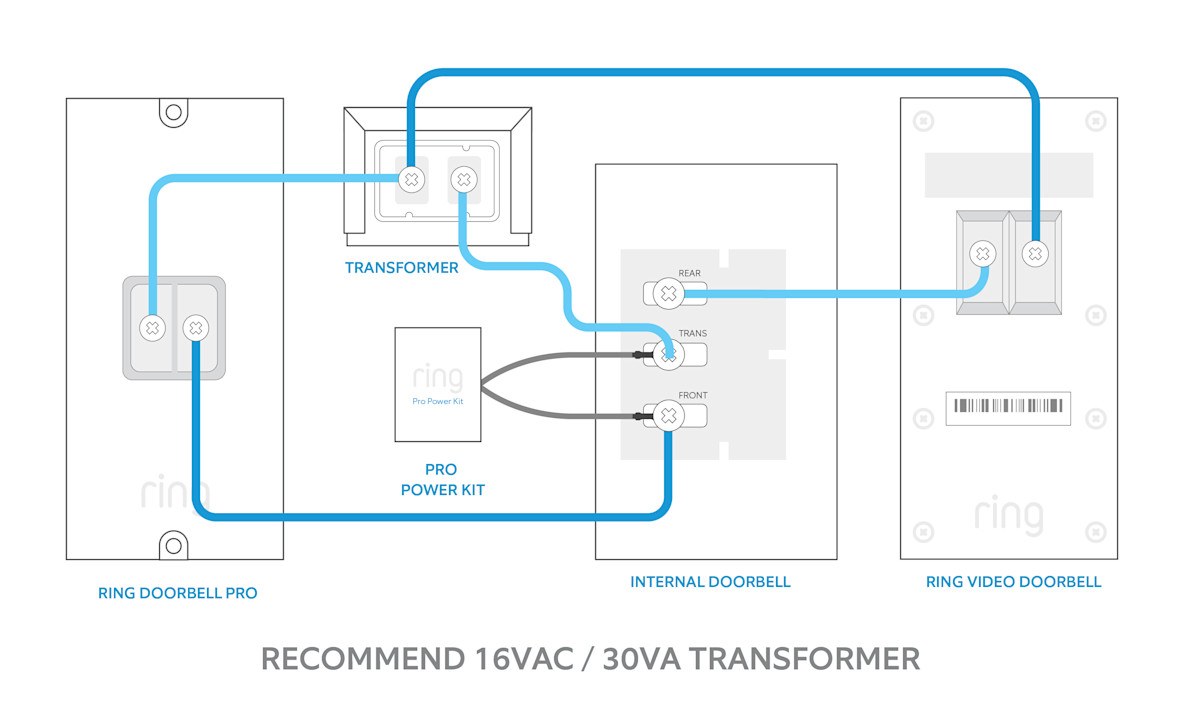
If you already have a wired doorbell, replacement is usually the cleanest path. You still need to verify the transformer voltage, chime type, and whether a power kit or adapter is required.
Turn off power before touching wires. If the wiring looks old, brittle, or unclear, a qualified installer is the safer choice.
1
Confirm requirements
Verify the exact model, power, network, storage, placement, household, rental, and platform requirements.
2
Plan safe placement
Consider privacy, field of view, weather, height, doors and windows, wiring, and emergency access.
3
Install and secure
Follow the exact manual, update firmware, use a unique password, and enable MFA.
4
Test and maintain
Test alerts, recording, outage behavior, batteries, users, permissions, and backup procedures.
Using a plug-in adapter or no-drill setup
Some homes do not have usable doorbell wiring. In that case, a plug-in adapter or a battery model with a no-drill mount may be a better fit.
These options can be useful for renters and for doors where drilling is not allowed. For a renter-friendly overview, see the no-drill mount guide.
Rental-friendly constraints and landlord approval considerations
Renters should check lease rules before drilling or changing wiring. Landlord approval may be required for exterior changes, especially on shared entryways or historic buildings.
If you cannot modify the property, choose a reversible setup. A battery doorbell with a removable mount is often easier to remove at move-out.
Placement, Wi-Fi, and Power Planning for Reliable Performance
Good placement helps the doorbell work well even when the voltage is correct. You still need a strong Wi-Fi signal, a clear view of the doorway, and enough protection from weather.
Think of power, network, and angle as one system. If one part is weak, the whole setup can feel unreliable.
Door height, field of view, and porch layout
Mount the doorbell at the height the manual recommends. That helps with face capture, package views, and motion detection near the door.
Porch depth, stairs, railings, and screen doors can all change the camera view. A small shift in placement can make a big difference.
Wi-Fi signal strength, 2.4 GHz coverage, and router distance
Many video doorbells rely on 2.4 GHz Wi-Fi, which usually reaches farther than 5 GHz. Check the exact model’s network support before setup.
If the router is far from the front door, you may need a mesh node or access point. A weak signal can cause slow alerts, missed clips, or setup failures.
Weather exposure, shade, and night performance
Direct sun, heavy rain, and deep shade can affect the camera image and motion alerts. A covered porch often helps, but the camera still needs a clear view.
Night performance also depends on porch lighting and reflections from glass or metal. Test the view after dark before you finish the install.
Troubleshooting Common Voltage and Power Problems
When a doorbell fails, start with the safest checks first. Look at power, wiring, chime settings, and Wi-Fi before assuming the device is defective.
Many problems come from a loose wire or an incompatible transformer, not from the camera itself.
Chime compatibility and buzzing issues
If the chime buzzes, hums, or rings weakly, the transformer or chime wiring may not match the doorbell’s needs. Digital chimes may need a power kit, while mechanical chimes may need a different setup.
Check the exact model instructions before changing anything. A mismatch can keep the chime from working correctly.
Doorbell not powering on or battery draining too fast
If the doorbell does not power on, confirm the transformer voltage, wire connections, and power kit requirements. A battery model that drains too fast may be seeing weak charging, too much motion activity, or poor Wi-Fi.
If the battery behavior changes after a wiring change, recheck the connection. A loose or wrong connection can create false charging behavior.
Voltage drops, loose wiring, and intermittent alerts
Intermittent alerts can happen when voltage drops under load. That may show up as random reboots, delayed notifications, or a doorbell that works only sometimes.
Loose terminal screws, corroded wires, and old transformers are common causes. If the problem keeps returning, replace the weak part instead of resetting the app over and over.
Privacy, Cybersecurity, and Neighbor Considerations
A video doorbell points at more than just your front door. It may capture sidewalks, visitors, package areas, and nearby homes, so privacy settings matter.
Use the app’s tools to narrow what the camera sees and who can access it. That is part of responsible setup, not an optional extra.
Motion zones, privacy zones, and reducing sidewalk capture
Motion zones help limit alerts to the area you care about. Privacy zones can block parts of the image, such as a neighbor’s window or a public walkway.
Adjust these settings before daily use. A small change can reduce unnecessary recordings and keep alerts more useful.
Account security, MFA, and shared-user permissions
Use a unique password and enable multi-factor authentication, or MFA. MFA adds a second check when someone signs in.
Review shared users often. Remove old accounts, limit permissions, and check which devices still have access.
Audio, recording notices, and local privacy expectations in 2026
Recording laws and privacy expectations can vary by state and by how the camera is used. If your doorbell captures audio, be careful about where it points and who may be recorded.
Post notices if needed, and keep your setup focused on your own entry area. A smart doorbell should help protect your home without creating avoidable neighbor issues.
Subscriptions, Storage, and Ownership Costs Over Time
The device price is only part of the cost. You also need to think about cloud plans, replacement parts, installation, and any wiring work.
That matters because a cheaper doorbell can still cost more over time if the plan or accessories add up.
What features may require a Ring plan
Some features may depend on a subscription, such as cloud recording or extended event history. The exact feature set can vary by model and plan.
Before buying, check what works without a plan and what does not. For a broader overview, the subscription guide explains the usual tradeoffs.
Cloud retention, alert history, and device lifecycle support
Cloud storage can make it easier to review past events from anywhere. The tradeoff is ongoing cost and dependence on the vendor account.
Also check how long the company supports the device and app. Older models may still work, but support can change over time.
Upfront wiring costs versus long-term subscription costs
Hardwiring may require a transformer replacement, a power kit, or electrician labor. Battery models may reduce wiring costs but increase charging or accessory needs.
Compare the first-year cost, not just the sticker price. That gives a clearer picture of what the doorbell really costs to own.
Local Storage
Explain hardware, capacity, access, backup, and theft risks.
Cloud Storage
Explain plan cost, retention, internet dependence, account access, and provider controls.
Maintenance and Next Steps After Installation
After setup, the work is not finished. A video doorbell needs updates, occasional checks, and seasonal attention.
Simple maintenance helps keep power stable and alerts reliable.
Checking firmware, battery health, and seasonal weather wear
Check for firmware updates in the app. Updates may improve stability, security, or compatibility.
Also watch battery health, seals, and mounting hardware. Heat, cold, and moisture can loosen parts over time.
When to call an electrician or replace the transformer
Call an electrician if the transformer is hard to find, the wiring looks damaged, or the voltage does not match the manual. That is also the right move if the chime keeps buzzing after basic checks.
A transformer replacement may be the simplest fix when the old unit cannot supply enough power. Do not keep forcing an incompatible setup.
Simple setup checklist before daily use
Before you rely on the doorbell, test live video, motion alerts, chime behavior, and night view. Then confirm user access and notification settings.
For model-specific setup help, the installation guide can be a useful companion after you verify the voltage.
Final Takeaway
The safest answer to ring video doorbell voltage is simple: match the exact model’s power requirements before you wire anything. If the transformer, chime, or wiring is unclear, use the manual or a qualified professional, especially in older homes and rentals.
It depends on the exact model. Check the manual for the listed voltage range before wiring, because battery and wired versions can differ.
Look for the label on the transformer near the chime, electrical panel, attic, garage, or utility area. If the label is missing, use the manual or ask a qualified electrician.
Many Ring models can run on battery power, and some can also be hardwired for charging or chime support. The setup path depends on the exact model and your home’s wiring.
A buzzing chime often points to a transformer, chime, or power kit mismatch. Recheck the exact model requirements before changing more wiring.
Yes, the doorbell needs Wi-Fi for alerts, video, and app access. A weak signal can cause delays, missed events, or setup problems.
Some features may work without a plan, but cloud recording and other functions can depend on subscription level. Check the current plan details for the exact model before you buy.
Hi, I'm Marcus Sterling, a smart home security expert with over 5 years
of hands-on experience testing and reviewing hundreds of security cameras, smart locks, and alarm systems. My mission is to make smart home security accessible, affordable, and easy to understand—and every review I publish is 100% independent, unbiased, and honest. I don't accept payments for positive reviews, just practical advice to help you secure your home with confidence.
Quick Security Answer Yes, a Blink video doorbell can be used without a subscription for basic live viewing, motion alerts, and two-way talk. The main tradeoff is reduced video history and fewer convenience features, so storage and placement matter more. The blink video doorbell without subscription question has a simple answer. You can use core…
Compare battery operated video doorbells for home coverage, privacy, power, storage, subscriptions, and value. Read the guide before choosing a system.
Quick Security Answer A ring battery doorbell chime setup can be a practical choice if you want flexible installation and indoor alerts. Check Wi-Fi, privacy, battery charging, and any subscription needs before you mount it. ring battery doorbell chime setup usually means pairing a battery-powered video doorbell with a compatible indoor alert device, app notifications,…
Compare lorex video doorbell for security, privacy, compatibility, setup, subscriptions, and value. Read the guide to choose the right option for your home.
View on Amazon Quick Security Answer Keep indoor cameras out of bedrooms, bathrooms, and areas with heat or weak Wi-Fi. Point them at entry points and shared living spaces instead, and test the view before you mount. Smart Home Security Guide Knowing where should you not put indoor security cameras is just as important as…