Ring doorbell video quality is usually good when the camera has the right angle, enough light, and a stable Wi-Fi connection. If the image looks weak, start with placement, power, and network checks before replacing the device.
Ring doorbell video quality depends on more than the camera label. In most homes, you get the best results with a clear view, steady power, and strong Wi-Fi.
Ring Doorbell Video Quality: What You Can Realistically Expect in 2026
Good video quality helps you identify faces, read motion, and review events without guessing. It does not mean every clip looks sharp in every condition.
Porch layout, light, distance, and network strength often matter as much as the camera itself. For many households, a Ring doorbell can provide useful daytime video and workable night footage.
What “good video quality” means for a video doorbell
For a doorbell camera, “good” usually means you can see a visitor’s face, package placement, and general movement at the front door.
It also means the app loads the clip fast enough to be useful. Clear audio matters too, because many doorbell events depend on sound as much as image.
Why resolution alone does not tell the full story
Resolution is only one part of the picture. A higher number can still look poor if the camera compresses video heavily, the lens distorts the edges, or the porch is too dark.
Frame rate, exposure control, and placement often change the result more than the headline spec.
The Main Factors That Shape Ring Doorbell Video Quality
Main factors influencing Ring Doorbell video quality.
The strongest video comes from a mix of camera settings and home conditions. If one part is weak, the whole image can suffer.
That is why a camera that looks great on paper may still disappoint at the front door.
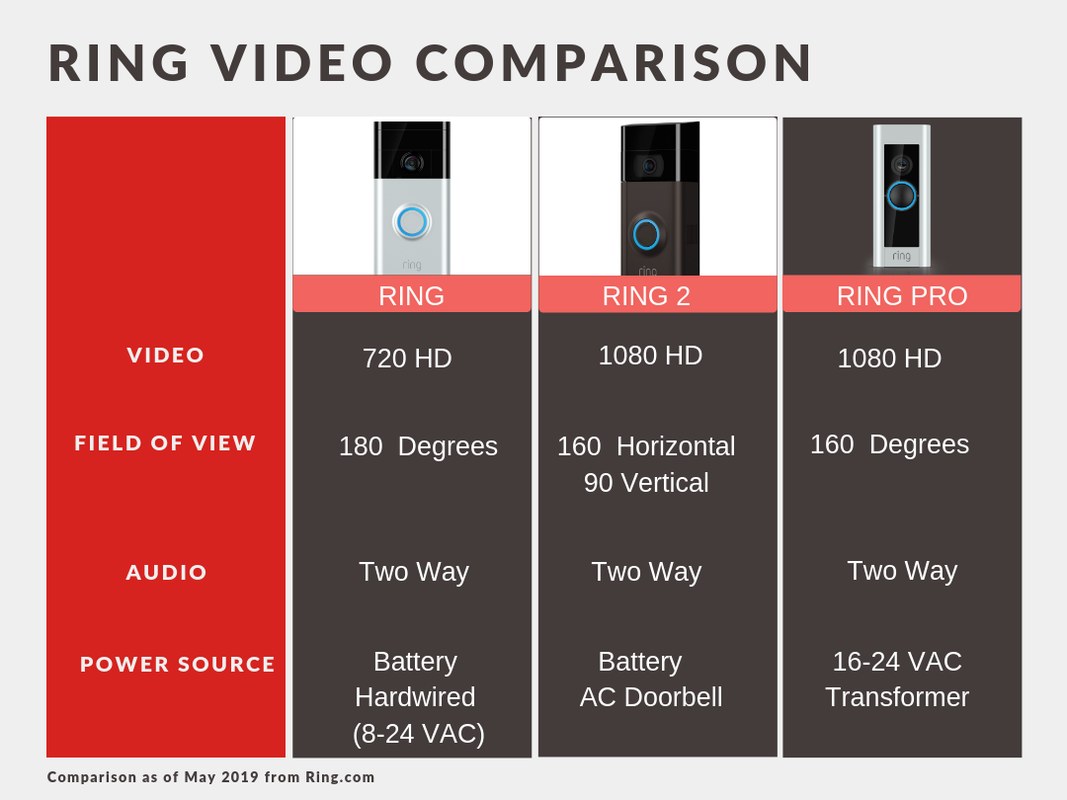
Resolution, frame rate, and compression
Resolution tells you how much detail the camera can capture. Frame rate affects how smooth motion looks.
Compression reduces file size. Too much of it can make faces and moving objects look blocky, especially when someone walks quickly toward the door.
Field of view, lens distortion, and porch layout
Field of view is the width of the scene the camera can see. A wide view helps capture more of the porch, but it can also stretch objects near the edges.
If your door is close to a wall or corner, the camera may need a wedge kit or a better angle to avoid distortion.
Daylight, low light, and infrared night performance
Bright daylight usually gives the cleanest image. Low light is harder, and infrared night vision can flatten colors and reduce detail.
Porch lights, streetlights, and reflective surfaces can all change how the camera handles dark scenes.
Marcus Sterling’s Security Note
In many homes, the biggest improvement comes from better placement, not a new camera. That is a practical judgment based on how video doorbell optics and Wi-Fi behavior usually work.
Audio clarity, motion detection, and alert timing
Clear audio helps you understand what happened when the picture is not perfect. Motion detection also affects your experience, because late or missed alerts can make good video less useful.
If the app notifies you after the person has already left, the image quality may not matter much.
Where You Mount It Matters More Than Most People Think
Mounting height and angle can change whether you see a face, a package, or only the top of someone’s head. Many video problems start with the install location.
A small adjustment can improve the view more than changing camera settings.
Door height, angle, and visitor distance
Most doorbells work best when they face visitors at a natural angle and not too high above the landing. If the camera is mounted too high, it may miss faces.
If it is too low, it may focus on shoes and packages instead of people.
Wall vs. corner placement and wedge kits
Wall placement is simple, but corner placement can widen the useful view. A wedge kit can tilt the camera toward the walkway or steps.
That helps when the door opens near a side wall or when the default angle points too much at the siding.
How steps, railings, and covered porches affect visibility
Steps and railings can block the lower part of the frame. Covered porches can also create dark zones that make faces harder to see.
If your entry has strong shadows, try shifting the angle so the camera sees the approach path, not just the doorway.
Power, Wi-Fi, and Network Conditions That Affect Image Quality<
Power and network conditions can affect smart home security video quality.
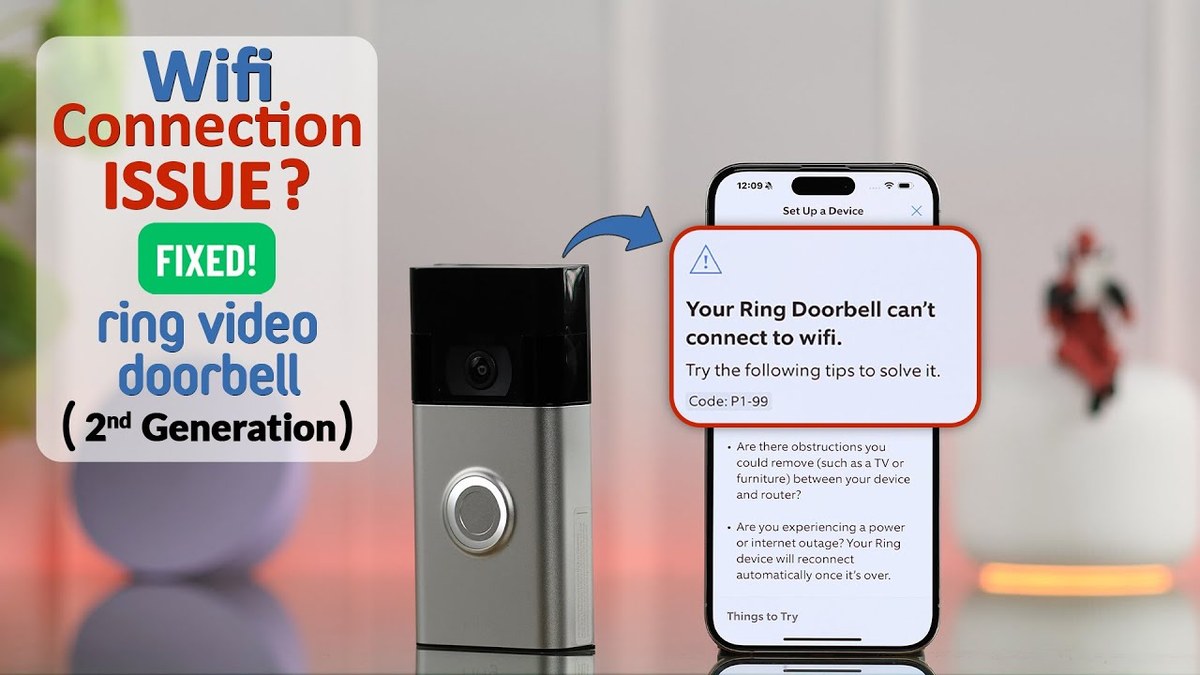
Video quality often drops because of power or network issues, not the camera lens. Weak Wi-Fi can cause delayed live view, frozen clips, or lower-quality streams.
Battery power can also change how often the doorbell records or stays ready.
Wi-Fi & Network Check
Check the supported Wi-Fi band, router distance, mesh behavior, and upload speed before you blame the camera. A strong signal at the door and a stable internet upload path usually improve live view and clip playback.
Battery vs. wired power and performance tradeoffs
Battery models are easier to place, which helps renters and many homeowners. Wired models may offer steadier power and fewer charging interruptions.
The tradeoff is that wiring can add installation complexity and may require a compatible transformer or chime setup.
2.4 GHz versus 5 GHz considerations for doorbells
Many doorbell cameras rely on 2.4 GHz Wi-Fi because it reaches farther through walls. Some models or hubs may also support 5 GHz in certain setups, but range is usually shorter.
The best band depends on the exact model and your home layout.
Signal strength, mesh systems, and router placement
A doorbell near the edge of your Wi-Fi range often shows worse video and slower alerts. A mesh node closer to the front door can help more than moving the camera.
Router placement matters too, especially in homes with brick walls, metal doors, or thick plaster.
Bandwidth sharing, upload speed, and video buffering
Video doorbells need upload capacity to send live video and event clips. If several devices are streaming at once, the image may buffer or drop detail.
This is more noticeable in larger households, shared apartments, and homes with many smart devices.
Storage, Subscriptions, and What You Lose Without a Plan
Storage choices affect what you can review later, how long clips stay available, and whether you can save important events. Some features may work without a plan, but playback and history often change when the subscription changes.
That affects the value of the camera as much as the image itself.
Live view, event history, and cloud retention basics
Live view lets you check the door in real time. Event history is the record of past clips.
Cloud retention is how long those clips stay available online, and that period can vary by plan or model.
How subscription status changes playback and review options
Without a plan, some users may still get live view or basic alerts, depending on the exact product and current policy. With a plan, the app may unlock longer history, richer clip review, or easier sharing.
Always verify current features for the exact model before you buy.
Local storage, if available, and ownership-cost implications
Local storage can reduce monthly costs, but it may require extra hardware or a hub. It also puts more responsibility on the homeowner to protect recordings and manage backups.
Cloud storage is more convenient for remote access, but it depends on the account and internet service.
Local Storage
Can lower ongoing fees.
May keep clips available without a cloud plan.
Needs careful backup and device protection.
Cloud Storage
Often easier to review from anywhere.
Depends on account access and internet service.
Usually adds recurring cost.
Privacy, Cybersecurity, and Neighbor Considerations
Video quality is only one part of responsible use. Doorbell cameras can capture public sidewalks, shared driveways, and neighboring property.
Good setup should protect your account and respect the people around your home.
Privacy & Data for US Users
Review privacy zones, motion masking, audio recording settings, retention, and deletion options before daily use. Also check how shared users, app permissions, and third-party integrations affect who can see recordings.
Privacy zones, motion masking, and shared property lines
Privacy zones let you block parts of the image from recording. Motion masking can reduce alerts from sidewalks or neighboring porches.
These tools matter most in townhomes, apartments, and homes with close property lines.
Account security, MFA, and password hygiene
Use a unique password for the account and turn on multi-factor authentication, or MFA. MFA adds a second check when you sign in.
It helps protect recordings and live view access if a password is stolen.
Shared users, app permissions, and guest access
Households often need more than one user. Give access only to people who need it, and review permissions after guests, contractors, or former roommates no longer need entry.
Shared access is convenient, but it also expands the number of people who can see your front door.
Retention settings and responsible clip management
Keep only the recordings you need. Delete clips that are no longer useful, and check whether exports are stored in other accounts or devices.
Good clip management lowers clutter and reduces the chance of unnecessary data exposure.
Cybersecurity Checklist
Use a unique password and enable MFA.
Update device, hub, router, and app software.
Review shared users, sessions, permissions, and integrations.
Use modern Wi-Fi security and isolate unsupported devices when practical.
Confirm how recordings and account data can be exported or deleted.
Installation and Setup Choices That Improve Video Results
Good setup starts before the first screw goes in. The best install balances visibility, weather exposure, wiring, and household access.
If you are renting, you may also need landlord approval or a no-drill option.
Installation Warning
Mounting near wiring, ladders, or exterior trim can add risk. If the manual is unclear, or if you are unsure about rental rules, HOA limits, or low-voltage wiring, stop and use a qualified installer.
Choosing the right height and viewing angle during install
Start with the manual’s recommended height, then think about who approaches the door and where they stand. Aim the lens at faces, not only at the threshold.
If the camera points too high or too low, the app may still work, but the image will be less useful.
Using a chime, transformer, or hub correctly
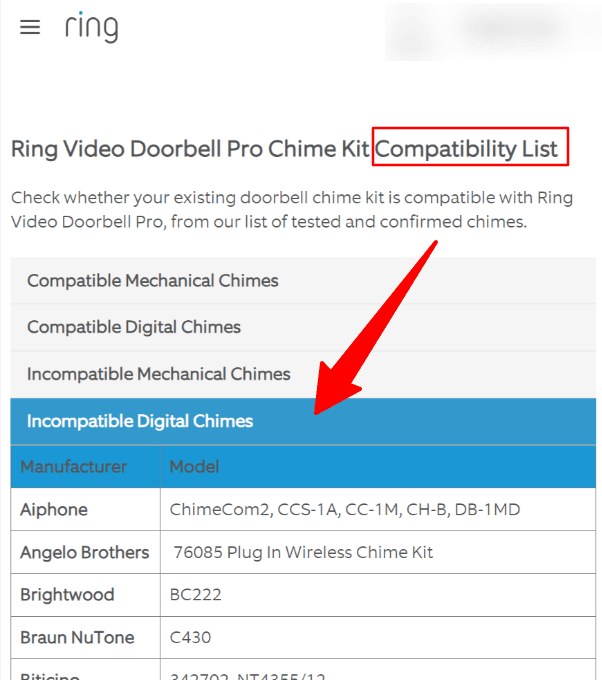
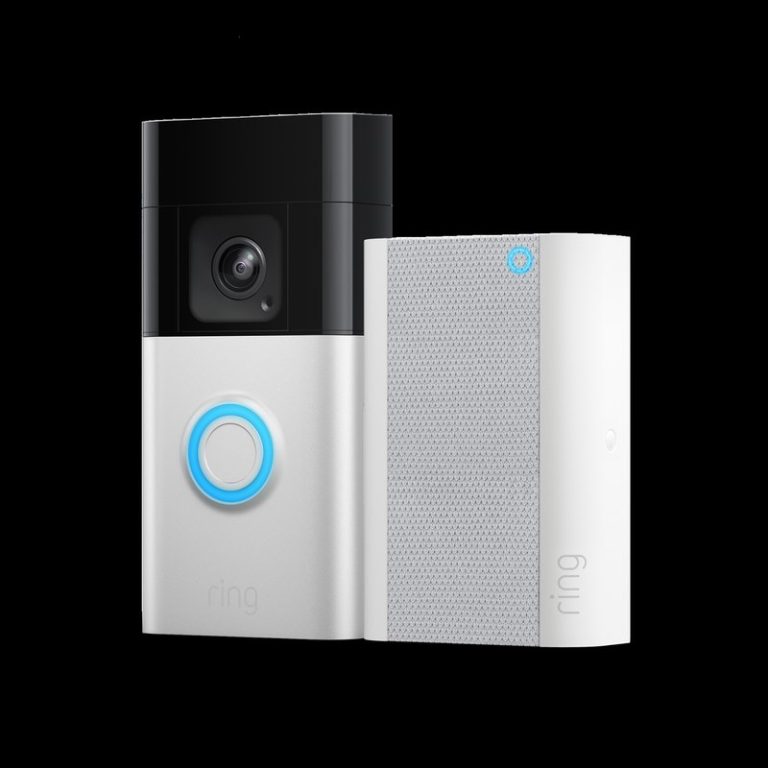
Some Ring doorbells need a compatible chime, transformer, or power accessory. Others rely on a hub or a battery.
For wired installs, check the exact voltage and chime requirements before connecting anything.
Firmware updates and app configuration after setup
After install, update the firmware and the app. Then check motion zones, alert timing, and privacy settings.
A camera can look fine but still miss events if the app settings are too narrow or too sensitive.
Troubleshooting Blurry, Delayed, or Choppy Ring Video
Start with simple fixes first. Clean the lens, check the angle, and test the Wi-Fi signal.
If the problem continues, narrow it down by time of day, motion type, or network load.
Fixing motion blur, glare, and overexposure
Motion blur often happens when people move fast or when light levels change quickly. Glare from sun, snow, or reflective siding can wash out the image.
Try adjusting the angle, adding shade, or moving the camera away from direct light.
Improving night video with lighting and placement changes
Night footage improves when the entry has steady, even light. A porch light can help, but it should not shine directly into the lens.
If the porch is too dark, the camera may rely too much on infrared and lose detail.
Reducing lag, missed events, and weak notifications
Delayed alerts often point to weak Wi-Fi, overloaded bandwidth, or aggressive motion settings. Check whether the app is allowed to send notifications, and make sure the phone is not blocking them.
If events are missing, widen the motion zone and test the detection path.
When the issue is the network, not the camera
If live view freezes, clips load slowly, or the image drops at the same times each day, the network may be the problem. Look for router distance, mesh handoff issues, or heavy internet use from other devices.
In many homes, the fastest fix is better signal at the door.
Maintenance, Longevity, and When to Reevaluate Your Setup
Doorbell video quality can drift over time. Dirt, weather, battery wear, and network changes all affect the result.
A quick seasonal check can keep the camera useful for longer.
Cleaning the lens, checking seals, and weather exposure
Wipe the lens with a soft cloth when dust or pollen builds up. Check seals and mounting points after storms or temperature swings.
If the camera is exposed to rain, sun, or snow, inspect it more often.
Battery care, wiring checks, and seasonal maintenance
Battery-powered models need charging or replacement at regular intervals, depending on use and conditions. Wired models should still be checked for loose connections or chime problems.
Seasonal changes can also affect motion detection and night performance.
When to adjust placement, upgrade networking, or change plans
If the image is still poor after basic fixes, move the camera or add a wedge. If lag remains, improve the network first.
If storage or review needs have changed, it may also be time to revisit the subscription or storage setup.
Final Takeaway
Ring doorbell video quality is usually good enough for everyday front-door use when the mount, light, and Wi-Fi are set up well. If the image looks weak, start with placement and network checks before assuming the camera itself is the problem.
Video quality itself does not depend on a plan, but review and storage features often do. Check what live view, event history, and clip access are included for your exact model.
Night blur often comes from low light, glare, or the camera being mounted too high or too far from the walkway. Adding even porch lighting and adjusting the angle can help.
A stronger and more stable Wi-Fi connection can improve live view, clip loading, and alert timing. If the signal is weak at the front door, a mesh node or router move may help.
Yes, many renters use no-drill mounts or battery models where allowed. The key is still to get the right angle, signal, and permissions from the property owner.
Confirm the exact voltage, transformer requirements, and chime compatibility in the manual. If anything is unclear, use a qualified installer.
Use a unique password, enable MFA, review shared users, and keep software updated. Also check privacy zones, retention settings, and deletion options.
Hi, I'm Marcus Sterling, a smart home security expert with over 5 years
of hands-on experience testing and reviewing hundreds of security cameras, smart locks, and alarm systems. My mission is to make smart home security accessible, affordable, and easy to understand—and every review I publish is 100% independent, unbiased, and honest. I don't accept payments for positive reviews, just practical advice to help you secure your home with confidence.
Quick Security Answer Ring video doorbell compatibility depends on power, Wi-Fi, and mounting fit first. Homeowners and renters should also check chime support, privacy settings, and ongoing subscription costs. Ring video doorbell compatibility starts with three basics: power, Wi-Fi, and fit at the door. If those line up, most homeowners can move forward with setup….
Quick Security Answer A ring battery doorbell chime setup can be a practical choice if you want flexible installation and indoor alerts. Check Wi-Fi, privacy, battery charging, and any subscription needs before you mount it. ring battery doorbell chime setup usually means pairing a battery-powered video doorbell with a compatible indoor alert device, app notifications,…
Quick Security Answer Check power, Wi-Fi, app permissions, and motion settings first. If those are fine, move to placement, storage, privacy, and support. Ring video doorbell troubleshooting usually starts with power, Wi-Fi, and app settings. These three areas cause many common issues. If your doorbell is offline, missing motion alerts, or showing poor video, work…
Quick Security Answer A Ring video doorbell can work well with battery, hardwired, or plug-in power, but the right choice depends on your wiring and Wi-Fi. Check compatibility, then choose the setup that fits your home and rules. Ring video doorbell power is the first thing to check before you buy, mount, or troubleshoot a…
Blink Outdoor 4 and Wyze Cam v4 take different approaches to home security. Blink focuses on long battery life and simple Alexa integration, while Wyze offers higher video resolution, color night vision, and a wider view. Choose Wyze Cam v4 for sharper 2.5K video and more features; choose Blink Outdoor 4 for a battery-powered setup…
Quick Security Answer A wired video doorbell can work with an existing chime if the transformer, wiring, and chime type match the model’s requirements. Check those details first, because compatibility, Wi-Fi strength, and storage costs often decide whether the setup is simple or frustrating. A wired video doorbell that works with existing chime is often…