Contact Sensor vs Motion Sensor Choosing the Right One
Most homes need both sensor types. Contact sensors guard doors and windows, while motion sensors watch open spaces.
The contact sensor vs motion sensor decision shapes how your security system detects trouble. Contact sensors guard doors and windows. Motion sensors watch rooms and hallways. Most homes need both. This guide explains the difference, the limits, and the smartest way to combine them.
Contact Sensor vs Motion Sensor: What’s the Difference?
A contact sensor tells you when a door or window opens. A motion sensor tells you when movement happens inside a room. One guards the border of your home. The other guards the space inside. They are not replacements for each other. They solve different problems.
Think about the path an intruder takes. First, they must open a door or break a window. A contact sensor catches that moment. Next, they move through a hallway or living room. A motion sensor catches that moment. Together, the two sensors tell a fuller story.
How Contact Sensors Work (and What They Can’t Do)
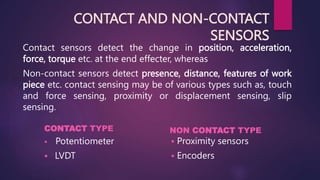
A contact sensor has two parts. One part attaches to the door or window. The other attaches to the frame. When the door opens, the two parts separate. The sensor sends an alert. Most use a magnetic switch. The switch is closed when the parts touch. It opens when they separate.
Contact sensors are simple and dependable. They rarely trigger false alarms because they only respond to a physical change. They also pair well with smart locks. A contact sensor can confirm the door closed after you lock it. If you are choosing between a smart lock and a traditional key lock, the sensor adds a useful second check.
Best Placements for Contact Sensors
Place contact sensors on every door and window someone could open. Front and back doors matter most. Ground-floor windows matter more than second-floor windows. Sliding glass doors need sensors too. Garage service doors are common weak points.
Keep the two sensor parts close together. Most require a gap of less than one inch. Check the manual for the exact distance. Avoid placing sensors on warped frames or loose hinges. A shifting door can cause false alerts.
Where Contact Sensors Fall Short
Contact sensors cannot see inside a room. Once a door opens, they go quiet. They cannot tell if a person entered, left, or moved around. They also cannot detect glass breaking. A thief can break a window without opening it. For that, you need a glass-break sensor or a motion sensor.
How Motion Sensors Work (and What They Can’t Do)
A motion sensor detects movement inside a space. Most home models use passive infrared, or PIR. PIR sensors detect changes in heat. A person moving across a room changes the heat pattern. The sensor sees that change and triggers an alert.
Motion sensors cover open areas. They work well in hallways, living rooms, and stair landings. They can also activate lights. Many people use them to light a dark hallway at night.
Motion sensors cannot see through walls. They cannot tell who is moving. A family member, a pet, or an intruder all create movement. Some models can ignore small pets, but none can identify a person by face.
PIR vs. Dual-Tech: What’s Inside Your Sensor
PIR sensors are the most common. They use little power and cost less. Dual-tech sensors combine PIR with microwave detection. Both technologies must agree before the sensor triggers. That reduces false alarms from heat or moving objects. Dual-tech sensors cost more and use more power.
Pet Immunity and Placement Rules
Many motion sensors include pet immunity. The sensor ignores heat signatures below a set size, often around 50 pounds. The exact threshold varies by model. Check the manual to confirm the limit for your pet.
Place the sensor high, usually 6 to 7 feet off the floor. Aim it across the room, not at stairs or windows. Heating vents, fans, and direct sunlight can cause false alarms. Keep the lens clean and free of dust.
Contact Sensor vs Motion Sensor: Side-by-Side Comparison
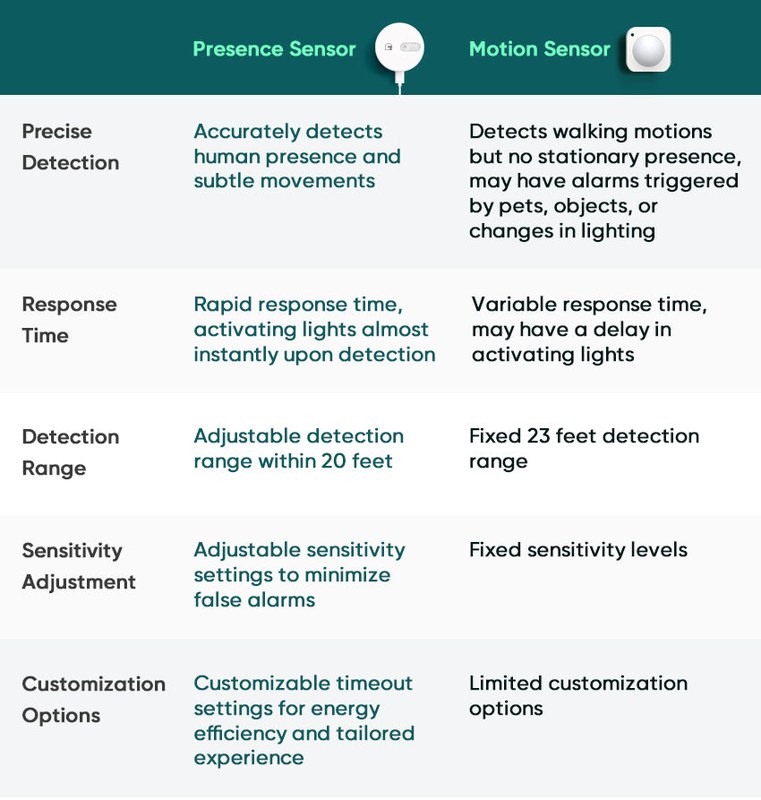
Here is how the two sensor types compare in daily use.
Detection Logic and False Alarm Risk
Contact sensors respond to a physical break. False alarms are rare. A sensor can trigger if the door blows open in wind or if the magnet shifts. Motion sensors respond to heat and movement. Pets, heaters, and moving curtains can trigger them. In general, contact sensors are the more reliable alert source.
Power, Battery Life, and Maintenance
Both sensor types usually run on batteries. Contact sensors use very little power because they only send a signal when the door moves. Motion sensors may wake more often because they constantly watch a space. Battery life varies by model, firmware, and alert frequency. Check the manual and replace batteries on schedule.
Installation and Renter-Friendliness
Contact sensors use adhesive backing. You can mount them in minutes and remove them without damage. Motion sensors also use adhesive on many models, but they need a higher position. That can mean a step stool or a small ladder.
Renters should check lease rules before mounting anything. Many landlords allow adhesive sensors, but rules vary. If you drill holes, you may lose your security deposit. Adhesive sensors are the safer choice for most renters.
Choosing the Right Sensor for Your Home Layout
Start with your entry points. Every exterior door and ground-floor window should have a contact sensor. Then add motion sensors to the rooms an intruder would cross. Hallways, stair landings, and main living areas are strong choices.
Apartment and Renter Considerations
Renters often prefer contact sensors. They are small, adhesive, and easy to remove. Motion sensors work well in apartments too, but placement matters. A sensor aimed at a window may trigger every time a bus passes. Check your lease for rules about drilling, mounting, and monitoring devices. Some landlords restrict security devices in shared spaces.
Single-Family Homes and Multi-Level Layouts
Larger homes need more coverage. Put contact sensors on every accessible door and window. Use motion sensors on each level. A sensor at the top of the stairs can catch movement before someone reaches the bedrooms. A sensor in the basement stairwell covers the lowest entry point.
Think about daily life too. A motion sensor in a busy hallway will trigger often. That is fine if you want the lights on, but it can create noisy alerts. Many systems let you set schedules. You can arm the sensors only when you are away or asleep.
Connectivity, Hubs, and Wi-Fi Requirements
Most contact and motion sensors do not connect directly to Wi-Fi. They use Zigbee, Z-Wave, or a proprietary radio. That means you need a hub or a base station. Some newer models connect directly to Wi-Fi. Check the product page before you buy.
Wi-Fi Bands, Zigbee, Z-Wave, and Hub Compatibility
Wi-Fi sensors usually support 2.4 GHz networks. Some support 5 GHz as well. If you are choosing a camera for the same system, the band matters. See our guide on 2.4 GHz vs 5 GHz security cameras to understand the trade-offs.
Zigbee and Z-Wave devices need a compatible hub. Not every hub supports every protocol. Check the exact model and firmware. A hub can also extend range by acting as a mesh. Place the hub centrally so sensors stay within range.
Firmware Updates, MFA, and Account Security
Treat sensors like any connected device. Update the firmware when the app prompts you. Use a unique password for your security account. Enable multi-factor authentication if the app offers it. Review which household members have app access. Remove old devices when you sell or recycle them.
Monitoring, Subscriptions, and Long-Term Costs
Contact and motion sensors can work without a subscription. The app sends alerts to your phone. You decide what to do. Some systems offer professional monitoring for a monthly fee. That fee usually covers a monitoring center that can call you and request emergency dispatch.
- The household receives alerts and decides what action to take.
- Usually has lower ongoing cost.
- Does not guarantee emergency dispatch.
- A monitoring center may review eligible alarms.
- Dispatch availability depends on the plan and event.
- Fees, contracts, permits, and false-alarm rules may apply.
Permits, False Alarms, and Dispatch Limits
Some US cities require alarm permits. Others charge fees for repeated false alarms. Check the rules for your address before you enable professional monitoring. A permit is often a small annual fee. False-alarm fees can be much larger.
Battery Replacement and Cloud Retention Costs
Plan for battery replacement. Contact sensors may go a year or more on one set. Motion sensors may need new batteries more often. If you add cameras, cloud storage becomes a separate cost. Review the plan page for current prices and retention limits.
Installation, Troubleshooting, and Maintenance Tips
Take your time during setup. Read the manual for the exact model. Test every sensor after you mount it. A sensor that cannot reach the hub is useless.
Common Installation Mistakes to Avoid
Common mistakes include placing the two contact parts too far apart, mounting a motion sensor near a heat vent, and skipping the final test. Another mistake is ignoring metal door frames. Metal can interfere with the magnetic switch. Use the spacer or mount included with the sensor.
Fixing False Alarms and Missed Events
Start with the simplest fix. Clean the sensor lens with a dry cloth. Move the sensor away from vents, sunlight, and moving curtains. Adjust the sensitivity setting in the app.
If a sensor misses events, check the battery and the distance to the hub. Move the hub closer or add a range extender. Similar troubleshooting applies to motion-based doorbells. See our guide on Ring Video Doorbell Not Sensing Motion for a helpful example.
Choose contact sensors for every door and window an intruder could open. Add motion sensors to rooms and hallways where movement matters. Most homes need both. Start with the entry points, test everything, and keep the batteries fresh. The best system is the one you actually maintain.
Frequently Asked Questions
No. A contact sensor only detects when a door or window opens. It cannot see movement inside a room. Use a motion sensor for that job.
No. Most motion sensors use heat or microwave detection and cannot see through walls. Place one in each room or hallway you want to cover.
No. Most work without a plan and send alerts to your phone. Professional monitoring, cloud storage, and some advanced features may require a paid plan.
Yes. Contact sensors are adhesive and renter-friendly. Motion sensors work too, but check your lease and avoid aiming them at shared windows or hallways.
Common causes include pets, heating vents, direct sunlight, and moving curtains. Clean the lens, adjust sensitivity, or move the sensor to a better position.
Yes. A contact sensor can confirm that a door closed after a smart lock locks it. Check that both devices work with the same hub or app.