Is the Reolink Argus 4 Pro Wireless? Connectivity Explained
The Reolink Argus 4 Pro gives you wireless video without a network cable or constant power connection. Yes, the Reolink Argus 4 Pro is wireless, using dual-band Wi-Fi 6 and a rechargeable battery. You can also connect its included solar panel to help maintain power outdoors.
I’ll examine its wireless connection, power options, 4K video, 180-degree view, night vision, smart alerts, storage, and app support. You’ll also learn what to consider before installing it and whether its wireless design fits your security needs.
Key Takeaways
- The camera uses Wi-Fi and battery power.
- Solar charging can reduce charging needs.
- It supports 4K video, wide coverage, and local storage.
Wireless Connectivity And Power Options
I can install the Reolink Argus 4 Pro without Ethernet or power cables. It uses Wi-Fi for network access, while its rechargeable battery can work with an optional Reolink solar panel for longer-term outdoor use.
Wi-Fi Band Support
The Argus 4 Pro supports dual-band Wi-Fi 6 on both 2.4 GHz and 5 GHz networks. I can use 5 GHz for higher speeds and less congestion when the camera sits near my router. The 2.4 GHz band usually reaches farther and passes through walls better, so it may work more reliably for cameras installed at a distance.
The camera does not need an Ethernet cable. I connect it through the Reolink app, with Bluetooth-based setup available to simplify network configuration. Wi-Fi signal strength still matters: thick walls, metal surfaces, and long distances can cause delays or connection drops. I should place the camera within a stable range of my router or add a compatible Wi-Fi extender if needed.
Battery And Solar Charging
The camera has a rechargeable battery, allowing me to install it where electrical wiring is unavailable. Battery life depends on factors such as motion activity, live viewing, recording settings, temperature, and Wi-Fi quality. Frequent alerts or extended live streaming can use power faster.
I can connect the Argus 4 Pro to a Reolink Solar Panel for regular top-ups. Solar charging depends on direct sunlight, panel placement, weather, and seasonal daylight. I should position the panel where it receives clear sunlight and keep its surface free from dirt. Solar power reduces how often I need to remove the camera for charging, but it does not guarantee uninterrupted operation in prolonged cloudy conditions.
Camera Features And Performance
I get a 180-degree view, 4K recording, and color night footage from a wire-free camera. The dual-lens design covers a wide area, while local storage and solar charging can reduce the need for extra equipment and monthly fees.
4K Video Resolution
The Argus 4 Pro uses two 4K lenses to create an 180-degree panoramic image. This gives me a much wider view than a typical fixed security camera and helps me monitor large areas with one device.
The 4K resolution captures more detail than lower-resolution cameras, which can help me identify people, vehicles, and other activity at closer and moderate distances. The stitched image may show some distortion at the edges, so I would position the camera carefully to keep important areas near the center of the frame.
The camera records over Wi-Fi and supports local storage. I can save footage without paying for a required cloud plan, although I still need to check storage capacity and network strength before installation.
ColorX Night Vision
Reolink’s ColorX system provides full-color night footage in low-light conditions. It uses the camera’s low-light sensors rather than depending only on infrared recording, so I may see more useful detail in areas with nearby ambient light.
Color performance depends on the scene. In very dark locations, the camera may use its built-in light or produce less detail than it does in normal low light. Bright lights, shadows, and moving subjects can also affect image quality.
I would test the camera at night after mounting it. This helps me check whether nearby lamps, reflective surfaces, or the camera’s light create glare or reduce useful detail.
Pan And Tilt Coverage
The Argus 4 Pro provides a fixed, 180-degree horizontal view through its two lenses. It does not function like a motorized pan-and-tilt camera, so I cannot remotely rotate the lens to follow movement or inspect a different direction.
The wide view works well for driveways, yards, porches, and other broad areas. It can reduce the need for multiple cameras, but distant subjects may appear smaller because the image covers such a large space.
I would mount it at a suitable height and angle before relying on it. A clear position gives both lenses an unobstructed view and keeps important entry points away from the image edges.
Installation And Placement Considerations
I can install the Reolink Argus 4 Pro without a network cable, but I still need to plan its mounting position, Wi-Fi signal, charging access, and viewing angle. A stable mount and suitable outdoor location help the camera provide reliable coverage.
Mounting Requirements
I can mount the camera on a wall or attach it to a tree or pole with the included mounting options. For a wall, I should use the mounting template and choose screws and anchors that match the surface. Masonry, wood, and siding may need different hardware.
I should place the camera high enough to reduce tampering, while keeping faces and entry points within the camera’s view. I also need to leave room to adjust the angle and maintain a strong Wi-Fi connection. Before drilling, I should check the live view and confirm that the camera covers the intended area.
The Argus 4 Pro uses a rechargeable battery, so I need to remove it or reach the charging port when necessary. If I add a Reolink solar panel, I should install it where it receives direct sunlight and aim it to avoid shade from walls, roofs, or trees.
Outdoor Weather Resistance
The Argus 4 Pro is designed for outdoor use, but I should still choose a location that limits constant exposure to heavy rain and snow. A covered position, such as under an eave, can reduce water buildup while preserving the camera’s view.
After charging, I should replace the rubber plug over the charging port. This plug helps maintain the camera’s weather protection. I should also check that the cover fits fully and inspect it from time to time for dirt, damage, or looseness.
I should avoid placing the camera where sprinklers spray directly onto it or where water collects. Strong sunlight can affect image quality, so I should test the view at different times of day and avoid aiming the lens toward a bright light source.
Smart Detection And Alerts
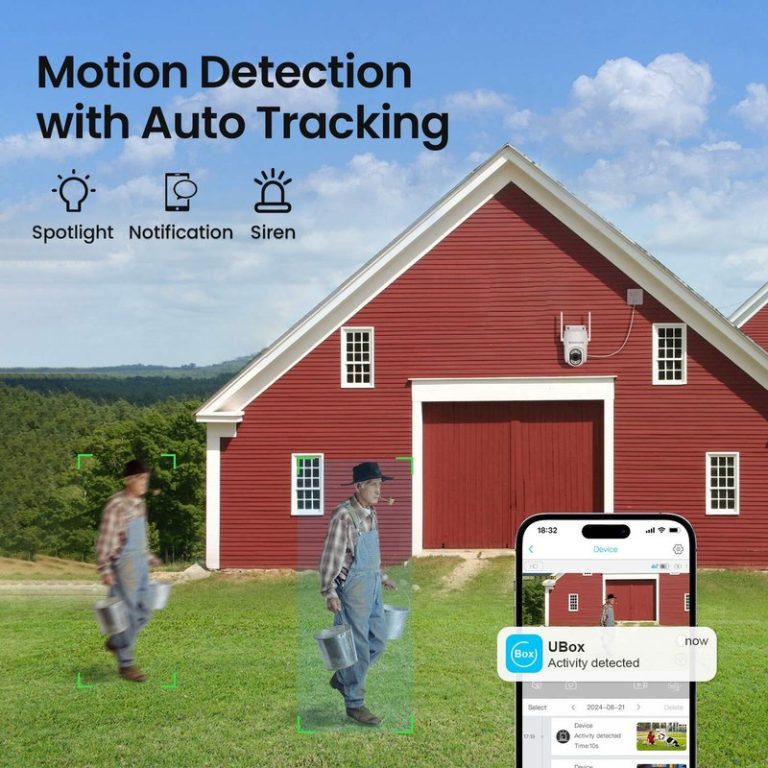
I can use the Argus 4 Pro’s smart detection to separate likely people, vehicles, and animals from general movement. I can also adjust detection areas and alerts so the camera focuses on important parts of my property.
Person Vehicle And Animal Detection
The Argus 4 Pro uses AI detection to identify people, vehicles, and animals. This helps me receive more useful alerts than I would get from basic motion detection, which can react to trees, shadows, or other movement.
Its 180-degree view works with a wide PIR motion sensor. The sensor detects movement across a broad area, while the camera’s detection system analyzes the event before sending an alert. I can then check the live feed through the Reolink app.
Detection accuracy can vary with distance, lighting, weather, and objects blocking the view. I should still position the camera carefully and review important alerts rather than treating AI classification as proof of an intrusion.
Motion Zones And Notification Settings
I can create motion zones to limit detection to specific areas, such as a driveway, gate, or walkway. I can exclude roads, sidewalks, and busy areas that might create unwanted alerts. The camera also supports privacy masks, which let me block selected parts of the image from monitoring.
The app lets me manage notification settings and choose which events trigger alerts. I can use these controls to receive alerts for people or vehicles while reducing notifications from general movement or animals.
The Argus 4 Pro can send smartphone notifications when it detects activity. I can open the alert to view the camera feed and assess the event. Settings may need adjustment after installation because changing light, camera angle, and normal activity affect alert frequency.
Storage And Reolink App Integration
I can save Argus 4 Pro footage locally on a microSD card or manage recordings through a compatible Reolink Home Hub. The Reolink app lets me view live video, review saved clips, adjust detection settings, and receive alerts without a monthly storage plan.
Local microSD Recording
I can insert a microSD card into the Argus 4 Pro for local recording. The camera supports cards up to 512GB, although I should use a reliable, high-endurance card designed for continuous video recording. Storage time depends on video quality, activity, and whether the camera records continuously or only after detecting motion.
The camera can save clips when its detection system identifies people, vehicles, or animals. Local storage keeps recordings at the camera, so I do not need a paid cloud subscription. However, the camera could lose access to recordings if someone removes it or damages the card. I can reduce this risk by pairing the camera with a Reolink Home Hub, which supports additional local storage and centralized management for multiple cameras.
Remote Viewing And Playback
I can use the Reolink app to check the Argus 4 Pro from a phone or tablet when the camera has an internet connection. The app provides live viewing, recorded clip playback, event searches, and settings for detection zones and alerts. I can also receive notifications when the camera detects selected types of movement.
Playback depends on where the footage is stored. With a microSD card, I can review recordings through the app while connected remotely. A Home Hub can provide another local storage option and help manage footage from several compatible Reolink cameras. I should keep the app and camera firmware updated to maintain compatibility and access the latest controls.
Frequently asked questions
Is the Reolink Argus 4 Pro wireless?
Yes. I classify it as a wire-free camera because it connects over Wi-Fi and runs on a rechargeable battery. It does not need a network cable or constant power connection.
Does it include solar charging?
Some packages include a solar panel, while others may sell it separately. I recommend checking the package contents before buying. A panel can reduce how often you need to remove the camera for charging.
Does it need a subscription?
No. I can use the camera without a monthly cloud plan. It supports local recording with a compatible microSD card, while optional cloud services may offer extra storage or features.
What video quality does it provide?
The Argus 4 Pro uses two lenses to create a wide 180-degree view in 4K resolution. This design can cover a broader area than many standard single-lens cameras.
Can it record in color at night?
Yes. Reolink’s ColorX technology supports color night footage in suitable lighting. In very dark conditions, image quality may vary, so I would place the camera where it receives some nearby ambient light.
Does it detect people and vehicles?
It includes AI detection for people, vehicles, and pets. I can adjust alerts and recording settings through the Reolink app to reduce unwanted notifications.
Is it suitable for outdoor use?
Yes. Its outdoor design supports installation in exposed areas, but I would mount it securely and follow Reolink’s guidance for placement and weather protection.
Conclusion
I consider the Reolink Argus 4 Pro a wireless outdoor security camera because it connects over Wi-Fi and runs on a rechargeable battery. It does not need a network cable or a constant power connection during normal use.
Its dual-lens design provides a wide 180-degree view, while 4K video and ColorX night vision can help capture clear footage across large outdoor areas. The included solar panel can also help extend battery life, depending on sunlight, settings, and activity levels.
I would choose it for monitoring driveways, gardens, patios, or other wide spaces where running cables would be difficult. However, I would not treat it as completely maintenance-free. I would still need to check the Wi-Fi signal, keep the battery charged when needed, and position the solar panel carefully.
Because the camera supports local storage and does not require a subscription for its main features, I see it as a practical option for buyers who want a flexible wireless setup.