Yes, many Ring battery doorbells can be hardwired if the exact model and existing transformer are compatible. Hardwiring usually helps keep the battery charged, but it does not fix weak Wi-Fi or replace model-specific setup requirements.
can you hardwire a ring battery doorbell? Yes, in many homes you can. But only if the exact Ring model supports wired power and your current doorbell setup works with it. Hardwiring often keeps the battery charged and can give steadier power. Still, the doorbell may remain a battery-based device in many cases.
Can You Hardwire a Ring Battery Doorbell? The Short Answer and What It Means
For most Ring battery doorbells, the answer is yes, but with limits. Hardwiring does not always turn the unit into a fully wired doorbell. Instead, it often supplies low-voltage power. That helps maintain the battery and support normal use.
The result depends on the exact model, transformer, chime, and wiring condition. If your home already has a working doorbell circuit, hardwiring may fit well. If it does not, battery-only use may be the safer and simpler choice.
How Hardwiring a Ring Battery Doorbell Actually Works
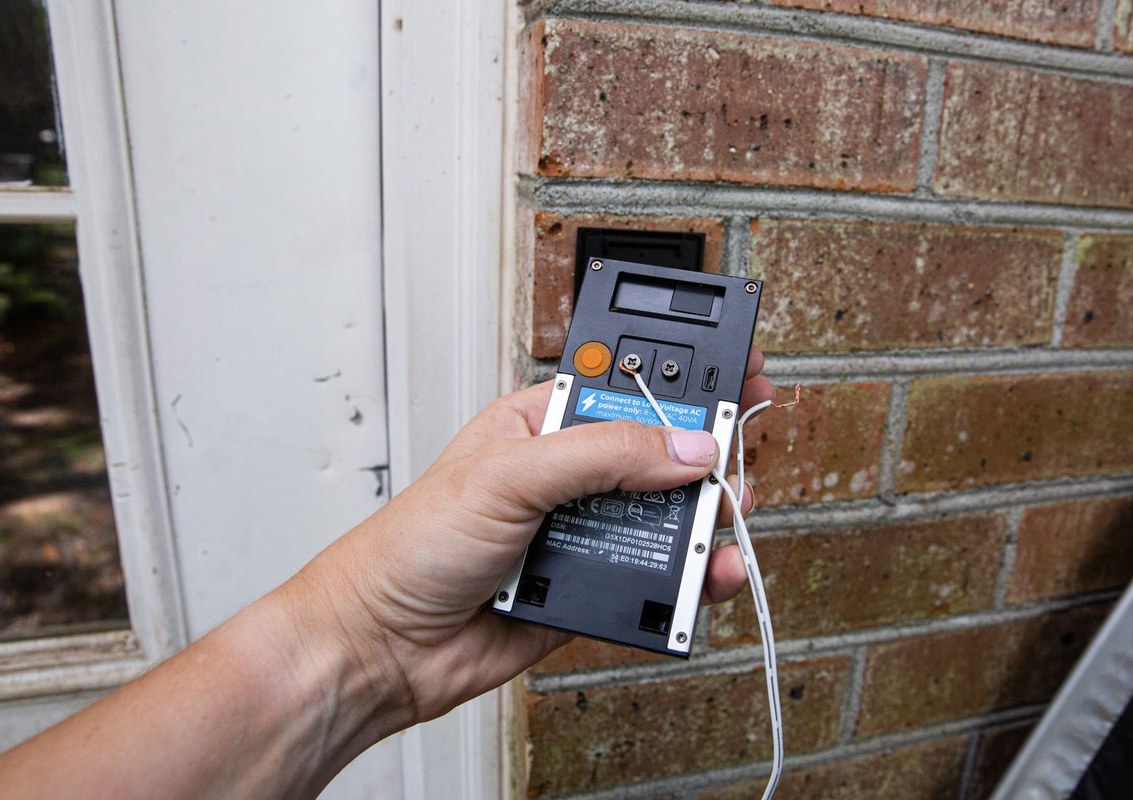
Illustration of hardwiring a Ring battery doorbell to an existing doorbell transformer.
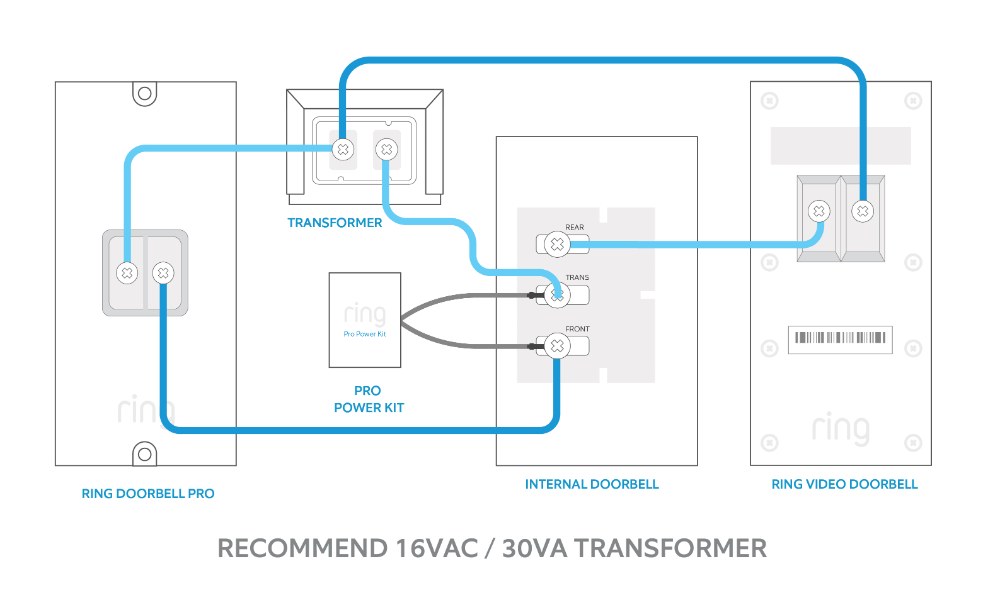
Hardwiring a battery doorbell means connecting it to the home’s existing doorbell wires. Those wires usually carry low-voltage power from a transformer. The doorbell can then draw power while still using its battery as backup or support.
In plain terms, the wire helps feed the device. It does not always remove the battery from the system. That is why some battery models can be wired, but they still need the battery installed.
Battery Mode vs. Wired Power Mode
Battery mode means the device runs from its internal battery. You must recharge it or remove it for charging. Wired power mode means the doorbell receives low-voltage power from the home circuit. On many Ring battery models, wired power helps extend time between charges rather than fully replace the battery.
That difference affects maintenance. A wired battery doorbell may need less frequent charging, but it may still need periodic checks. It can also behave differently in the app, depending on model and firmware.
What Hardwiring Does and Does Not Change
Hardwiring can improve convenience. It may reduce manual charging and keep the unit powered more steadily. It may also help the doorbell ring a mechanical or digital chime, if the model and transformer support that setup.
Hardwiring does not fix weak Wi-Fi, poor placement, or bad motion settings. It also does not guarantee better video quality, faster alerts, or longer cloud retention. Those depend on network strength, app settings, and the plan you use.
Compatibility Check Before You Install
Before you connect anything, check the exact model and the existing doorbell system. This step matters more than the screwdriver. A battery doorbell can only be hardwired if the model allows it and the home wiring can support it safely.
Existing Doorbell Transformer Voltage and Chime Support
Your transformer must match the doorbell’s required voltage range. The chime also matters. Some setups need a power kit or chime connector so the doorbell and indoor chime work together correctly.
If you are not sure what transformer you have, check the label on the chime box or transformer itself. If that is not possible, a qualified electrician or installer can verify it. Guessing is not worth the risk.
Homeowner, Renter, and HOA Constraints
Homeowners usually have more freedom, but they still need to follow code and safety rules. Renters should check the lease before drilling or changing wired hardware. Some landlords allow battery-only mounting but not any wiring changes.
HOAs may also care about visible hardware, wire routing, or exterior changes. If you live in a shared building, ask before drilling into common surfaces. That protects both your deposit and your relationship with management.
Wi-Fi Signal, Door Placement, and Weather Exposure
Hardwiring does not replace Wi-Fi. The doorbell still needs a stable connection for live video, alerts, and app access. Placement also matters because thick walls, metal doors, and distance from the router can weaken the signal.
Weather exposure matters too. A front door that gets direct rain, snow, or strong sun may need a better mounting angle or cover. For model-specific weather claims, check the exact product listing or manual. If you are comparing Ring-style battery options, this Ring doorbell comparison can help you think through power and placement tradeoffs.
Installation Steps for a Hardwired Battery Doorbell<
Installation steps for hardwiring a battery doorbell are shown.
/h2>
The safest approach is to work in order. Confirm compatibility, cut power, connect the wires, mount the device, then finish the app setup. If any step does not match the manual, stop and verify before continuing.
1
Confirm requirements
Check the model, voltage, chime support, and whether a connector or adapter is needed.
2
Plan safe placement
Choose a height and angle that balance face visibility, neighbor privacy, and weather exposure.
3
Install and secure
Follow the manual. Connect the wires, mount the unit, and tighten hardware carefully.
4
Test and maintain
Check alerts, chime behavior, battery status, and account settings after setup.
Turning Off Power and Verifying the Circuit
Turn off power at the breaker before touching any wires. Then verify that the circuit is actually off. A non-contact voltage tester can help. If you are unsure how to use one, get help from a qualified professional.
Do not assume the old doorbell wires are safe just because they are low voltage. Old insulation, loose splices, and damaged transformers can still cause problems. Safety comes first, even for a small install.
Connecting the Wires and Mounting the Doorbell
Connect the existing doorbell wires to the terminals listed in the manual. Keep the wires neat and avoid pinching them behind the mount. If the model needs a power kit or adapter, install that exactly as directed.
Then mount the doorbell at the recommended height. Most homes place video doorbells around chest height, but the best height depends on the camera angle and porch layout. If you need a model-specific setup walkthrough, see the Eufy Video Doorbell E340 setup guide or the installation guide for a similar wired-battery install pattern.
Configuring the App, Chime, and Power Settings
After mounting, open the app and finish device setup. Check power status, chime type, motion zones, and notification settings. If the app asks about wired or battery mode, choose the setting that matches your actual setup.
Test the doorbell button, live view, and motion alerts. Then verify the indoor chime, if your system supports one. If the chime does not work, the issue may be the transformer, the connector, or app settings.
Common Problems After Hardwiring
Most post-install issues come from power mismatch, weak Wi-Fi, or setup errors. Start with the simplest checks first. That usually means battery status, wire connections, app settings, and router signal.
Doorbell Not Charging or Showing Low Power
If the battery stays low, the circuit may not be delivering enough power. The transformer may be underpowered, the wires may be loose, or the model may need a connector. Sometimes the battery also needs time to recover after initial setup.
Check the app for power status and review the manual’s voltage guidance. If the doorbell still drains fast, stop and inspect the wiring. A wrong transformer can create ongoing problems.
Chime Not Ringing or Wired Power Not Detected
If the doorbell works in the app but not with the indoor chime, the chime circuit may be incompatible. Some homes need a digital chime adapter or a bypass kit. Others need the chime settings changed in the app.
If wired power is not detected, recheck the terminals and the transformer. A loose connection can look fine from the outside. If you are comparing how different brands handle power setup, this video doorbell troubleshooting guide is useful for general symptom checking.
Wi-Fi Drops, Delayed Alerts, and Motion Misses
Power and Wi-Fi are separate systems. A hardwired doorbell can still have slow alerts if the network is weak. Distance from the router, mesh handoff issues, and crowded Wi-Fi channels can all cause delays.
Motion misses often come from settings, not hardware failure. Adjust motion zones, sensitivity, and activity areas before assuming the device is broken. If alerts still lag, test the signal near the door and review router placement.
Privacy, Cybersecurity, and Neighbor Considerations
A video doorbell affects more than your front porch. It can capture guests, delivery workers, sidewalks, and sometimes a neighbor’s property line. Good setup helps reduce privacy issues and keeps account access safer.
Camera Angles, Privacy Zones, and Audio Settings
Set the camera angle so it covers your entryway, not the whole street. Use privacy zones when available to block areas you do not want to record. That is often the best way to reduce tension with neighbors.
Audio settings deserve attention too. If the device records sound, know when that happens and whether the app lets you turn audio features down or off. State and local rules can vary, so check your area if you plan to record conversations near the door.
Account Security, MFA, Shared Users, and Recovery
Use a unique password and turn on multi-factor authentication, also called MFA. That adds a second check when someone signs in. It is one of the simplest ways to reduce account takeover risk.
Review shared users and connected services regularly. Remove anyone who no longer needs access. If you ever lose access to your account, recovery methods should be set up before you need them.
Cloud Storage, Local Retention, and Subscription Limits
Some video doorbells store clips in the cloud. Others support local storage, or both. Cloud storage usually depends on a subscription, while local storage may depend on a hub, card, or compatible base station.
If you want a broader view of storage tradeoffs, compare the device’s local and cloud options before buying or wiring it in. For a related example of storage and plan limits, see Ring indoor cam local storage. If you are deciding whether a subscription-free setup fits your home, this Blink subscription guide shows how plan limits can change the ownership experience.
Maintenance, Ownership Costs, and Long-Term Use
Hardwiring can reduce routine charging, but it does not make the doorbell maintenance-free. You still need to watch battery health, app updates, network health, and storage settings. Over time, those small tasks affect how well the system works.
Battery Health, Firmware Updates, and Seasonal Checks
Battery health changes with heat, cold, and age. Very hot or very cold weather can affect charging and runtime. Seasonal checks help you catch small issues before they turn into missed alerts.
Firmware updates also matter. They can fix bugs, improve stability, or change app behavior. Check for updates during setup and again after major app changes or router changes.
Subscription Costs vs. Self-Use Without a Plan
Many battery doorbells still work without a plan, but features may be limited. You may still get live view and basic alerts, while recorded history, smart alerts, or advanced review tools may require a subscription. The exact split depends on the model and plan.
Before you hardwire the unit, think about total cost. That includes the device, any power kit, possible installation help, and any monthly storage plan. If you want a broader sense of ownership tradeoffs, the same logic applies across many battery cameras and doorbells.
When Hardwiring Makes Sense and When It Does Not
Hardwiring makes sense when you already have compatible wiring, want fewer battery charges, and plan to keep the doorbell in one place. It also helps when the home has a reliable transformer and a supported chime setup.
It may not make sense for renters, homes without a working doorbell circuit, or porches with poor Wi-Fi. In those cases, battery-only use can be simpler and safer. If you want to compare doorbell behavior against other camera setups, this video doorbell comparison can help with broader planning.
Final Takeaway: The Best Next Step for Your Home Setup
Final Takeaway
You can often hardwire a Ring battery doorbell, but only if the exact model and your existing wiring support it. The safest next step is to verify the transformer, chime, and model manual before you drill, connect wires, or change settings.
In many cases, yes, if the exact model supports wired power and the existing doorbell circuit is compatible. The battery often stays in use, so hardwiring may support charging rather than fully replace the battery.
The required transformer voltage and VA rating depend on the exact model. Check the manual or support page for the specific requirement before installation.
Often, yes. Hardwiring may reduce how often you charge the battery, but many battery models still rely on the battery for full operation or backup.
The chime may be incompatible, the connector may be missing, or the app setting may be wrong. Recheck the transformer, wiring, and chime support in the manual.
No. Wired power does not improve Wi-Fi signal or internet speed. For better alerts and video, focus on router placement, signal strength, and motion settings.
Renters should review the lease, ask the landlord, and check whether drilling or wiring changes are allowed. If not, a battery-only install may be the better choice.
Hi, I'm Marcus Sterling, a smart home security expert with over 5 years
of hands-on experience testing and reviewing hundreds of security cameras, smart locks, and alarm systems. My mission is to make smart home security accessible, affordable, and easy to understand—and every review I publish is 100% independent, unbiased, and honest. I don't accept payments for positive reviews, just practical advice to help you secure your home with confidence.
The Reolink Argus 4 Pro uses a 5,000 mAh battery, but its runtime depends on how often it records, detects motion, and connects to the network. ColorX night vision avoids IR lights, which can help reduce power use compared with some traditional cameras. Under typical use, you can expect battery life to vary widely, so…
Quick Security Answer A Ring battery doorbell is usually a practical DIY install for many homes and rentals. The key is to check Wi-Fi strength, mounting rules, and privacy settings before drilling. installing ring battery doorbell is usually a straightforward DIY task for many US homes and rentals. The best result depends on placement, Wi-Fi,…
Compare 9 smart home security picks, including ring battery doorbell solar charger options, with compatibility notes, value tips, and a quick buyer guide.
Quick Security Answer A Ring battery doorbell usually takes several hours to charge, but the exact time depends on the model, battery level, charger, and temperature. If charging seems slow, check the cable, power source, Wi-Fi, and battery age before assuming the device is faulty. how long does ring battery doorbell take to charge is…
Quick Security Answer A Ring battery doorbell is usually set up by charging the battery, adding the device in the app, and mounting it in a spot with a clear front-door view. The most common problems are weak Wi-Fi, poor placement, or skipped privacy settings. If you want to know how to setup ring battery…
The eufy Video Doorbell E340 supports several chime options, but compatibility depends on the setup you choose. You can use an existing wired chime, a compatible eufy add-on chime, supported HomeBase models, Alexa devices, or Google Assistant devices. For the simplest wireless setup, use the official eufy Add-On Chime, while wired installations require a 16–24…